

Screenshots

 Watch trailer on Steam ↗
Castle of Shikigami 3
Cosmo Machia, Alfa System · Published by Cosmo Machia Inc. · Official site ↗
Positive — 92% positive (24 reviews) · 100 achievements
Last updated 30 Sept 2026
・A culmination of character shooting games set in a unique worldview! ・A wide variety of newly added playable characters and attack methods, as well as a 2P scenario that is different from 1P play. ・Features a high-tension MAX system that will satisfy your insatiable passion for shooting games!
£24.99
Lowest price we've ever recorded
View on SteamPrices can lag the live Steam store — always confirm before buying.
Price history
Action · 2025 · More £15 - £30 games
Explore a new dimension of character shooting games in Castle of Shikigami 3. With over 20 playable characters and a high-tension MAX system, this action-packed adventure offers both solo and cooperative play for intense battles.
About this game
"Castle of Shikigami III" is a PC port of the third game in the Shikigami Castle series, which first hit arcades in 2006.
Game Overview
A culmination of character shooting games set in a unique worldview!
A wide variety of newly added playable characters!
Supports online rankings and various achievements!
Controls
Control the character with an 8-way lever and 2 buttons (shot, bomb).
Character Selection
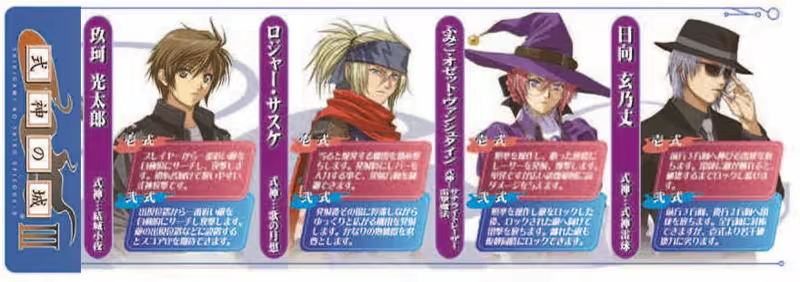

Players select one of several characters with different normal attacks, shikigami attacks, special attacks, and movement speeds.
You can also choose between the first and second types of attack, which have different performance for each character, allowing for a variety of attack methods.
You can also play with two players. (Supports remote play together! Challenge with shikigami users from around the world!)
Each character has their own backstory, and a story demo is inserted immediately after starting play and before and after the start of the stage.
In addition, when playing with two players, the story and scenario change depending on the combination of characters selected.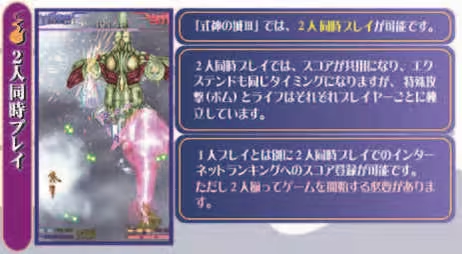
Various Attacks
There are three types of attacks: normal attacks, shikigami attacks, and special attacks.
Normal Attacks (Shots)
A rapid-firing attack. Since it can attack a relatively wide area, you can ensure your own safety by focusing on this in battle.
Also, when the Tension Bonus System is at its maximum, it becomes a high tension attack, and the firing speed and power increase.
Shikigami Attack
In exchange for a slower movement speed during the attack, this attack automatically collects the coins that appear.
Special Attack
A so-called bomb. You can use as many bullets as you have, and your ship becomes invincible while using it.
Tension Bonus System
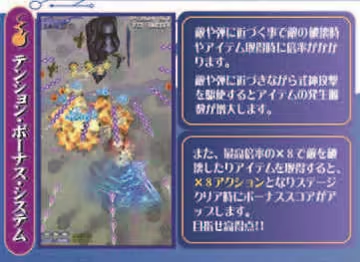
A system unique to "Castle of Shikigami," commonly known as T.B.S.
You can get a bonus if you destroy an enemy when the enemy or enemy bullet is close to the center of your ship (hit detection).
The closer the hit detection is to the enemy bullet, etc., the more bonus you can get, up to a maximum of 8 times. The points you get with a normal attack increase, and the number of coins that appear increases even more with a Shikigami attack.
High Tension MAX System
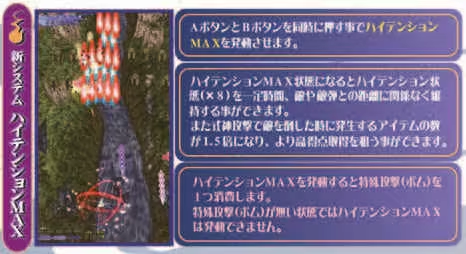
Equipped with a new function that satisfies your insatiable passion for shooting games!
A system that consumes one special attack to activate. There is a short period of invincibility when activated. A red gauge will be displayed at the top edge of the screen for a certain period of time, and until it runs out, "T.B.S. judgment will always be 8 times (≒ always in a high-tension shot state)" and "the amount of coins appearing will be 1.5 times."
System Requirements
Will my PC run this? →Minimum
- Requires a 64-bit processor and operating system
- OS: Windows 10
- Processor: Intel Celeron G1620 2.7GHz
- Memory: 4 GB RAM
- Graphics: GeForce GTX 650
- DirectX: Version 9.0c
- Network: Broadband Internet connection
- Storage: 1 GB available space
Recommended
- Requires a 64-bit processor and operating system
- OS: Windows 10
- Processor: Intel Core i3-3220 3.3GHz
- Memory: 8 GB RAM
- Graphics: GeForce GTX 750Ti
- DirectX: Version 9.0c
- Network: Broadband Internet connection
- Storage: 1 GB available space
Supported Languages
*languages with full audio support
Latest news
AnnouncementsOfficial
"Castle of Shikigami 3" DLC "Dramatic Change Mode" Released
"Dramatic Change Mode" (Console Port Addition)We have released DLC that adds "Dramatic Change Mode," a single-player mode where you select two characters and can switch between them during gameplay.Updating the "Castle of Shikigami 3" software adds this option to the menu; purchasing the DLC from the store enables you to select the mode.Please be sure to apply the update, as this release also makes the hidden character ”Münchhausen” available for selection from the menu by default.Read full article on Community Announcements (steruyama)AnnouncementsOfficial
How to use Munchausen
The hidden character “Munchausen” from the arcade version can now be used as a player character in Arcade Mode. This is a port of the arcade version. By default, “Munchausen” is not displayed in the selection icon. On the character selection screen, move the selection cursor to ”Fumiko” and press the joystick down. The character selection will then change from Fumiko to Munchausen, which can then be selected. {STEAM_CLAN_IMAGE}/45493545/6fa61a06c9be0d1076bd3ff72786463a031a04a4.png {STEAM_CLAN_IMAGE}/45493545/5ffa041f59f7d3d053eec53b14123b151b0e8c98.png *The "Dramatic Change Mode" that allows 2P scenarios to be viewed by 1P has not been implemented, so please use two controllers to enjoy this release.(This is why the game is also compatible with Steam Remote Play Together.) We plan to implement this in an update at some point, but the timing has not yet been decided.Read full article on Community Announcements (steruyama)AnnouncementsOfficial
About Online Rankings
That's how to check rankings online with the Steam client. 1. Access the community page 2. Select "Rankings" from "Show Data" in the top right of the "All" tab page 3. Select the ranking you want to check from the play data page 4. You can switch the display from the pull-down menu. *Note The data displayed for each ranking is taken from the in-game score and is uniformly divided by 1/10. This is to avoid the limit on the number of digits that can be displayed for Steam rankings.Read full article on Community Announcements (steruyama)AnnouncementsOfficial
Changing the screen size
By default, the game is set to arcade resolution because it is an arcade port. You can change this in the "WINDOW SIZE" option in the OPTION menu. OFF (Full SCREEN) x1.0 (640x480) x1.5 (960x720) x2.0 (1280x960)Read full article on Community Announcements (steruyama)


