

Screenshots

 Watch trailer on Steam ↗
Radiant Silvergun
Live Wire, Treasure · Published by Live Wire · Official site ↗
Very Positive — 93% positive (224 reviews) · 12 achievements
Last updated 27 Sept 2026
Set on the earth and in space on July 14, 2520 A.D., the film explores the mystery of mankind's extinction. Various terrains become battlefields. Enemies attack from all directions. There are 23 bosses in total. Aim for a high score by making full use of score bonuses and level-up weapons!
£16.75
Lowest price we've ever recorded
View on SteamPrices can lag the live Steam store — always confirm before buying.
Price history
Action · 2023 · More £15 - £30 games
Embark on a thrilling journey through diverse terrains in Radiant Silvergun, where live wire battles and cosmic confrontations await. Aim for the top score by mastering weapons and outmaneuvering 23 formidable foes in this intense action game from 2023.
About this game
<Story>
July 14, 2520 AD.The light emitted by a "stone-like object" excavated from the strata of B.C. enveloped the earth, destroying the human race. Only the four crew members of the space cruiser TETRA and one robonoid barely escaped into satellite orbit. ......
One year later. The TETRA is forced to re-enter the atmosphere because the ship's supplies have finally been depleted. The battle for the survival of the TETRA begins.
<A highly strategic shooting game>
The battlefield is a stage with various terrains, including intricate crevices and moving containers, where enemies attack from all directions, up, down, left, and right. Twenty-three bosses await in six highly strategic stages.There are also secret bonuses that occur when enemies are defeated in a specific order, as well as hidden score items. The key to obtaining a score is to cover all of these items, build your own original attack pattern, and accurately destroy the targeted enemies.
Use weapons that level up in accordance with your score to update your high score!
<Game Features>
- Score system specialized for the origin of shooting games.
- Weapons that level up as you defeat enemies.
- 5 difficulty levels for beginners to enjoy.
- Story mode with a strong message.
- Beautiful 3D graphics.
- Sound that colors the game world by Hitoshi Sakimoto, who is highly acclaimed both in Japan and overseas.
- Game mode with the rules of "Ikaruga," the second installment of Project RS.
- CLASSIC / MODERN mode that can be enjoyed with different viewing angles for SegaSaturn version and XboxLiveArcade version.
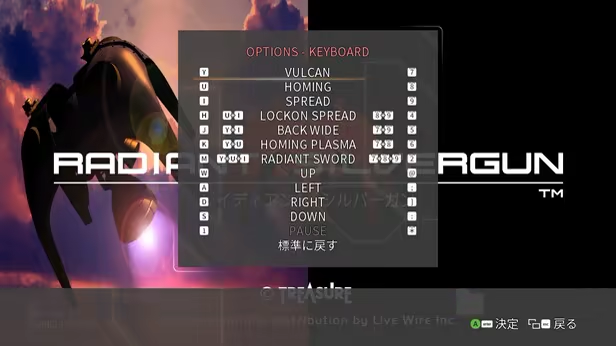
- Compatible with keyboard operation.
- Online ranking to compete with rivals from around the world.
<New Function>
- Compatible with all Xbox / Nintendo Switch / PlayStation controllers
- CLASSIC / MODERN mode that can be enjoyed with the aspect ratio of the Sega Saturn version and Xbox Live Arcade version
- Compatible with keyboard operation. One keyboard can be used by two people, and can also be used in conjunction with a controller.
<Notes on controllers>
When playing with a SWITCH controller, be sure to set "Nintendo Button Layout" to "OFF".<Notes on play environment>
If you are using a PC with the minimum system requirements, you may experience processing delays while playing.We recommend playing on a PC that meets the recommended system requirements, including a graphics board.

System Requirements
Will my PC run this? →Minimum
- OS: Windows 10/11
- Memory: 8 GB RAM
- DirectX: Version 9.0c
- Storage: 2 GB available space
Recommended
- OS: Windows 10/11
- Memory: 8 GB RAM
- Graphics: NVIDIA GeForce GTX 750
- DirectX: Version 9.0c
- Storage: 2 GB available space
Supported Languages
*languages with full audio support
Latest news
Patch NotesOfficial
Patch Note(Rev:242 BuildID:22023369)
Thank you for playing Radiant Silvergun. We would also like to thank you for your feedback.This update addresses the following issues.UpdateWe identified an issue in a specific boss battle where, under certain conditions,unintended behavior could occur and allow players to continuously earn score.This update adds a safeguard to ensure the process ends correctly,preventing unintended infinite score farming.We have also implemented this fix in a way that minimizes impact on the existing gameplay feel and replay data as much as possible.If you have any concerns after updating, please We apologize for the inconvenience,but please contact us with a bug report or support. Thank you for your continued support of Radiant Silvergun.Read full article on Community Announcements (Live Wire Staff HAL)Patch NotesOfficial
Patch Note(Rev:236 BuildID:13852823)
{STEAM_CLAN_IMAGE}/44452692/14a3c6082c83e68dc77c945e07e9e756e8b4a521.jpg Thank you for playing Radiant Silvergun. We would also like to thank you for your feedback. This update addresses the following issues. Update Added TRAINING function During training, we have implemented the following functions to make it easier to practice. These functions can be changed at the start of training or at any time from the pause menu. ▼Demo Skip You will be able to skip event scenes that are displayed every time. ▼Invincibility Even if you come into contact with enemies, objects, or enemy bullets, you will not be treated as being hit. Your aircraft will flash when hit. ▼Hyper Sword You can optionally set the starting Hyper Sword Gauge. Adjusting screen display The following changes have been made to the screen display. ▼Displaying INSERT COIN ▼NEW+OLD added to HUD display type ▼When the window size is maximized, it is now the size of the monitor resolution. *After starting at 0%, open the menu while pressing RT and change to 100%, it is also possible to issue the Radiant Sword while the gauge remains at 100%. When you maximize a window, it becomes borderless. If you want to change back from borderless to windowed or change from windowed to borderless: Press "F11" on your keyboard. SE adjustment Adjusted the volume and timing of SE playback. If you have any concerns after updating, please We apologize for the inconvenience, but please contact us with a bug report or support. Thank you for your continued support of Radiant Silvergun.Read full article on Community Announcements (Live Wire Staff HAL)Patch NotesOfficial
Patch Note(Rev:224 BuildID:1361857)
Thank you for playing Radiant Silvergun. We would also like to thank you for your feedback. In this mini-update, we have addressed the following. UPDATE Fixed bugs that occurred with some bosses Despite clearly avoiding the attack from NASU during the boss "NASU" that appears during 2C, Fixed an issue where in rare cases the player-unit would be treated as being hit by a bullet. Addresses issues that occur during actual play and when replaying replay data. We have taken measures to address the issue where the game moves differently from the actual play when playing replay data. Due to this modification, there may be a difference in the calculation of score addition. Along with this, "v05" will be displayed in the replay data. When recording a game using Geforce Experience, the save destination folder name and file name may be changed.Response to phenomena that are generated with a name different from the original intention. Up until now, when recording games using Geforce Experience, Folder name and file name are originally generated with the name "Raidiant Silvergun" We have confirmed a phenomenon where videos are saved in a folder named "Raven Squad." To address this issue, by changing the game's executable file name, I have made sure that the file is correctly saved in the folder called "Raidiant Silvergun". From now on, the video will be saved in the folder named "Raidiant Silvergun". Please note that videos taken before the update are saved in a folder named "Raven Squad". If you have already recorded, please check your settings and manage the files. Also, if the game does not start properly after this support, please restart STEAM and then Please try "Verify integrity of game files". If you have any concerns after updating, please We apologize for the inconvenience, but please contact us with a bug report or support. Thank you for your report. Thank you for your continued support of Radiant Silvergun.Read full article on Community Announcements (Live Wire Staff HAL)Patch NotesOfficial
Patch Notes (Rev:211 BuildID:13051456)
Thank you for playing Radiant Silvergun. We would also like to thank you for your feedback. In this mini-update, we have addressed the following: Update Arrow keys can now be assigned using the keyboard Arrow keys can be assigned by setting HELP & OPTIONS > KEYBORAD. Regarding key assignment, you can set the target key using the left and right keys. By pressing the OK button, you can make the assignment, then press the arrow key you want to correspond to and set it.。 Added retry function You can start over by selecting Retry from the pause menu during the game. Arcade mode and story mode will restart from 3A. Training mode allows you to start over from the beginning of a specified stage. Other adjustments OPTIONS > SETTING > Changed the initial arrangement of filters on the game screen. From "HI-RES+EFFECT" and "ALPHA+" Changed to "HI-RES" and "MESH1". Please try the screen display of your choice. If you have any concerns after updating, please We apologize for the inconvenience, but please contact us with Bug Report or Support Thank you for your report. Thank you for your continued support of Radiant Silvergun.Read full article on Community Announcements (Live Wire Staff HAL)Patch NotesOfficial
Patch Notes (Rev:193 BuildID:12727930)
Thank you for always playing Radiant Silvergun. Also, thank you very much for your feedback. This mini-update addressed the following issues: Bug fix Event scenes do not play correctly and appear completely black on some PC environments using AMD graphics cards. If this phenomenon still occurs after the update, or if you have any other concerns, please submit a Bug Report or Support.Read full article on Community Announcements (Live Wire Staff HAL)


