

Screenshots

 Watch trailer on Steam ↗
Acro FS
Knife Edge Software · Published by Knife Edge Software · Official site ↗
Mixed — 58% positive (224 reviews)
Last updated 27 Sept 2026
Acro FS is a recreational, stick-and-rudder flight simulator for high-performance aerobatic aircraft. Practice your routine, race against the clock, or just get up there and fly - the checklist is done and the engine is running.
Free to PlayEarly AccessVR
Free
Simulation, Early Access · 2018 · More free games
Dive into the thrill of aerobatic flying as you master high-performance aircraft in Acro FS. Practice routines or race against time, all while immersed in this early access simulation from Knife Edge Software.
About this game
By Aviators, For Gamers

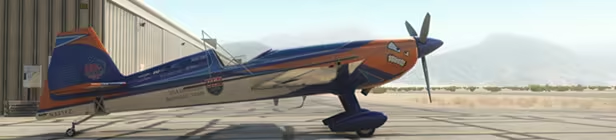
Acro FS is a stick-and-rudder aerobatic flight simulator created by Jim Bourke, airshow pilot and member of the US Unlimited Aerobatic Team. Designed from the ground up to accurately simulate aerobatic flight, it allows you to experience what it’s like to strap into a high-performance stunt plane and take to the sky. Take control of an aerobatic airplane, throttle up, and discover what you can do. There’s no navigation, no radios - just a lot of horsepower in a state-of-the-art aircraft.
Exciting Features
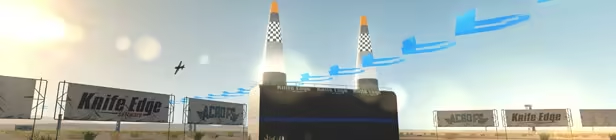
- High Speed Racing: Challenging Entertainment
- Virtual Reality Immersion: Oculus, SteamVR, or Windows Mixed Reality
- Expansive World Design: Hundreds of Thousands of Square Miles to Explore
- Environmental Controls: Wind, Precipitation, Daylight At Your Command
- Stunning Visual Detail: Powered by Unigine2
- Impressive Physics: Accurate, Predictive, Component Based Simulation
- Multi-controller Support: Use Your Multi-USB Cockpit System
Controller Required!
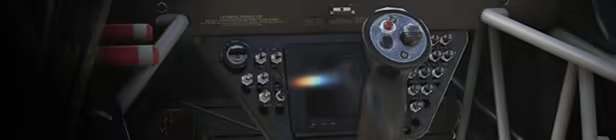
Acro FS requires a controller to fly. For good control, you'll need a 4-axis controller. A gamepad will work, as will "3D" flight sticks that include pitch, roll, yaw, and throttle. For best results, you can also use an RC-style controller that places these controls on two sticks, or muliti-USB systems with stick, throttle, and rudder pedals.
System Requirements
Will my PC run this? →Minimum
Minimum:
- Requires a 64-bit processor and operating system
- OS *: Windows 7, 8, or 10
- Processor: Intel i3 or equivalent
- Memory: 2 GB RAM
- Graphics: DirectX 11 Mid-Range Video Card with 2 GB of video memory
- DirectX: Version 11
- Storage: 4 GB available space
- VR Support: SteamVR or Oculus PC. Keyboard or gamepad required
Recommended
Recommended:
- Requires a 64-bit processor and operating system
- OS *: Windows 7, 8, or 10
- Processor: Intel i5, Ryzen 1500, or equivalent
- Memory: 4 GB RAM
- Graphics: GTX 1060, RX580 or equivalent
- DirectX: Version 11
- Storage: 6 GB available space
Supported Languages
English, French, Italian, German
Latest news
AnnouncementsOfficial
Acro FS Version 0.01.090
Acro FS has been updated with three new aircraft and three new flying sites, along with multi-USB controller support. Pilots can now choose from four aircraft: American Champion Super Decathlon Yakovlev Yak-54 “Russian Thunder” XtremeAir Sbach 342 Extra 330SC “Fuzz Machine” ...and they can fly at four different locations: Borrego Valley Airport, Borrego Springs, CA (day and night) Flight School (day and night) Homestead Joe’s Garage There are also updates to racing: New race courses Preliminary web-based leaderboards Multiple USB controller devices are now supported: You can use your flight stick, throttle and rudder pedals to create a custom cockpit. Single controllers are still supported, but you’ll want at least 4 axes.Read full article on Community Announcements (KnifeEdgeS&C)AnnouncementsOfficial
Controller Required
You'll want at least a 4-axis controller for flying Acro FS. At this point, all of those axes need to be on one controller - we don't support multi-USB configurations yet. We have provided profiles for: Our InterLink RC controllers Gamepads A couple of flight sticks If your controller doesn't work with any of these profiles, you'll need to set it up through the profile editor. Settings->Controller->Advanced will take you to the Controller selection page. From there, you can select the controller you want to use, and press the Edit button to edit the profile. Use the profile editor to assign controls to the numbered control channels, and optionally, the UI functions at the bottom of the list. Once you have a good working profile for your controller, consider sharing it. We'll set up a facility for users to send us profiles they've had success with. Watch for more information on that as we get it figured out.Read full article on Community Announcements (NoBeard)


