

Screenshots

 Watch trailer on Steam ↗
Prehistoric Hunt
Antiproto Studios · Published by Antiproto Studios · Official site ↗
Content notice: Includes intense violence and blood.
Very Positive — 84% positive (792 reviews) · 91 achievements
Last updated 27 Sept 2026
Dive into intense dinosaur hunting adventures with your friends. Complete hunting contracts for Preton Corporation. Gather rewards, improve your equipment and become a master hunter. Are you the hunter or the hunted?
£8.39
£13.99Lowest price we've ever recorded
View on SteamPrices can lag the live Steam store — always confirm before buying.
Price history
Action, Adventure, Indie, Simulation, Early Access · 2020 · More £5 - £15 games
Embark on thrilling dinosaur hunts as you gather contracts for Preton Corporation in Prehistoric Hunt. Experience intense action and simulation gameplay, perfect for both solo hunters and multiplayer adventures.
About this game
In Prehistoric Hunt your task is to hunt the rarest dinosaurs from a challenging primal environment. Will you be able to complete your hunting contracts or will you turn into the hunted?
DINOSAURS
You can hunt a wide variety of 21 dinosaur species including Tyrannosaurus Rex, Spinosaurus, Stegosaurus, Quetzalcoatlus, and Utahraptor. Each of them have their own behavior and characteristics. Our species live on land, water, and air! Beware, as the dinosaurs can hunt both you and each other.
ENVIRONMENT
Explore dense tropical jungles, open plains and high mountains. The weather changes dynamically. Experience a full day and night cycle. Discover new special locations. Move on foot, swim or fast travel. Find story notes to learn about the history of the island.
TROPHY LODGE
Build a customizable trophy lodge with multiple rooms to store your full-sized dinosaur trophies. Choose what to include from a selection of mounts, furniture and rooms.
TROPHY SHOTS
Take trophy shots with your catch and store memories from your hunting trips.
MULTIPLAYER OR SOLO
Play solo or multiplayer with up to 12 players.
WEAPONS AND HUNTING EQUIPMENT
Choose from 12 different weapons including .700 double rifle, revolver, .50 cal heavy rifle and hunting bow. Utilize a vast variety of hunting utility from callers to range finder. Purchase new equipment from the shop or find new items in loot boxes.
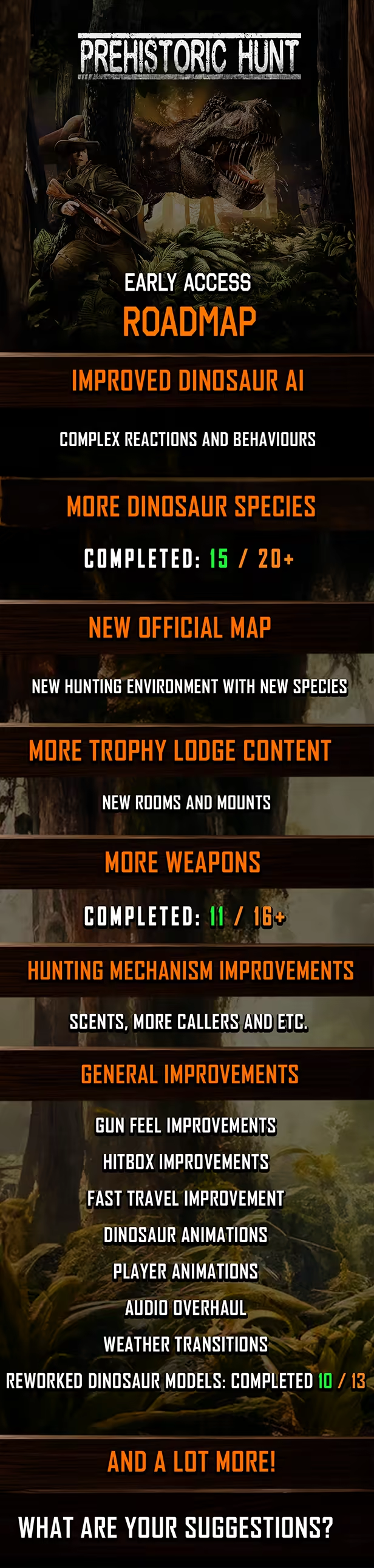
NOTE FROM DEVELOPER
Join our great community on Discord!
You can influence what features will be implemented into the game. We welcome any feedback and development ideas. Thank you for your support!
System Requirements
Will my PC run this? →Minimum
- OS: Windows 10
- Processor: Dual-Core processor
- Memory: 8 GB RAM
- Graphics: Radeon Vega 8 Graphics or NVIDIA GeForce 940M
- DirectX: Version 11
- Network: Broadband Internet connection
- Storage: 12 GB available space
Recommended
- OS: Windows 11
- Processor: Quad-Core processor
- Memory: 16 GB RAM
- Graphics: AMD Radeon HD 7970 or NVIDIA GTX 770
- DirectX: Version 11
- Network: Broadband Internet connection
- Storage: 12 GB available space
Supported Languages
*languages with full audio support
Latest news
Patch NotesOfficial
Open testing for upcoming gameplay update!
Greetings dinosaur hunters! Open testing of the upcoming gameplay update is now available! If you want to help us locate possible issues and give feedback before release, you can now try out the latest test build. This testing phase focuses especially on the introduction of the first vehicle system alongside upcoming weapon and dinosaur balance changes. Your feedback will help us fine-tune gameplay balance and vehicle handling before the update officially launches. Things to take into account before starting testing The open testing version of the game utilizes a different server. You won’t be using the same player in the test version, but instead start from zero with a fresh player. Once you move back to the main server you will continue progress with your existing account and lose any progress made in the test server. Latest updates allow the game to have different save files for dev server, so you should not lose your online player trophy lodge. Before you start transferring your game into the open testing mode please make a backup of your offlineplayer.txt file. It can be found in: %steamlibrary_folder%/Prehistoric Hunt/Prehistoric_Hunt_Data/ offlineplayer.txt The file contains your offline player data and it can be overwritten if you don’t take a backup and play in offline in the dev server. Once you move back from the test version to the actual game you can copy this backup file back to its original location. Please note that when you have the test build active you cannot launch the actual game. When you want to switch back to it in the Betas-menu you will need to choose “None” to get back. You can freely switch between the versions. Instructions how to get the test version Right click the game name in Steam library list view and choose “Properties”. Then choose the “Betas” tab. From the dropdown choose “public_test”. Steam will now download the test version and you’ll see in your library instead of “Prehistoric Hunt” the name: “Prehistoric Hunt \” New things ...Read full article on Community Announcements (Sebastian)Patch NotesOfficial
Hotfix 0.128.07
Greetings dinosaur hunters! A new hotfix has been deployed focusing mainly on map editor. Thank you for your continued feedback! Fixes & ImprovementsAdded ability to remove nearest special location in map editor.Added visual guides to special locations when creating them in map editor.Fix for in development dinosaurs appearing in some lists. Thank you for reading and we look forward to your thoughts.Read full article on Community Announcements (Sebastian)Patch NotesOfficial
Hotfix 0.128.06 – Multiplayer hit registration fixes
{STEAM_CLAN_IMAGE}/37926273/d38342ccd417bc4a21da24b67bb433e798820a5e.png Greetings dinosaur hunters! A new hotfix has been deployed focusing mainly on multiplayer synchronization and hit registration improvements. Thank you for your continued feedback! Fixes & Improvements Fixed an issue in server rewind that could cause hitbox inconsistencies in multiplayer Fixed animation-related differences between hosts and clients that could lead to incorrect dinosaur hit registration at longer distances Minor sell menu fix Thank you for reading and we look forward to your thoughts.Read full article on Community Announcements (Junkerdale)Patch NotesOfficial
Game Update 0.128 – Improved multiplayer synchronization
{STEAM_CLAN_IMAGE}/37926273/b9516572d200e69afaa981fc5be7ab0c16c3d732.png Greetings dinosaur hunters! This update focuses heavily on improving multiplayer synchronization and overall online stability, especially in sessions with multiple players and under higher latency conditions. Alongside the networking improvements, the update also introduces performance optimizations, trophy lodge improvements, cave and lighting fixes, and new quality-of-life features for the map editor. Multiplayer & Networking Added server-side hitbox rewind to match client synchronization delay to make client players be able to shoot dinosaurs the same way as the host without needing to do extra advance shots. {STEAM_CLAN_IMAGE}/37926273/a705b2d89a6587430d9fb6237f14da65b608b654.png Fixed solo mode minor issues with flying dinosaurs caused by previous network rework Performance & Visual Improvements Reduced reflection-related performance spikes Fixed reflection and lighting issues in the Tenebris Sea base & Factory. Improved Moreau Cave lighting Fixed issues with the Moreau Cave entrance Trophy Lodge Added difficulty and map information to trophy lodge trophy views Added a grid view when placing new room. Grid will show available space to place rooms. Each room has information about how much space from the grid it requires {STEAM_CLAN_IMAGE}/37926273/549143ba8ff9ec1afd9cd0a02cb8d8acf65c1806.png Map Editor & Custom Objects Added depth-based rendering for custom object colliders to better show whether colliders are behind or in front of objects in the map editor Fixed double-sided texture preview issues in the custom object editor Fixed custom texture settings not updating correctly while selecting textures for custom objects. It also now resets back to default if removing selection. {STEAM_CLAN_IMAGE}/37926273/fc77af21716f089e7cd3697819a5d2df5a8bdcd9.png Beta Branch Improvements Added new separate player and cache files for the beta branch to reduce switching issues between live and beta versio...Read full article on Community Announcements (Junkerdale)Patch NotesOfficial
Game Update 0.127 - Network Rework
Greetings dinosaur hunters!This update focuses on rework of the multiplayer net code in the game. Whether you now play with low or high ping with other players, the client players should now experience smooth gameplay too. Old multiplayer system was trying to predict the future too much, which caused more glitches than any good.Previous 0,125 update improved stability and network logic, so the game can handle more players with more stability. Combined with this update, the experience in multiplayer should now be a lot better than previously.Multiplayer improvementsRewritten dinosaur net code for smooth multiplayer experience. (No more rubber banding)Improved server prioritization logic, so dinosaurs are synced more efficiently.Fix for dead flying dinosaurs not being removed on clients that joined the game session later.This update is part of our continued work on making multiplayer hunts feel better.Thank you for reading and we look forward to your thoughts.Read full article on Community Announcements (Sebastian)


