

Screenshots

 Watch trailer on Steam ↗
BitVoxel
Balancia Games · Published by Balancia Games
2 user reviews — 100% positive (2 reviews)
Last updated 29 Sept 2026
Build working digital computers in a 3D voxel sandbox. Design logic circuits, CPUs, memory, and programmable machines using switches, wires, gates, LEDs, and reusable components, limited only by your imagination.
£9.09
Lowest price we've ever recorded
View on SteamPrices can lag the live Steam store — always confirm before buying.
Price history
Simulation, Early Access · 2026 · More £5 - £15 games
About this game

BitVoxel is a 3D digital logic sandbox where you build working circuit systems inside a voxel world.
Create circuits using switches, wires, LEDs, and logic gates such as AND, OR, XOR, and NOT. Start with simple input-and-output designs, then combine your circuits into larger machines, systems, and experiments.
Build Working Digital Circuits
Every circuit in BitVoxel is built from real logic behavior. Place blocks, connect signals, test your design, and watch your circuit react as you change inputs.
Build simple gates, larger systems, or massive logic creations in an open sandbox world.
Create Reusable Components
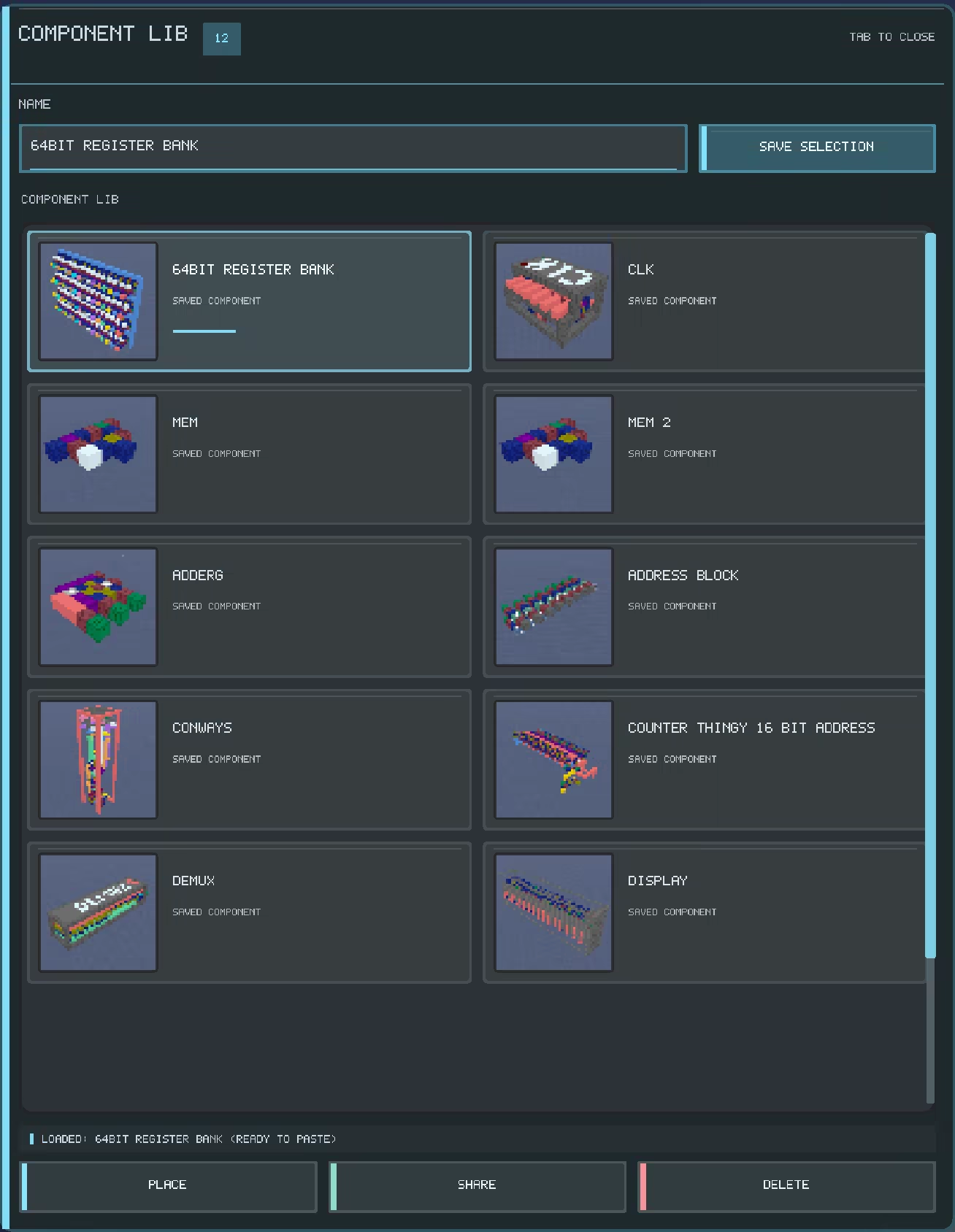
BitVoxel includes a component tool that lets you select part of a circuit, save it, and place it again later.
Build your own library of reusable circuit parts or find components other players have shared on the workshop and use them across different worlds. This makes it easier to create larger systems without rebuilding the same designs from scratch.
Build Faster With Editing Tools
Use editing tools like copy, paste, move and rotate to speed up larger projects. Expand your builds, rearrange designs, test new ideas, and keep improving your worlds as your circuits grow.
Share Builds With Steam Workshop
With Steam Workshop support, players can share their builds and reusable components with the community. Download creations from other players, share your own circuit parts, and use community-made components in larger projects.
Sandbox Building And Circuit Experimentation
BitVoxel is currently focused on sandbox building, digital logic, and circuit experimentation. Build freely, test ideas, save worlds, create reusable components, and push your designs as far as you want.
The game is in Early Access, and future updates are planned to improve the experience with more polish, better onboarding, structured learning, challenges, and progression.
Build, test, improve, and create working systems inside a 3D voxel world.
System Requirements
Will my PC run this? →Minimum
- Requires a 64-bit processor and operating system
- OS: Windows 10 64-bit
- Processor: Intel Core i5-2400 or AMD FX-6300
- Memory: 4 GB RAM
- Graphics: NVIDIA GeForce GTX 750 Ti
- Storage: 1 GB available space
- Sound Card: Windows compatible audio device
- Additional Notes: Vulkan-capable graphics driver required.
Recommended
- Requires a 64-bit processor and operating system
- OS: Windows 10/11 64-bit
- Processor: Intel Core i5-8400 or AMD Ryzen 5 2600
- Memory: 8 GB RAM
- Graphics: NVIDIA GeForce GTX 1050 Ti
- Sound Card: Windows compatible audio device
- Additional Notes: Vulkan-capable graphics driver required.
Supported Languages
Latest news
AnnouncementsOfficial
Career Mode, Better Tutorials & Compile Mode
Hello everyone!This major update focuses on making BitVoxel easier to learn and smoother to play, with improvements to the tutorial and Career Mode, world logic compilation, and game performance.Improved Tutorial & Career ModeA mentor now guides you through practical lessons with clearer explanations, step-by-step objectives, and visual placement guides. this is still a work in process but a good starting point for the future of learning in bitvoxel.Compile Mode & Performance ImprovementsThe Compile World Logic option lets you prepare your world’s circuits for simulation from the pause menu’s settings.This update also brings improvements to logic simulation and rendering, helping the game run more smoothly as your builds become larger and more complex.Steam Programming Fest SaleBitVoxel is joining the Steam Programming Fest sale, September 10–14! If you’ve been waiting to try it, this update gives you a more guided way to get started.Thank you for the feedback, bug reports, and creations. I’m looking forward to seeing what you build next!Read full article on Community Announcements (Popcorngamers)AnnouncementsOfficial
From 16 to 32 BitVoxel Goes 32-Bit!
BitVoxel is making the jump from 16 to 32 bits.This update doubles the number of address, data, wire, and bus channels available in the game, giving you much more room to build larger and more complex circuits.32-Bit MemoryMemory now supports up to 32 address bits and 32 data bits. This gives larger builds far more room to grow, whether you're working on a computer or storing data, the memory should now be able to store what ever you could desire.More Wires, More Buses.Wire and bus have also been doubled from 16 to 32.All 32 channels have their own colors, making it easier to keep larger builds organized and tell different signals apart.Built for Bigger ProjectsMoving to 32 bits gives BitVoxel a lot more room for the kinds of builds I've been wanting to make possible.Larger computers, bigger memory systems, wider data buses, displays, and whatever else you can figure out how to build with it.BitVoxel started with 16. Now it's time to see what you can do with 32.As always, I'd love to see what you build.Read full article on Community Announcements (Popcorngamers)AnnouncementsOfficial
A New Look UI and Menu Overhaul
BitVoxel Interface OverhaulThis update gives BitVoxel’s interface a major visual overhaul, creating a cleaner design and a more consistent experience throughout the game.The goal was not simply to change how the menus look. Navigation, world management, component browsing, settings, guides, and in-game tools have all been redesigned to make BitVoxel clearer and easier to use.A Completely Redesigned Main MenuThe main menu has been rebuilt around the game world instead of hiding it behind a full-screen interface.The selected world now remains visible in a live 3D preview while the new navigation panel provides quick access to the game’s main areas.New left-side navigation panelCleaner and more readable world browserthumbnails generated from saved worldsReframed live 3D world previewClearer accent colors and selection statesImproved spacing, typography, and visual hierarchy World saves are now easier to recognize at a glance, making it faster to find and manage the world you want to continue building in.Browse Components Before Entering a WorldSaved components now have their own dedicated area in the main menu.Selecting a component updates the live 3D preview, allowing you to inspect reusable circuit designs before loading into a world.The component library can be used to browse, manage, import, share, and delete saved components from one consistent interface.The in-game component menu has also received a matching visual and usability overhaul.Updated Pause MenuThe pause menu has been redesigned to match the new main-menu style.World saves now use the same card layout and thumbnail system, while settings, key bindings, and other panels have been reorganized to provide a more consistent experience.The in-game guide has also been updated with improved spacing and readability, allowing longer sections to fit more naturally within the available space.Improved Scaling and NavigationSeveral smaller improvements make the interface more comfortable to use across different reso...Read full article on Community Announcements (Popcorngamers)AnnouncementsOfficial
RGB LED, Bus Blocks, and Expanded Speaker Controls
This update introduces several new blocks and features designed to make large circuits cleaner, easier to organize, and more powerful.The update includes:Bus BlocksRGB LED BlockBus control support for Speaker Blocks16 New Bus Blocks Bus Blocks allow multiple wire signals to be carried through a single organized connection.When Wire Blocks are connected to a Bus Block, their signals are transferred through the corresponding channels of the bus.There are 16 Bus Block, allowing you to visually separate different data lines and systems within larger builds. acting the same way as wires allowing for bus blocks to be side by side and not connect. allowing for more compact buildsBus Blocks can help reduce wiring clutter and make computers, memory systems, displays, audio systems, and other complex circuits easier to build and understand.New RGB LED BlockThe new RGB LED Block can display up to 4,096 different colors and supports two control modes.Normal ModeIn Normal Mode, the RGB LED operates the same way as a normal led block,but with an added interface to select the color that it should display. This mode is useful for decorative lighting, indicators, status lights, and color-coded systems.Bus ModeIn Bus Mode, the RGB LED receives its color information from 12 bus channels.Channels 1–4: Red intensityChannels 5–8: Green intensityChannels 9–12: Blue intensityEach color channel uses four bits, allowing the strength of red, green, and blue to be controlled independently.This makes it possible to create animated lighting, programmable color displays, status indicators, visualizers, and smooth color transitions.Speaker Block Bus SupportSpeaker Blocks can now also be controlled using the new Bus Blocks.The 16 bus channels are divided between frequency, waveform, and volume controls:Channels 1–12: Frequency Channels 13–14: Waveform Channels15–16: Volume This allows a single bus connection to fully control the sound produced by a Speaker Block.By rapidly changing the bus data, pl...Read full article on Community Announcements (Popcorngamers)Patch NotesOfficial
BitVoxel Update – Speaker Blocks & Multi-Threaded Logic Simulation
Hello everyone!This update introduces Speaker Blocks, giving your creations the ability to generate sound.Whether you want to compose music, build programmable instruments, add sound effects to your machines, or simply experiment with audio, speaker blocks open up a whole new category of creations in BitVoxel.Multiple WaveformsSpeaker blocks support several waveform types, each producing a unique sound:SineSquareTriangleSawtoothEach waveform has its own character, making it possible to create everything from smooth melodies to retro inspired electronic sounds.Notes & ChordsEvery speaker block can be assigned its own frequency, allowing you to play individual notes across a wide range of pitches.Since multiple speakers can be activated at the same time, you can also play chords, making it possible to create harmonies, richer songs, and more advanced musical creations using logic circuits.I'm looking forward to seeing what the community builds from simple melodies to fully programmable music players.Multi Threaded Logic SimulationThis update also includes a major improvement to the simulation engine.Previously, all logic simulation was processed on the main CPU thread. BitVoxel can now spread the workload across multiple CPU threads when possible, allowing larger and more complex builds to take better advantage of modern multi core processors.This is another step toward improving performance as creations continue to grow in size and complexity.Thank You!Thank you to everyone who has been reporting bugs, suggesting new ideas, and pushing BitVoxel to its limits. Every update helps make the game better, and I'm excited to see what you'll create with the new speaker blocks.Read full article on Community Announcements (Popcorngamers)


