

Screenshots

 Watch trailer on Steam ↗
Thousand Floors
琥珀塔 · Published by 琥珀塔
Mixed — 49% positive (260 reviews) · 17 achievements
Last updated 28 Sept 2026
Tower Climbers carry amber light; allies follow through misty pagodas in an endless Eastern tower. Thousands Floors blends side-view pixel art with hands-off combat—summon, upgrade, and let them climb. Grow via allies, floor lockdown, and relics.
£9.09
Lowest price we've ever recorded
View on SteamPrices can lag the live Steam store — always confirm before buying.
Price history
Indie, Strategy, Casual · 2026 · More £5 - £15 games
About this game
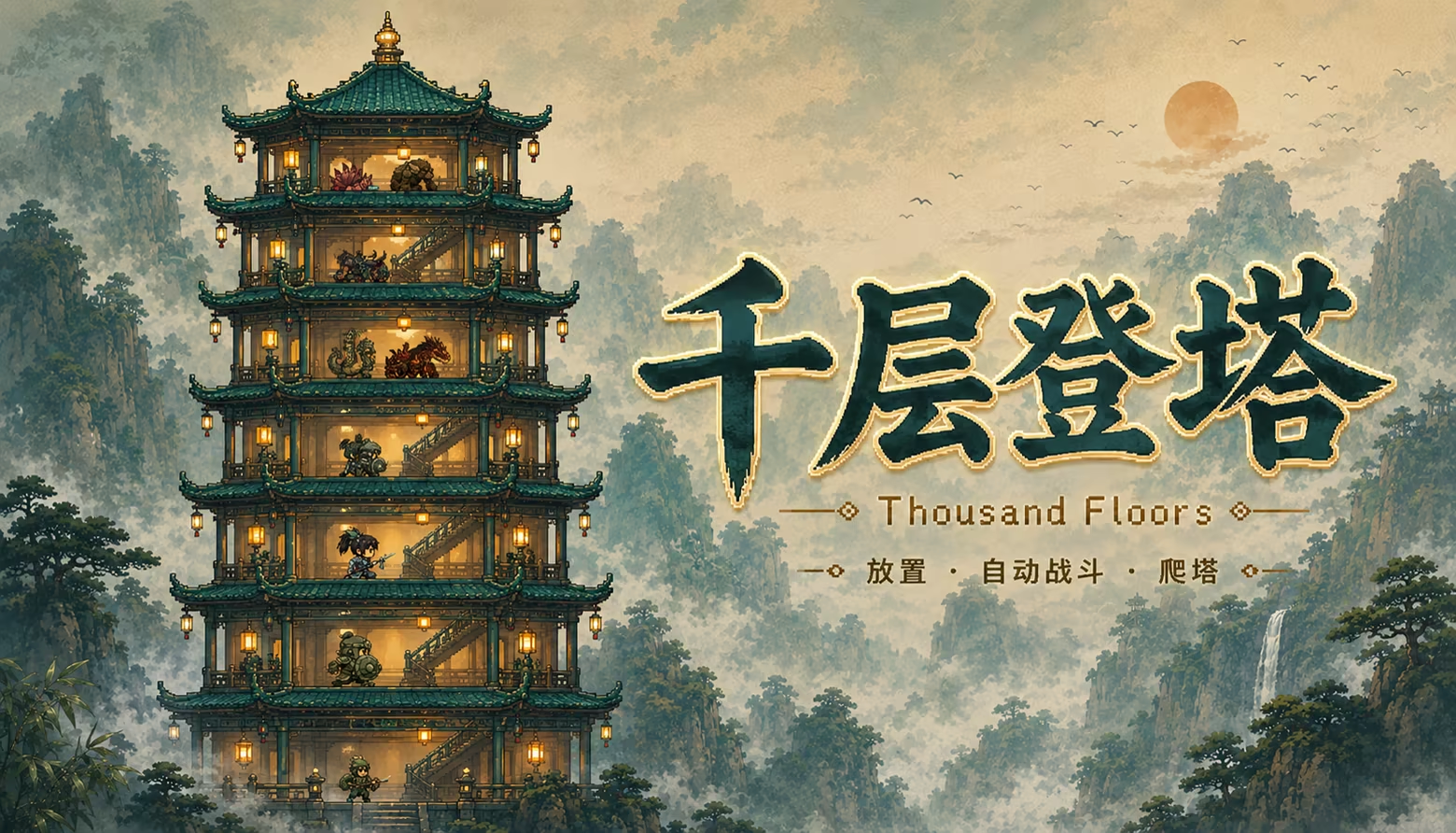
Thousands Floors is a Chinese-inspired pixel idle tower-climbing game.
Summon Tower Climbers and fellow allies who patrol automatically through layered pavilions, battle creatures from the Classic of Mountains and Seas, and keep climbing upward along winding staircases.
Defeat enemies for gold, upgrade stats and mystic arts anytime, push to higher floors, and earn relics.
Floors stretch on forever—grow stronger even while idle. Perfect for players who love relaxed progression, crisp Eastern pixel art, and screen-filling allies fighting together.
Community
Join our Discord:
---
It all begins on the first floor at the tower's base—and the moment you first tap a floor and a Tower Climber bursts through the rain.
Welcome to Thousands Floors—
an incremental idle game built around a sky-piercing pagoda.
Here you are not only the guide who summons climbers, but the architect who keeps the entire tower running like a well-oiled machine.
Tap the Tower, Fight Together
Master the rhythm of "tap a floor, fight on that floor": click or hold the tower to spawn climbers from your chosen level; unlocked allies join automatically on a timer. Crash into foes, trade blows, fall back, surge forward—every collision hits crisp and satisfying. Higher floors mean fiercer fiends and juicier gold and chest drops. But walkways are limited and on-screen climbers are capped—you cannot mindlessly tap your way to a full tower. Use Floor Lockdown to seal the base and concentrate summons on the floors that actually pay.
Mystic Arts & Strategy
Explore a branching tree of mystic arts: expand summon capacity, lock down lower floors to focus on the climb, and deploy active arts like Cloud-Step and Renewal to turn key battles. Every upgrade asks the same question—pour gold into climber training, or unlock the next skill line?
Roster of Allies, Ten Paths
Unlock and train a dozen distinct allies—sword cultivators, spear guards, shield bearers, archers, talismanists, dancers, wandering monks, apothecaries, assassins, artificers… Allies have no global cap—pair relics with shorter spawn intervals to truly fill the walkways at peak.
Relic Codex, Chest Rewards
Milestone floors and placement chests hide permanently stacking relics: attack, HP, move speed, gold, chest odds… No equip slots—only ever-growing global bonuses.
Rebirth & the Wish-Lamp
When your climber reaches sufficient mastery, trigger Rebirth: abandon this run's floors and arts progress, climb again from floor one; keep every relic earned, and with the Wish-Lamp Talisman roll fresh rewards. The loop begins anew—this time with a richer relic vault, records, and strategy.
Why wishlist?
* Unique tap-a-floor summoning + collision combat—idle play that feels tactile and punchy
* Climber cap × unlimited ally spawns × lockdown strategy—resource and space puzzles
* Mystic arts, relics, and allies—three deep progression lines
* Rebirth + Wish-Lamp Talisman reshapes every next climb
* Offline gold on return—idle income that matters
* Eastern pixel pagodas + many units on screen—a visual and numeric sense of "a thousand floors"
System Requirements
Will my PC run this? →Minimum
- OS: Windows 10 64-bit
- Processor: Intel Core i3-2100 / AMD FX-4300 or equivalent
- Memory: 2 GB RAM
- Graphics: Intel HD 4000 / NVIDIA GeForce GT 630 / AMD Radeon HD 7670 or equivalent
- Storage: 500 MB available space
- Sound Card: DirectX compatible
Recommended
- OS: Windows 10/11 64-bit
- Processor: Intel Core i5-4590 / AMD Ryzen 3 1200 or equivalent
- Memory: 4 GB RAM
- Graphics: NVIDIA GeForce GTX 750 Ti / AMD Radeon R7 260X or equivalent
- Storage: 500 MB available space
- Sound Card: DirectX compatible
Supported Languages
Latest news
AnnouncementsOfficial
Thousand Floors — Major Updates Since 1.0
Hello, climbers. Since Thousand Floors launched on Steam, we’ve added Theme Store, Peach Blossom Reverie, and other features.Here’s what’s new, by section:What’s new1. Theme Store (v1.2.0)Bottom-bar Themes: preview and switch unlocked scenesOptional auto-rotate on rebirth, or lock your current lookWorld switching now lives in Theme Store2. Peach Blossom Reverie (theme DLC)Optional theme and cosmetics: Peach Blossom ReverieCheck availability on Steam from Theme StoreLater builds improved texture loading when switching theme/cosmetics on Steam3. Relics & auto battle (v1.1.0)Left panel Relics: preview and browse unlocked relics; stacks and Steam bonuses shownAuto settings for climber / skills / allies, summon rules, rebirth floor, multipliers, and moreMore auto upgrade and summon options (including strongest-only)4. Lockdown floors — camera & performanceCamera eases upward as lockdown deepensOff-screen lockdown floors unload to reduce loadDynamic lockdown display and spawn behavior fixes5. Steam inventory, chests & ranksChests auto-pick up after landing; more reliable open sync; sell for gold when allowedAdded gold-storage chests and related dropsIn-game Steam leaderboards (peak floor / relics, and more)6. Controls & otherActive skill bar, batch upgrade multipliers; version shown in SettingsFrame-rate caps; idle-window and floor-switch performance improvementsOther stability and display fixesThanks for your support. Full patch notes are in each version’s community posts.— The Thousand Floors teamRead full article on Community Announcements (空城琥珀柒)Patch NotesOfficial
Thousand Floors V1.2.3
Since v1.2.2: smoother Peach Blossom theme and cosmetic skin texture loading on Steam (less repeated PNG decode hitching). Improvements Gameplay without Peach Blossom theme matches v1.2.2; this update mainly improves smoothness when the Peach Blossom DLC is installed and in use Bug fixes On Steam release builds, switching Peach Blossom theme or cosmetics: each texture is decoded once and then reused, reducing hitching when re-applying skins Peach Blossom cosmetic availability and frame loading now use the same bare-PNG path as sky/UI chrome, avoiding missing-skin glitches when files are present How to get this update (Playtest) If you have not received the update yet: Steam Library → right-click Thousand Floors → Properties → Betas Check Enter beta access code, enter: qiancengdengta (lowercase, no spaces) Under Select beta, choose playtest (not Default) Close Properties and wait for Steam to finish downloading Launch the game — v1.2.3 appears at the bottom of Settings Troubleshooting Only Default in the list: the new version is not live yet — try again later Wrong version number: confirm playtest is selected; Verify integrity of game files, then restart Steam When this version ships on the main branch, switch back to Default in Betas — no access code needed.Read full article on Community Announcements (空城琥珀柒)Patch NotesOfficial
Thousand Floors v1.2.2 hotfix
Bug fixes With the Peach Blossom DLC owned: theme shop shows the Peach Blossom preview; switching to it correctly applies sky, tower look, and UI frames/buttons (Steam release build) Theme Shop “Get on Steam” opens the Thousand Floors store page (not the Steam homepage) Rebirth keeps theme selection; auto-rotate advances correctly among owned themes You need to own and install the DLC on Steam; if the theme still looks wrong after updating the base game, verify integrity of game files and confirm the DLC is installed Without the DLC, behavior is unchanged — the theme shop will not treat Peach Blossom as unlocked How to get this update (Playtest) If you have not received the update yet: Steam Library → right-click Thousand Floors → Properties → Betas Check Enter beta access code, enter: qiancengdengta (lowercase, no spaces) Under Select beta, choose playtest (not Default) Close Properties and wait for Steam to finish downloading Launch the game — v1.2.2 appears at the bottom of Settings Troubleshooting Only Default in the list: the new version is not live yet — try again later Wrong version number: confirm playtest is selected; Verify integrity of game files, then restart Steam When this version ships on the main branch, switch back to Default in Betas — no access code needed.Read full article on Community Announcements (空城琥珀柒)Patch NotesOfficial
Thousand Floors v1.2.1
Bug fixes Missing theme scene-name locales fall back to English (not Chinese) Theme Shop card names refresh when the language changes Also new Theme scene names fully localized for all 11 languages How to get this update (Playtest) If you have not received the update yet: Steam Library → right-click Thousand Floors → Properties → Betas Check Enter beta access code, enter: qiancengdengta (lowercase, no spaces) Under Select beta, choose playtest (not Default) Close Properties and wait for Steam to finish downloading Launch the game — v1.2.1 appears at the bottom of Settings Troubleshooting Only Default in the list: the new version is not live yet — try again later Wrong version number: confirm playtest is selected; Verify integrity of game files, then restart Steam When this version ships on the main branch, switch back to Default in Betas — no access code needed.Read full article on Community Announcements (空城琥珀柒)AnnouncementsOfficial
Thousand Floors v1.2.0
New features & improvementsTheme Shop (new bottom-bar entry)New Theme button between Bestiary and LeaderboardAuto-rotate toggle: on rebirth, cycle among unlocked scenes; off locks the current sceneSelect Theme shows unlocked scenes as preview cards; confirm fades into the new lookFormer Settings “world rotation” moved here; rebirth count no longer hard-binds the active sceneMore themes: check Steam from the shop when availableOtherDemon Horn effect text: Fierce Aura and demon-unit power +1%ImprovementsCareer Record vault: centered icons and margins to reduce right-edge clippingModal menus: mouse wheel no longer scrolls the tower or left listHow to get this update (Playtest)If you have not received the update yet:Steam Library → right-click Thousand Floors → Properties → BetasCheck Enter beta access code, enter: qiancengdengta (lowercase, no spaces)Under Select beta, choose playtest (not Default)Close Properties and wait for Steam to finish downloadingLaunch the game — v1.2.0 appears at the bottom of SettingsTroubleshootingOnly Default in the list: the new version is not live yet — try again laterWrong version number: confirm playtest is selected; Verify integrity of game files, then restart SteamWhen this version ships on the main branch, switch back to Default in Betas — no access code needed.Read full article on Community Announcements (空城琥珀柒)


