

Screenshots

 Watch trailer on Steam ↗
Idle Startup
Merrill Lines · Published by Merrill Lines
Mixed — 59% positive (338 reviews) · 65 achievements
Last updated 28 Sept 2026
Build a tech company from a one-person garage into a global empire. Train six skills, automate the grind, prestige for permanent Founder bonuses, climb the leaderboards, and chase 50+ achievements in this clean, endlessly-scaling idle game — progress rolls on even while you're away.
Free to PlayDJCTQ 14
Free
Indie, Simulation, Free To Play, Casual · 2026 · More free games
About this game
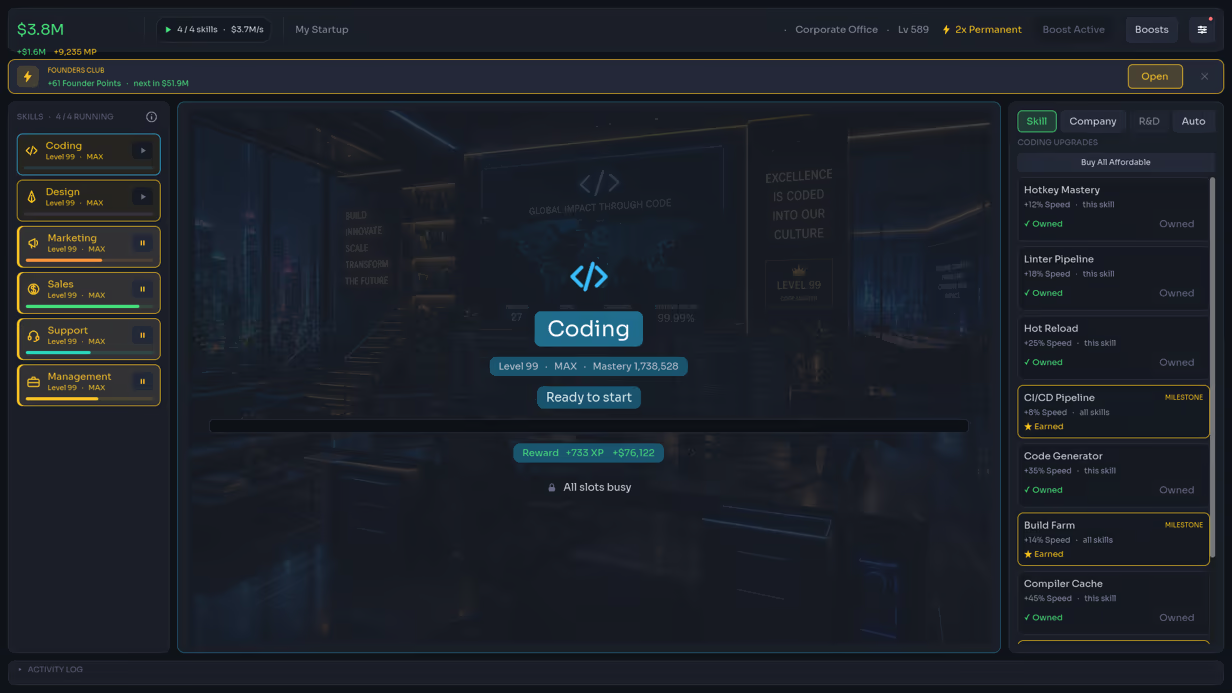
From a garage to a global empire
You started with a laptop and an idea. Idle Startup is a relaxing incremental game about growing that idea into a global tech company — one completed task at a time. Pick a skill and it goes to work: progress bars fill, XP rolls in, money stacks up. Spend it, level up, and watch new skills and whole departments unlock as your company climbs from a one-person Garage Startup to a Corporate Office.Six skills, each its own journey
Every one of the six skills has its own upgrade tree gated by level and cost, backed by a company-wide store and an R&D lab. Push each skill through milestones at levels 25, 50, 75 and 99 for permanent, company-wide bonuses — and when a skill maxes out it keeps earning Mastery, a slow bonus that never stops growing.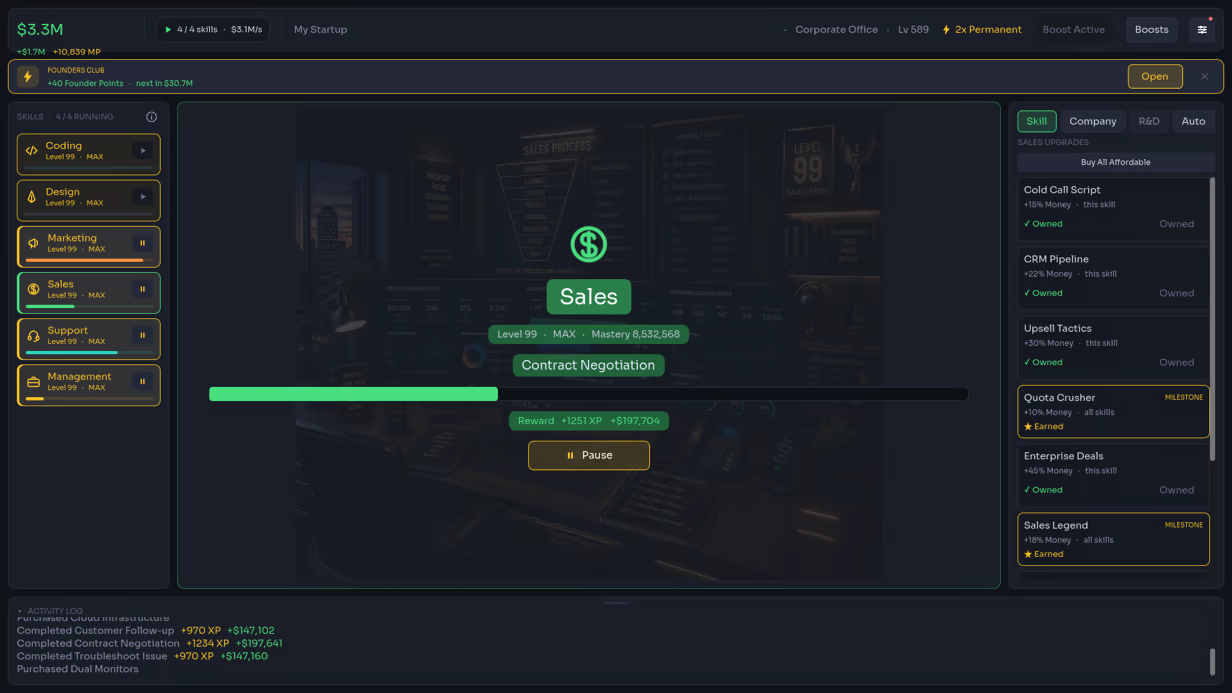
Prestige, and go again — faster
Cash out your company for Founder Points and spend them in the Founder Store on permanent, cross-run upgrades: extra parallel skill slots, compounding growth, seed capital, a veteran team. Every run resets the ramp so the next climb is faster and reaches higher. It's an endless prestige loop with real teeth.Automate the grind
Once you know the loop, hand it off. The Auto tab lets you toggle Auto-Hire, Auto-Train, Auto-Invest, Auto-Research, Auto-Accept-Contracts — even Auto-Refound. Build a machine that runs your whole company while you watch the numbers climb, or walk away entirely and come back richer.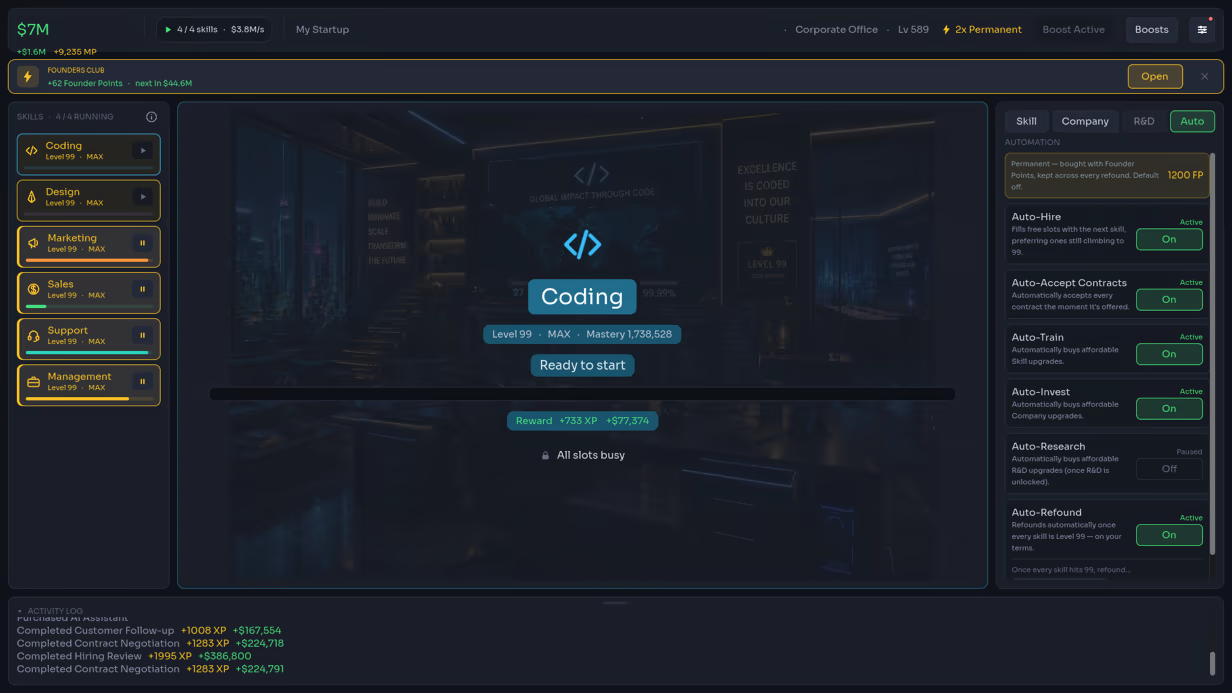
Take on contracts, climb the boards
Accept contracts for bonus goals, then measure yourself against everyone else: global and friends leaderboards, plus time-to-99 speedrun boards tracked down to the second. How fast can you max a skill?Make it yours
Switch between interface themes — the sleek Midnight IDE or the warm Poolside FM sunset — with seasonal drops like the Star-Spangled July 4th theme and its full-length lo-fi music playlist. A tidy, modern interface designed to stay out of your way.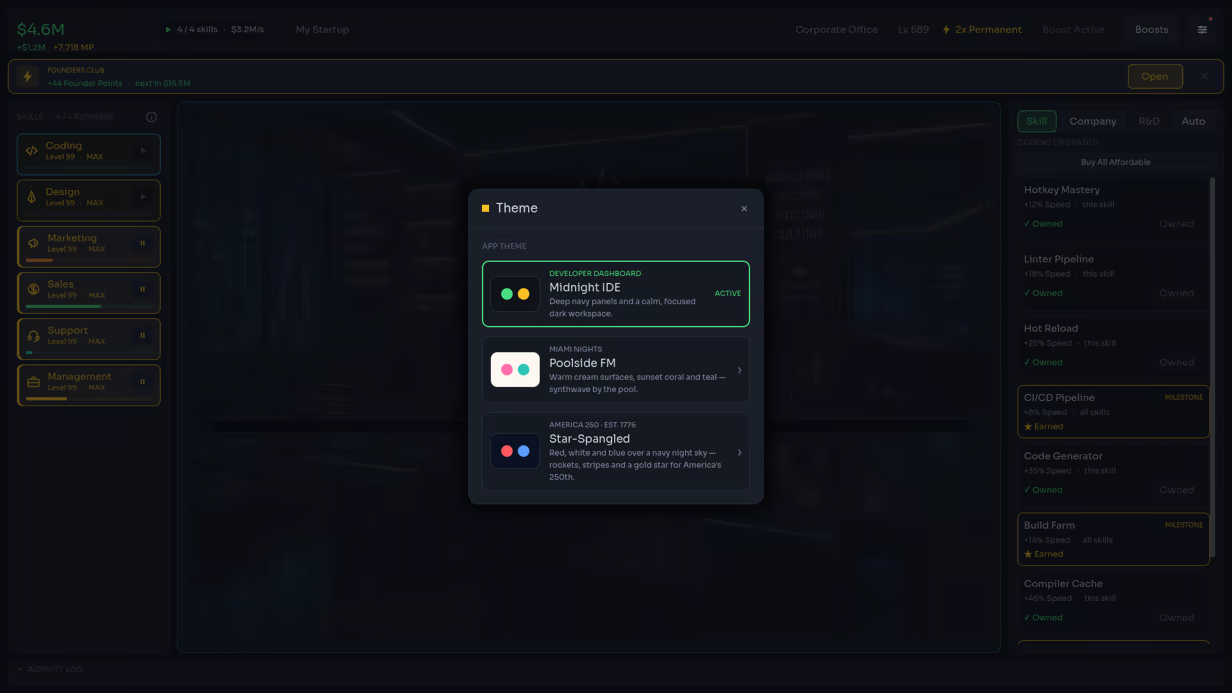
Always progressing
Idle Startup respects your time. It keeps earning while it's closed, greets you with a Welcome Back recap of everything you made and every level you gained, and hands you a free Coffee Break speed boost a few times a day. Your save syncs through Steam Cloud, so you can pick up on any device.Optional boost packs (you don't need them)
Three small optional purchases let you skip ahead if you want to: an Energy Drink for a 2× speed boost across four hours, a Coffee Pot for a full 24 hours, and a one-time Productivity Suite for a permanent 2× speed boost and unlimited offline earnings. None of them are required — the whole game is playable and completable without spending anything.Features
- One-click idle loop — pick a skill, it runs itself
- 6 skills across 4 company tiers, from Garage Startup to Corporate Office
- Deep upgrade trees — 66 skill & company upgrades, an R&D lab, and a Founder Store
- Milestone bonuses at Lv 25/50/75/99, plus endless Mastery on maxed skills
- Prestige loop — cash out for Founder Points and permanent cross-run upgrades
- Full automation — six toggleable auto-managers, including auto-prestige
- Contracts for bonus goals to chase
- Global + friends leaderboards and time-to-99 speedrun boards
- 50+ Steam achievements, from First Day to Trillionaire
- Interface themes, including seasonal drops with their own music
- Offline progress with a clear Welcome Back recap
- Steam Cloud saves — play on Windows and macOS (Steam Deck supported via Proton)
- A free recurring speed boost, no ads ever
- Optional one-time boost purchases — never required, never gated
System Requirements
Will my PC run this? →Minimum
Minimum:
- Requires a 64-bit processor and operating system
- OS: Windows 10 (64-bit)
- Processor: Dual-core 1.6 GHz
- Memory: 2 GB RAM
- Graphics: Any GPU with OpenGL 3.3 (Intel HD 4000 era and up)
- Storage: 250 MB available space
- Additional Notes: 1280×720 minimum window size
Recommended
Recommended:
- Requires a 64-bit processor and operating system
- OS: Windows 11
- Processor: Dual-core 2.0 GHz or better
- Memory: 4 GB RAM
- Graphics: Any modern integrated or discrete GPU
- Storage: 250 MB available space
Supported Languages
English
Latest news
Patch NotesOfficial
Update 8i: The card collection bar really does fill now
A fix for a fix. The card collection bar now actually fills A while back someone reported that the Collection completion bar left a tiny empty sliver at the far right once you had all 150 cards. I fixed part of it, said it was done, and they came back to tell me they could still see the gap. They were right, and I had only closed about half a pixel of a four pixel problem. The real cause was the bar itself. It was built by hand out of two pieces sitting side by side, a filled part and an empty part, and that kind of layout always keeps a small gap between its two halves no matter how you size them. So the filled part could never reach the end, at any percentage. It is now a standard progress bar, which draws all the way to the edge when it is full. Below 100% it looks exactly the same as before. This time I checked it with a screenshot of a finished deck instead of just reading the code, which is what I should have done the first time. Thanks to the player who pushed back instead of letting it go.Read full article on Community Announcements (TheCandyMan)Patch NotesOfficial
Update 8h: No more useless duplicate crafts
A small one from your feedback. Crafting duplicates is blocked Someone asked on the forums what the point of crafting a duplicate card was, and the honest answer was: there wasn't one. You can only equip one copy of a given card, and breaking a spare back down returns just a fraction of the shards you spent, so crafting a card you already owned only wasted shards. Now, if you already own a card, the Craft option for it is greyed out with a note explaining why. Crafting a card you are still missing works exactly as before, so you can still target the specific cards you need to finish your deck. Thanks for the good question.Read full article on Community Announcements (TheCandyMan)Patch NotesOfficial
Update 8g: A couple of fixes
Two small things from your reports. July 4th theme and the right side of the screen On smaller or high-DPI windows, the Star-Spangled (America 250) theme added an extra label to the top bar that could push the Boosts and Menu buttons off the right edge, which made it hard to get back to Settings. That label now tucks away on narrow windows, the same as the other top-bar extras, so those buttons always stay reachable. Card collection bar now fills all the way Once you had collected every card, the completion bar left a tiny sliver unfilled at the far right. It now fills completely at 100%. Thanks as always for the reports.Read full article on Community Announcements (TheCandyMan)Patch NotesOfficial
Update 8f: A few fixes
Some small things you reported. Refound confirm dialog Two fixes here. First, pressing "Refound" on the confirm dialog now actually closes it and resets your run, instead of leaving the dialog sitting open. Second, the Founder Point total on that dialog now updates live while it is open, so it reflects what you would actually bank right now instead of the value from when you opened it. No more sideways wobble On smaller windows the middle skill panel would shift a few pixels to the side as the level, XP and current task text changed width. It now stays put. Thanks as always for the reports.Read full article on Community Announcements (TheCandyMan)Patch NotesOfficial
Update 8e: Two small fixes
A couple of things you reported. No more "0 seconds" on the speedrun boards The fastest-first-99 and fastest-all-99 boards sort by shortest time. A very fast run that finished in under a second was getting rounded down to zero, so it sorted to the very top as a "0 seconds" record. That is fixed. Any real time now counts as at least one second, so those fake zero-second entries stop showing up. To be clear, this does not fix outright cheating. Some entries with impossible totals are people editing the leaderboards from outside the game, and there is no server check on my end to stop that yet. I am aware of it and looking into it. Readable Founder Points Founder Point numbers now have comma separators, so 2000000 shows as 2,000,000. That applies to your balance, the Founder store costs, and the refound amounts, which makes it much easier to tell two million from twenty million at a glance. Thanks for the reports, keep them coming.Read full article on Community Announcements (TheCandyMan)


