

Screenshots

 Watch trailer on Steam ↗
onRails
Monkey Face Software LLC · Published by Monkey Face Software LLC · Official site ↗
Positive — 100% positive (10 reviews) · 24 achievements
Last updated 28 Sept 2026
onRails turns your feedback into a setup personalized to your driving style. Tell it what the car's doing and it tells you exactly what to change, right on top of your sim, so you can start racing for higher positions today.
£31.49
Lowest price we've ever recorded
View on SteamPrices can lag the live Steam store — always confirm before buying.
Price history
Indie, Simulation, Sports, Racing · 2026 · More £30+ games
About this game
Your private race engineer, in your sim cockpit.
Build a race setup. Fix what is making you slow. Do it without leaving your sim.
onRails is a transparent overlay that sits on top of your sim. Answer a few questions about how the car feels, and it helps you build a complete setup: springs, dampers, aero, brakes, diff, tailored to your car and track, across 9 supported sims. Then, lap by lap or mid-race, tell it what the car's doing wrong and get the exact change to fix it. No spreadsheets, no alt-tabbing, no downloading a stranger's setup and hoping it works for your style.
Four tools:
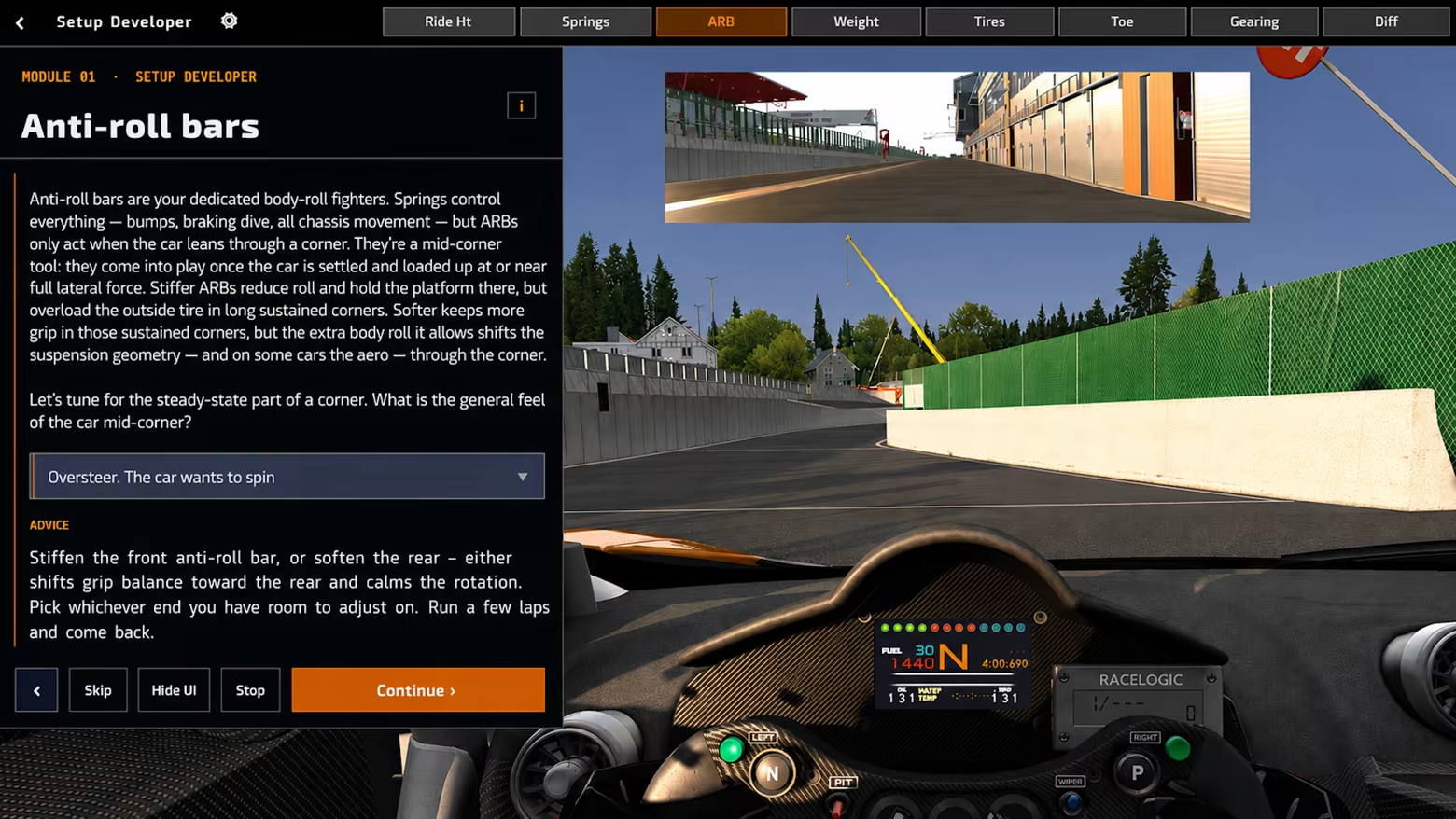
Setup Developer - build your own baseline, one question at a time
Pick your car and track, answer simple questions about how the car feels in each setup area, and onRails builds a complete starting setup around your answers. By the time you're done, you know why every value is what it is, not just what it is. All major car types and track layouts are supported.
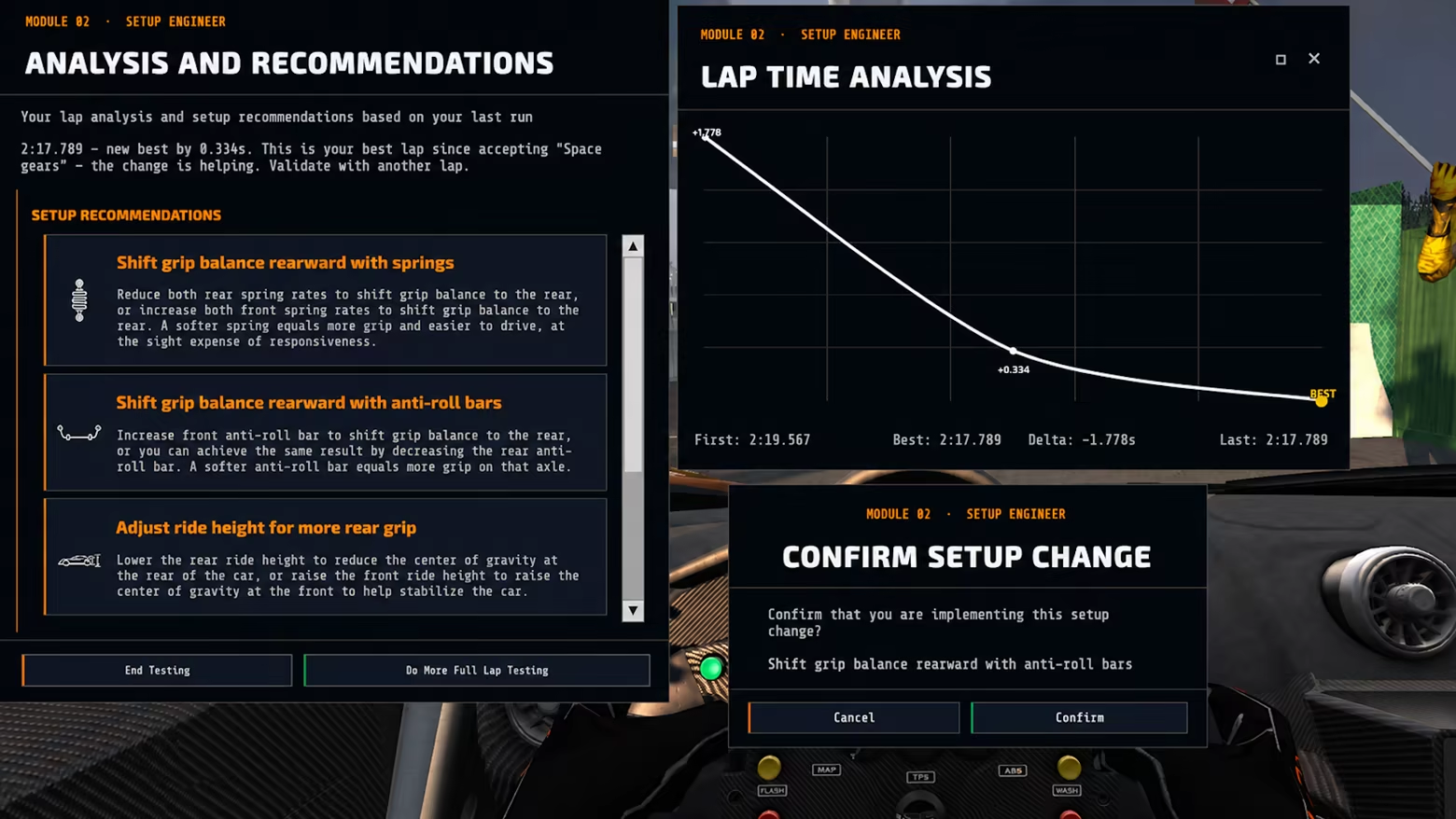
Lap Wizard - fine-tune until it's fast and comfortable
You're in the ballpark, but something's off. Log your lap time, describe how the car behaved overall, and get a ranked list of specific changes with plain explanations. Confirm one, log your next stint, and watch the times drop.
Corner Wizard - when one corner is the problem
Pick the direction, the phase (entry, apex, exit), and what's happening, and get advice scoped to that corner alone, so fixing it doesn't unsettle the rest of the lap.
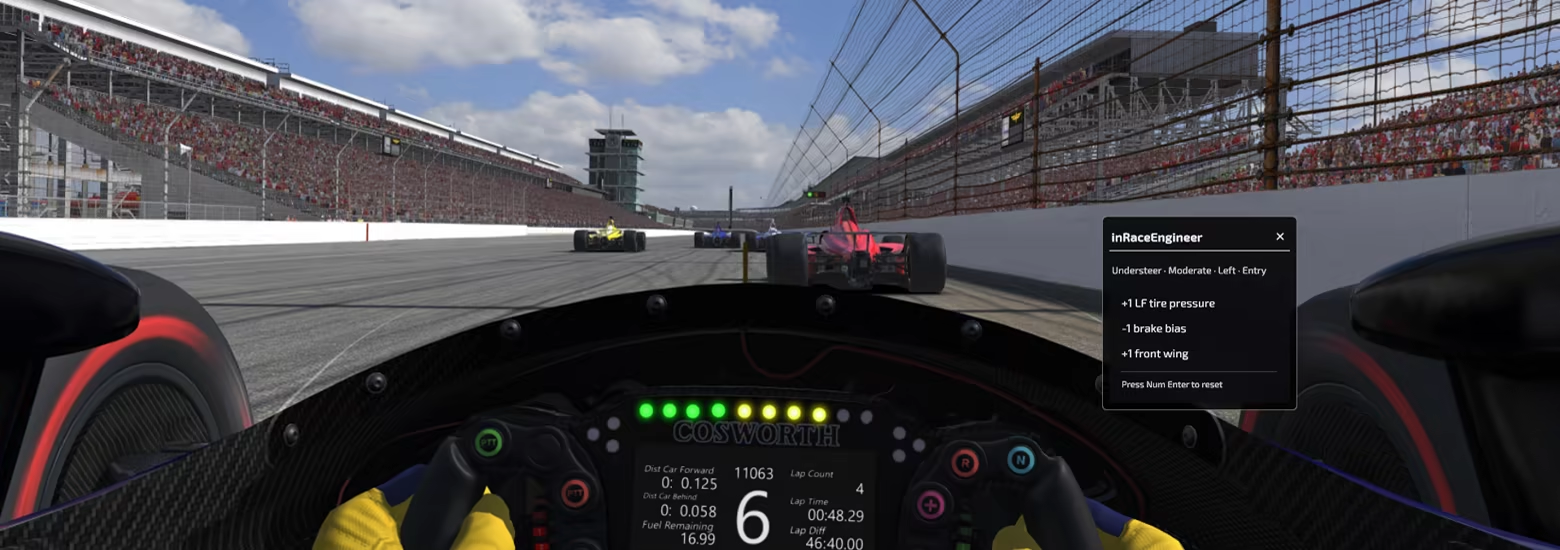
In-Race Engineer - help without leaving the cockpit
A keyboard-only assistant that takes up almost no screen space. One hotkey to toggle, numpad to answer a couple of quick questions, and you get a one-line pit-call recommendation you can act on immediately.
simReader - telemetry without touching a spreadsheet
onRails automatically detects your simulator and pulls tire temps and lap times straight in as you drive, no manual entry, no leaving the cockpit. A hotkey capture is still there if you'd rather trigger it yourself.
Supported sims: Assetto Corsa, Assetto Corsa Competizione, Assetto Corsa EVO, Automobilista 2, iRacing, Le Mans Ultimate, Project Cars 2, RaceRoom Racing Experience, rFactor 2. Any other sim still works via manual entry.
Built for your cockpit
Runs as a windowed panel or a transparent overlay on top of your sim, no second monitor required. Panels, hotkeys, and theme are all yours to customize, fully localized, with built-in tutorials for every panel. Includes the companion eBook "Race Car Setup: Think Like a Race Engineer, Drive Like a Pro", free with your purchase.
Built for sim racers, by a sim racer.
System Requirements
Will my PC run this? →Minimum
- Requires a 64-bit processor and operating system
- OS: Windows 10 64-bit
- Processor: x64
- Memory: 1 GB RAM
- Graphics: DirectX 11 compatible graphics card
- DirectX: Version 11
- Storage: 500 MB available space
- Additional Notes: Runs overlaying the sim, not standalone. It is a transparent overlay — the user is expected to have the sim running in borderless window.
Recommended
- Requires a 64-bit processor and operating system
- OS: Windows 11 64-bit
- Processor: x64
- Memory: 1 GB RAM
- Graphics: DirectX 12 compatible graphics card
- DirectX: Version 12
- Storage: 500 MB available space
- Additional Notes: Runs overlaying the sim, not standalone. It is a transparent overlay — the user is expected to have the sim running in borderless window
Supported Languages
Latest news
Patch NotesOfficial
onRails v1.1 Update
Feature release adding two new sims, automatic sim data capture, and My Garage — plus sim-aware subject filtering, FWD differential guidance, and two new languages.AC Evo SimReader support added.RaceRoom Experience SimReader support added.Garage feature: save a car's CarType, Drivetrain, and Subject setup once, then load it back next time you drive that car — no more reconfiguring from scratch every session.Automatic sim detection now shows only the setup subjects your connected sim actually supports, graying out the rest.Expanded all SimReaders to pull car and track data. rFactor2 users: a new plugin DLL is included and must be used.Added FWD differential recommendations to the Setup Developer module.Added a per-car drivetrain stepper to the Setup Engineer Selections screen's Car Type cards.Added Spotlight walkthroughs for the SDT Settings and Setup Engineer Subjects panels.Module card descriptions, header eyebrow text, and module tags now correctly resize with the Font Size setting.The Transparency slider's label now matches the font used by the toggle labels beside it in SDT and SE Settings.Added a Font Size dropdown to the Launcher menu.Increased default text/element sizing across the Launcher UI, and made cards, guides strip, and eBook banner scale in width with font size.Fixed: sim detection incorrectly locking onto Project CARS 2, Assetto Corsa EVO, Le Mans Ultimate, or RaceRoom when a leftover shared-memory map was present without an active session running.Fixed: the Lap Wizard and SDT share-result overlays becoming completely unclickable (including Close) in Transparent Overlay mode.Lowered the maximum Transparency setting from 60% to 50%, so the overlay UI (including the slider itself) never fades below 50% opacity.Added Dutch and Hungarian localizations.Read full article on Community Announcements (Monkey Face Software LLC)AnnouncementsOfficial
onRails v1.1 Preview: Try New Sims, Auto-Capture in Beta
Shipping in v1.1Two Sims Added to the Growing ListRaceRoom Racing Experience and Assetto Corsa EVO drivers get full onRails support: tire temps, lap capture, and the same guided setup process as every other supported sim. This brings the total list up to nine supported sims! SimReader Auto-CaptureYou no longer need to press a hotkey to import tire or lap time data into onRails. When onRails sees your sim running, it pulls your lap time and tire temps straight into the tools that need them. A status dot in the top right of the AppHeader confirms the connection. Lap time and tire temps are captured at each sector and at the start/finish line, you choose which to use in the Lap Wizard. The Setup Developer Tool auto-fills from the same feed. One toggle in Settings turns it on or off based on what you prefer. My GarageonRails detects every car you use and saves it to your Garage, accessible from the Setup Engineer's Selections screen. Within each saved car, adjust the Car Type, Drivetrain, and Subjects setup. Load it back the next time you drive that car, no reconfiguring from scratch every session. It also tracks your lap times for each track, and over time compiles a list of which setup adjustments worked best for you. Car & Track CaptureEvery SimReader now pulls car and track identity, not just tire temps and lap time. That's what makes the Garage work automatically. rFactor2 users: this requires a new plugin DLL, included in the Extras folder within your onRails installation. Replace your old DLL with this new one before you drive, or car/track capture won't work. Sim-Aware Subject FilteringonRails now detects which setup subjects your connected sim actually supports and grays out the rest. No more dialing in a subject your sim doesn't read. Per-Car Drivetrain StepperSports/Touring Car only. Set drivetrain right on the Car Type card in Setup Engineer Selections by clicking the card again to cycle between drivetrain options. Setup recommendations are tailored to that ...Read full article on Community Announcements (Monkey Face Software LLC)Patch NotesOfficial
onRails v1.017 patch notes
- Fixed: The demo-limit-reached screen can now be closed — its buttons were unresponsive while Transparent Overlay mode was active. - Fixed: ACC detection now requires an active session, not just its shared-memory presence, preventing it from permanently blocking detection of other running sims — note: ACC will briefly show as "not detected" while sitting at its main menu before a session loads.Read full article on Community Announcements (Monkey Face Software LLC)Patch NotesOfficial
onRails v1.016 patch notes
onRails v1.016=========================Hotfix release with UI, gameplay-feel, and sim-detection reliability fixes. • Redesigned Setup Developer Track and Car Selection into single merged panels with collapsible, auto-expanding Variables sections for each. • SDT Nudge: if you keep picking the same answer three times in a row, onRails now nudges you to move on to the next subject instead of letting you spin your wheels. • Lap/Corner Wizard Nudge: recommendations you've already accepted now drop to the bottom of the list, so you see fresh setup suggestions first. • Added lap-time sanity checks: a modal warns when a logged lap differs more than 5% from the last one, and session-improvement leaderboard uploads are discarded if the session's gain exceeds 25%. • Expanded and clarified Setup Engineer's FWD differential recommendations. • Fixed: text fields in Setup Developer's tire/camber grid and lap-time entry not responding correctly to keyboard input while Transparent Overlay mode is active. • Fixed: sim detection now periodically re-checks all sims, so it can no longer get permanently stuck on one after that sim closes. • Fixed: sim detection no longer relies on exception handling to check if a simulator is running, resolving a bug where pressing a snapshot hotkey could cause detection to get permanently stuck on the wrong sim.Read full article on Community Announcements (Monkey Face Software LLC)AnnouncementsOfficial
onRails Is Here — Available Now
Ten months of solo development — this is the most technically ambitious thing I've built. Live SimReader integration across seven simulators, and a transparent overlay that actually stays out of your way instead of fighting you for screen space. There were plenty of points this year where I wasn't sure the overlay piece would work the way I wanted it to, but it got there. onRails has come a long way since the first app in this series, way back in 2009. Now it is time to start going faster. onRails is now available. If something's broken or you've got an idea for where this should go next, I want to hear it. Three ways to reach me: In-app: the dropdown menu in the launcher header Discord: https://discord.gg/MTrsvSStSe (fastest) Email: support@virtualracecarengineer.comTo everyone who tested builds, reported bugs, and pushed back on ideas that weren't quite right these last few months — thank you. onRails is better because of you.Read full article on Community Announcements (Monkey Face Software LLC)


