

Screenshots

 Watch trailer on Steam ↗
Harmonic Drive
Kareel Hicks · Published by Emotive Studios LLC
1 user reviews — 100% positive (1 reviews) · 26 achievements
Last updated 28 Sept 2026
An arcade-style rhythm game built around player reactive background effects. Build combos, chase perfect runs, climb the leaderboards, and experience a soundtrack built for late-night sessions and score chasing.
£1.59
£2.65Lowest price we've ever recorded
View on SteamPrices can lag the live Steam store — always confirm before buying.
Price history
Indie, Casual · 2026 · More under £5 games
About this game
Harmonic Drive is an arcade-style rhythm game built around player reactive background effects, AI generated music, community submitted charts and community submitted background effect packs.
The game supports 4KEY - 8KEY charts and the featured songs in the game all use 5KEY.
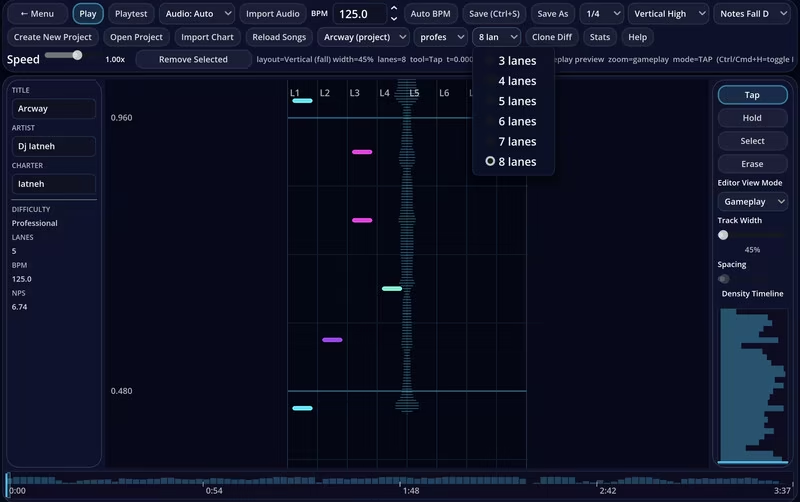
Subscribe to charts via the workshop, import charts from your friends or create your own in the Chart Editor!
Check out the EMS Creator to customize your in-game effects using the "Emotional Motion System". Customize your three primary colors, define background images for both gutters, etc.
Want a really trippy experience?! Level up and unlock the "Black Hole" gameplay modifier in the Loadouts menu and enable "Disable chart background" in the Options menu. :)
The soundtrack ranges from energetic dance tracks to emotional late-night melodies, with multiple gameplay modes and difficulty levels available for every song. Jump in for a casual session, or push yourself into the hardest charts the game has to offer.
Features
AI generated soundtrack primarily featuring EDM
Multiple gameplay modes for every song
Difficulty options ranging from beginner-friendly to seriously challenging
Online leaderboards for score chasing and competition
Multiplayer gameplay
Calibration tools for low-latency gameplay
Cross-platform support for Windows, macOS, iOS, and Android
Frequent updates with new songs and improvements
System Requirements
Will my PC run this? →Minimum
- Requires a 64-bit processor and operating system
- OS: Windows 10 64-bit
- Processor: Intel Core i5-4570 / AMD Ryzen 3 1200 or better
- Memory: 4 GB RAM
- Graphics: Intel HD Graphics 4600 or better
- DirectX: Version 11
- Network: Broadband Internet connection
- Storage: 2 GB available space
- Additional Notes: Requires a 64-bit processor and operating system.
Recommended
- Requires a 64-bit processor and operating system
- OS: Windows 11 64-bit
- Processor: Intel Core i5-8400 / AMD Ryzen 5 2600 or better
- Graphics: NVIDIA GTX 1060 / AMD RX 580 or better
- DirectX: Version 11
- Network: Broadband Internet connection
- Storage: 4 GB available space
- Additional Notes: Requires a 64-bit processor and operating system.
Supported Languages
*languages with full audio support
Latest news
Patch NotesOfficial
The Creative Flow Update: 4 New Songs, Practice, Visualizer & Live Editor
This is one of Harmonic Drive’s largest updates yet, bringing four new songs, two new ways to experience the music, major Chart Editor improvements, expanded EMS progression, balance adjustments, and numerous fixes. Four New Songs - I Can’t Pretend I’m Fine - I Forgot The Sound of You - I Learned How to Smile Without You - We Should Let Go Practice Mode Practice any song without rankings, failure, or progression penalties. Pause playback, seek directly through the song, adjust its playback speed, and replay difficult sections as often as needed. Visualizer Mode Experience Harmonic Drive as an EMS-powered music visualizer. Select a specific song or shuffle the catalog, then choose between Player Reactive and Chart Reactive behavior. Chart Reactive uses the Professional Classic chart and performs a virtual All Perfect Full Combo, allowing every EMS reaction to unfold without displaying normal gameplay or player hit effects. Visualizer Mode also includes song search, remembers your last song, honors EMS background settings, and introduces more varied effect placement for supported loadouts. Chart Editor "Live Editor" Mode The Chart Editor can now open songs directly in the gameplay view for real-time chart creation and testing via the new Live Editor mode. Live Editor includes playback controls, a movable timeline, adjustable playback speed, synchronized waveform timing, and Live Adding for taps, chords, and hold notes. Turn Live Adding off to immediately test the section with normal judgement, combo, accuracy, and scoring. Additional improvements include a customizable hold threshold, live timestamps, marquee-selection auto-scrolling, better reduced-speed synchronization, improved layout scaling, and substantially faster note insertion during playback. Expanded EMS Progression All EMS Loadouts are now unlocked with previous unlock requirements removed. Sections 15 - 20 now have official names and EMS Loadouts: - Spectrum: Chromatic Rift - Horizon: Skyline Mirage - Res...Read full article on Community Announcements (Iatneh)Patch NotesOfficial
New Tracks, All Songs Unlocked & Note Speed Options
This update expands the soundtrack and makes it easier to jump directly into the music you want to play.Added two new tracks: “Where We Used To Dance” and “I Can’t Pretend I’m Fine.”All 57 songs are now immediately playable through Enter The Flow.Progression now unlocks EMS visual Loadouts instead of restricting song access.Added Classic and Modern Note Speed options:Classic automatically scales note speed by difficulty.Modern uses your customizable Note Approach Time.New players now begin with the recommended 40% Lane Width setting. Existing preferences are preserved.Removed “Can Love” from the song lineup.Updated song-selection, progression, results, settings, and chart-preview behavior to support the new systems.Read full article on Community Announcements (Iatneh)Patch NotesOfficial
Update Part 2 for June 21: Workshop Sync Status Messages
Added display status messages for when the game syncs subscribed or unsubscribed workshop items. The game will also display status messages when downloading a subscribed YT chart so that the player knows what is happening. Log file location is also provided in case the download fails for any reason.Read full article on Community Announcements (Iatneh)Patch NotesOfficial
Update Notes for June 21 - Fixing Workshop download issue
This patch fixes an issue identified when downloading YT workshop submissions.Read full article on Community Announcements (Iatneh)AnnouncementsOfficial
Workshop support for Custom Charts and EMS Packs
This update focuses on adding workshop support for custom charts and custom EMS packs as well as some UI enhancements, gameplay performance improvements, and 14 unlockable EMS packs to try out (earned after completing a section in "Enter The Flow").The new feature in this update is the addition of the EMS Creator v1, a simple editor to allow you to slightly customize the background effect system for your gameplay. Try to create something cool and upload it to your workshop! I've included all of the built-in unlockable EMS packs in the editor for those that want to experiment with resizing or combining multiple effects.You can now chart songs using a YouTube URL. Open the Chart Editor, create a new project, select Import Audio, and then select the YouTube option. Please refer to the screenshots below for the order of button presses to setup a YouTube based project.Charts configured with YouTube URLs are the only method allowed for workshop submissions. For players that chart songs with their local audio and want to share that chart with other players, you may export to .harmonic using the "Export .harmonic" option and then share that .harmonic export with another player for them to then import in to their game.Added a "Community Charts" playlist in the Main Menu which will contain any charts that you've subscribed to in the Steam Workshop. Requires restarting the game after subscribing to an item.Added a "Reset Defaults" button to the Options menu for a way to reset your settings back to the recommended default values.Updated the layout of the "Shop/Loadout" menu to be a tabular menu for easier navigation.In the main menu, the currently playing song now displays at the very bottom above the Copyright statement.The last update to highlight as a more modern look to the in-game UI while still allowing for the previous in-game UI display via a toggle in the Options Menu under Graphics & Display. Set the option "In-game UI" to the value of "Modern in-game UI".Read full article on Community Announcements (Iatneh)


