

Screenshots

 Watch trailer on Steam ↗
Dynamine
HexagonNico · Published by HexagonNico
Last updated 28 Sept 2026
Dynamine is an incremental mining game based on Minesweeper. Dig for ores while avoiding explosives, sell what you found, buy better tools to dig more efficiently, then rinse and repeat!
Strategy, Casual · More free games
About this game

What if Minesweeper was actually about mining? Your goal in Dynamine is to mine for ores and sell them to make money while avoiding explosives. The rules are the same as the classical Minesweeper but inside an incremental mining game. Dig a cell to reveal its contents and find ores.
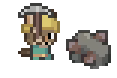

Sell your valuables to make money, buy upgrades and special tools to help you dig and make money faster, then collect even more ores that you can sell to make even more money!
Find the elevator in every layer of the mine to go deeper and reach the more valuable minerals. How deep can you go? Be careful though, the deeper layers are also more dangerous!
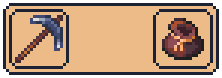

Explore an infinite procedurally-generated world, find different biomes with different resources, find abandoned structures, and sometimes even special treasures.

As you keep digging and your cave becomes larger and larger, you are going to need to set up minecart tracks to move around.
Selling raw ores is not profitable enough anymore? Set up some furnaces to process them and increase their value!


The numbers on the ground indicate how many explosives are in the 8 adjacent cells.
Dig a cell to reveal its content. It could be empty, contain a mineral, or reveal a large open area. Don't worry if you dig an explosive cell, you will only have to pay for the damage and then you will be able to keep mining and fix your mistake.
System Requirements
Will my PC run this? →Minimum
- OS: Windows 10
- Processor: Intel Core 2 Duo E8200, AMD FX-4100, Snapdragon X Elite
- Memory: 1 GB RAM
- Graphics: Intel HD Graphics 2500 (Ivy Bridge), AMD Radeon R5 Graphics (Kaveri)
- Storage: 512 MB available space
Recommended
- OS: Windows 10 or newer
- Processor: Intel Core i5-6600K, AMD Ryzen 5 1600, Snapdragon X Elite
- Memory: 2 GB RAM
- Graphics: NVIDIA GeForce GTX 650 (Kepler), AMD Radeon HD 7750 (GCN 1.0)
- Storage: 1 GB available space
Supported Languages
Latest news
Patch NotesOfficial
Update 0.5
ChangesHitting a mine and causing an explosion now causes all destroyed tiles to be replaced by indestructible walls.Hopefully, this should disincentivize from carelessly hitting walls at random, without being as harsh of a punishment as a complete reset.Changed the color palette of most sprites.The game now asks you if you want to continue the saved level AFTER selecting the level.Technical changesUpdated engine to version 4.7.Save directory structure has been changed.This was done to accommodate for Steam's Cloud Sync feature, which will come in a future update.You shouldn't have lost any significant progress, though some data may have not been transferred.Read full article on Community Announcements (HexagonNico)Patch NotesOfficial
Patch 0.4.1
Fixes:The pause menu no longer opens above the inventory or other GUIs when tabbing out of the game with “pause on lost focus” enabled.Keep on grinding! :)Read full article on Community Announcements (HexagonNico)Patch NotesOfficial
Update 0.4 - The game can now be saved!
You can now save the game!It has been requested since the first prototype and now it’s here! You can now save the game at any time, quit, and continue from where you left off.Mining an explosive also no longer cause a game over. You will need to pay for the damage you caused, but after that you will be able to keep playing in the same level.My initial vision for this game was for it to work like a Roguelike, where you play for some time in your first run, make a mistake, then try again in a new run and try to last longer. I was also planning to add integration with the Steam leaderboard at some point and allow players to compete for the best score. After testing the game for some time and seeing people’s feedback about the demo, I decided to change direction and allow you to save your progress for the current level at any time. The leaderboard integration is also probably not going to be added anymore, at least not in the way I initially planned.Gameplay changesThe game now saves automatically when you quit a level.Works both when returning to the title screen from the pause menu and when closing the application.When you click “Start game” in the title screen, you will now be asked if you want to continue the saved level or start a new one.Continuing the game puts you back in the middle of the mine and everything is as you left.If you choose to start a new level, the old saved one will be deleted.Mining an explosives no longer resets the mine.When you hit a mine, you will now lose your inventory and half of your money.You can then come back to where you died and continue mining.The penalty can be configured from the accessibility settings.You can adjust the percentage of money lost from 50% to none.You can choose whether you want to lose your inventory or not.Time and score have been removed (for now).The contents of your backpack are now saved in between runs.You no longer have to worry about forgetting to sell your ores!Technical changesPerformance improvement to ...Read full article on Community Announcements (HexagonNico)Patch NotesOfficial
Patch 0.3.1
New minecart movementI decided to change the way the minecart moves, since I had the impression that many people didn’t find it very intuitive. Hopefully now it should be easier to use!You can now use WASD to pick a starting direction when your minecart is not moving.If the “character follows mouse” or the “click to walk” options are enabled, you can also pick a direction by simply moving the mouse cursor.Holding down the primary action button (left mouse button or space bar) will make your minecart accelerate forward.The minecart turns automatically when there is a turn, no need to press WASD again.If the button mode in the accessibility settings is set to “toggle”, pressing the button once will make the minecart start accelerating and pressing it again will start decelerating it.You can now only get off the minecart using the secondary action button (right click or F), since the primary one is now used for moving.Other changesThe on-screen toolbar can now be clicked to select a tool.Small improvement to patfinding for the “click to walk” option.Tweaked the UI of the buy menu.Planned for future patchesChange the default colors of certain numbers.Allow tools to be placed more easily when using the mouse.Read full article on Community Announcements (HexagonNico)Patch NotesOfficial
Update 0.3
You can now play using only the mouse!Since it was highly requested, the feature is now here: you can click on a tile and your character will walk there!New “click to walk” optionMust be enabled in the game options (off by default).When enabled, you can click on any tile to make your character walk there.If you left-click or right-click a wall, a mineral, or an object you can interact with, your character will walk there and dig, place a flag, or interact with the object immediately!New “toggle” modeAdded the option to choose between “Hold” and “Toggle” mode.Must be set in the accessibility settings (the default value is “Hold”).When set to “Toggle”, you will no longer need to hold down the dig button to dig. It will be enough to click once to start digging and click again to cancel the action.Let me know if you like this new feature or you prefer the old WASD/controller movement.Also tell me if you find any issues or you have any suggestion for changes!Happy mining!Read full article on Community Announcements (HexagonNico)


