

Screenshots

 Watch trailer on Steam ↗
Ore Factory Squad ⛏️
threeW · Published by PlayWay S.A.
Very Positive — 89% positive (1,906 reviews) · 35 achievements
Last updated 28 Sept 2026
Ore Factory Squad is a co-op mining and factory-building game with procedural mining and fun at its core! Play alone or with friends, buy properties, dig deep for valuable resources, complete contracts, upgrade and automate production lines and grow your factory from zero to industry!
£8.57
£11.75Lowest price we've ever recorded
View on SteamPrices can lag the live Steam store — always confirm before buying.
Price history
Indie, Simulation · 2026 · More £5 - £15 games
Design and expand your factory as you dig deep for resources in this co-op mining simulation. Team up or play solo to complete contracts and automate production from scratch.
About this game
Roadmap
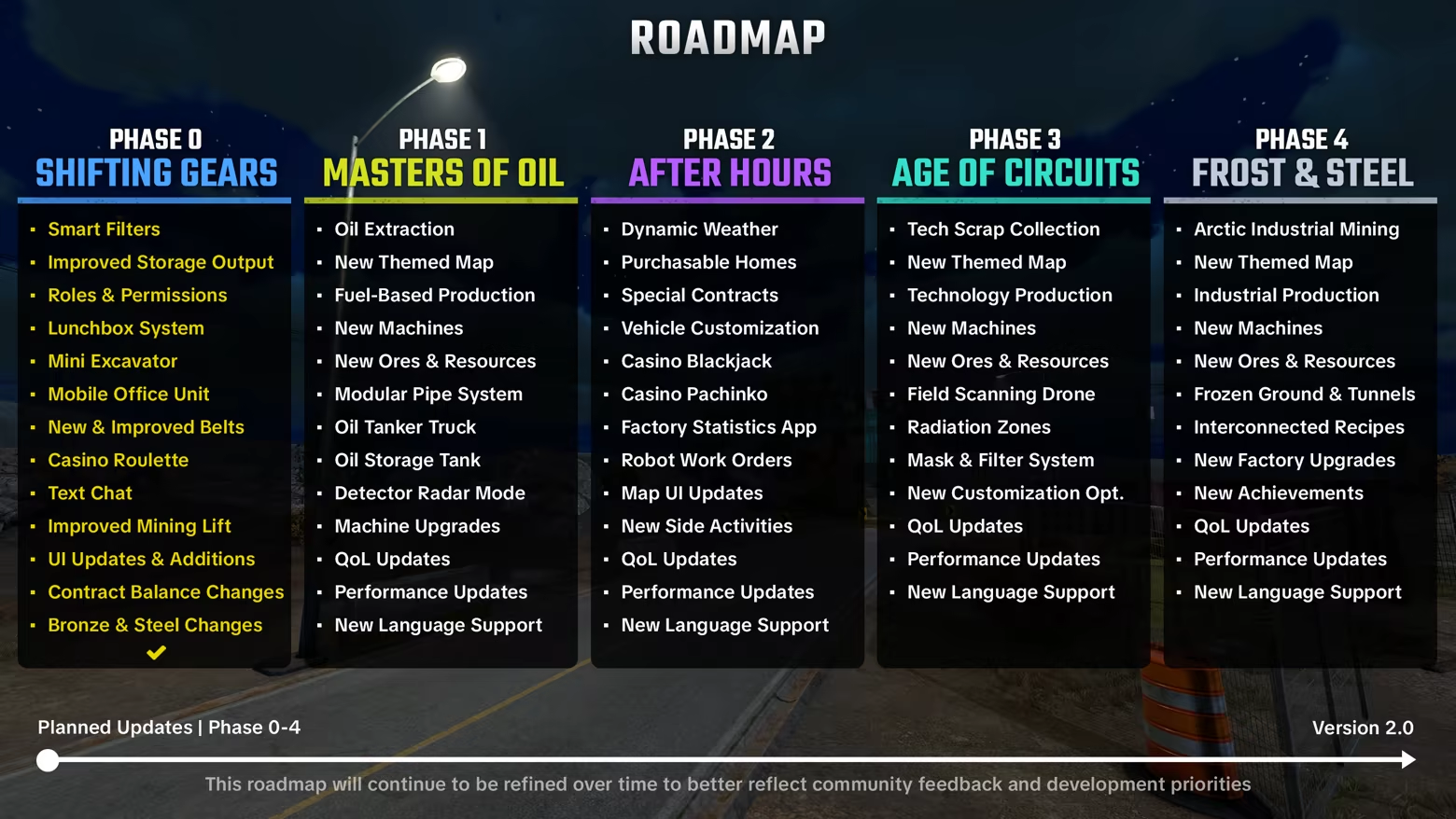
About the Game
Ore Factory Squad is a co-op mining and factory-building game with procedural mining and fun at its core! Start from a small warehouse, buy properties, dig deep for resources, process what you extract, and turn it into profit. Expand step by step and turn a simple setup into a fully functioning factory.
Play solo or with up to 4 players, running the entire operation yourself or working together to build it faster!
Procedural Mining at Its Core
Every property features procedurally generated underground resources with no fixed paths, allowing you to dig freely and shape your own tunnels.
Start with a shovel, move on to pickaxes for tougher layers, use jackhammers to speed things up, and clear large sections with dynamite. As you go deeper, resources become more valuable, making each decision more important.
From Warehouse to Industrial Production
Your factory starts with simple machines and basic resources, then expands as you unlock new machines and recipes through progression and licenses.
Handle logistics with pallets and forklifts, connect your machines with conveyor belts to create more efficient production flows, gradually turning your warehouse into a larger and more capable industrial system.
Buy Properties, Dig for Profit
Purchase different types of properties, each featuring randomized resource distribution and profit potential.
From small backyards to big construction sites, forest areas, and large quarries on snowy mountains, each location offers a different environment and opportunities.
Dig, extract, process, and turn every property into profit as you grow into larger and more valuable operations.
Contracts, Sales, and Growth
Take on contracts from companies requesting specific products and quantities, negotiate deals, prepare deliveries, and load trucks to fulfill orders for higher rewards.
Manage your stock, use smart warehouse robots, organize shipments, and balance your growth with fast stock sales.
Tools, Upgrades, and Equipment
Begin with simple tools and unlock and upgrade more powerful mining equipment as you progress.
Upgrade your factory to expand your operation, increase your market reach, take on more contracts, improve negotiation rates, hire and manage workers, and gain licenses that unlock new machines and production lines.
Customize your character with different outfits, faces, gloves, and helmets, and personalize your factory with walls, floors, signs, and decorations.
Build Solo or Scale Together
Run everything yourself or work together as a team. Take full control and progress at your own pace, or split the work, optimize production, and grow faster together.
Core Features:
Procedurally generated underground with fully diggable terrain and no fixed mining paths
Unlockable and upgradeable mining equipment including shovel, pickaxe, jackhammer, and explosives
Property system with multiple types, each featuring randomized ore distribution and profit potential
Multi-stage production system with machines enabling different processing outputs
Factory progression driven by machine unlocks, licenses, expanding production chains, upgrades
Conveyor-based production system with integrated factory automation, including warehouse robots
Logistics and transport using controllable vehicles such as forklifts and trucks
Contract system with production requirements, delivery preparation, loading, and negotiation mechanics
Character and factory customization
Fully playable solo or co-op with up to 4 players
System Requirements
Will my PC run this? →Minimum
- OS: Windows 10 or later (64-Bit)
- Processor: i7-6700 or Ryzen 3 1200X
- Memory: 8 GB RAM
- Graphics: NVIDIA GTX 1060 6GB or AMD equivalent
- DirectX: Version 11
- Storage: 11 GB available space
- Additional Notes: Internet connection required for multiplayer
Recommended
- OS: Windows 11 or later (64-Bit)
- Processor: i5-12400 or Ryzen 5 5600X
- Memory: 16 GB RAM
- Graphics: NVIDIA RTX 2070 or AMD equivalent
- DirectX: Version 11
- Storage: 15 GB available space
- Additional Notes: Internet connection required for multiplayer
Supported Languages
Latest news
Patch NotesOfficial
Masters of Oil | Major Patch Notes - v1.1.0
Hi Miners! ⛏️ Masters of Oil, our first major roadmap update, is now live!With Phase 1, Ore Factory Squad expands beyond traditional mining and into a brand-new industrial layer: oil extraction, fluid transport, petrochemical production, and fuel-based manufacturing.Here’s what’s included in today’s update:🏜️ New Property – DesertA forgotten desert town outside Redstone City is now open for business, and there is still plenty of oil waiting under the dirt.This new property takes you to an old desert settlement with an active oil extraction facility, an abandoned motel, and plenty of buried oil waiting underground.The land may look empty at first, but there are still active reserves beneath the surface. Turns out, empty desert plots can be surprisingly valuable.Be careful around old oil pipes left behind in the area. They may not be as harmless as they look.🛢️ Crude Oil & Oil ReservesCrude Oil has been added as a new underground resource, but finding it works a little differently than regular ores.Oil is found deep underground as a reserve that needs to be cleaned with the Jackhammer before extraction.The Ore Detector now includes a new Radar Mode, which works like a simple underground sonar to help you scan oil density beneath you.Once you reach the oil bed, clear the reserve, install the Pipe Head, and get ready for extraction.⛽ Oil Extraction & Tanker TruckOil extraction introduces a completely new fluid-based workflow.The Oil Pipe Head acts as the surface unit for pulling oil from underground reserves.The new free-placement pipe system lets you extend pipes piece by piece from the surface unit all the way down to the reserve.The new Tanker Truck is used to collect Crude Oil from the extraction point and bring it back to the factory.Once connected, the motor starts running and Crude Oil slowly transfers into the tanker.Back at the factory, the new Oil Tank lets you store the Crude Oil for later processing.🏭 Oil Refinery & Oil ProcessorOil brings a new petrochemica...Read full article on Community Announcements (charlermaster)Patch NotesOfficial
Fixes & Improvements | Patch Notes - v1.0.9
Hi Miners! ⛏️ Before we fully move into Phase 1 and start digging into oil extraction, we’re releasing one more QoL focused update.We know many of you were also waiting for the patch notes for v1.0.8, which we released as a silent patch last week. Normally, our goal is to keep you informed with every update, but this follow-up patch took a little longer than expected and we wanted to cover both versions together in one post.Including the changes from the previous version, here’s what’s new in this update: ☁️ Steam Cloud & Save SystemSteam Cloud has been re-enabled.In update v1.0.8, we made a core change to how dig data is stored. Dig data is now packaged and saved in a safer way, which should make save files more stable against Steam Cloud sync issues.The Backup folder is no longer included in Cloud Save. This means if a cloud conflict ever gives you older save data, your local backup should still remain safe as long as you do not save over it.If Steam ever asks you to choose between two conflicting saves, please make sure to select the newest and most up-to-date save file and If you receive a Steam Cloud sync warning on Steam, restarting the game should clear the issue. 🤖 Warehouse Robot PriorityWarehouse Robots can now be managed more clearly.You can now interact with a Warehouse Robot and choose whether it should prioritize moving products into storage or pulling items from storage for packaging and delivery.We also fixed several cases where robots could get stuck, and added a new option to cancel a robot’s current pallet-carrying task. 📦 Elevated Belts: New Compatible PiecesElevated Belts are now more flexible.Elevated Belts now support more belt pieces on the raised section, including Merge Belts, Splitter Belts, and left/right turning belts.This should make elevated factory layouts much easier to build and connect properly. 🎓 Tutorial SkipTutorial Skip function has been added.If you have previously completed the tutorial on a save file and then start a new gam...Read full article on Community Announcements (charlermaster)Patch NotesOfficial
Steam Cloud Support Temporarily Disabled | Important Notice
Hi Miners! ⛏️ We are aware of an issue related to Steam Cloud save conflicts that may cause players to lose progress after reverting to corrupted cloud save, or in some cases, prevent save files from loading correctly after sync problems.We are currently working on a fix and plan to release it as soon as possible.Until we are fully confident that the issue is resolved, we have temporarily disabled Steam Cloud Support for Ore Factory Squad.Once Steam Cloud is enabled again, your saves should continue normally. However, if Steam ever asks you to choose between two conflicting saves, please make sure to select the newest and most up-to-date save file.If you are currently having trouble loading your save file, please join our Discord and explain the issue to us. We’ll do our best to help. Thank you for your patience.💬 Feel free to join our Discord to follow development closely, share feedback, and be part of the community or just say hi!Read full article on Community Announcements (charlermaster)Patch NotesOfficial
Excavator, Mobile Office & Roulette | Patch Notes - v1.0.6
Hi Miners! ⛏️Phase 0 Part 2 is now live! With this update, we are completing Phase 0 from our roadmap. This means we are wrapping up the first wave of feedback-focused improvements and finishing an important step before moving toward bigger new content updates.Thank you again for all your feedback. Many of the changes in this update were shaped directly by what you shared with us.Here’s what’s included in today’s update:🚜 Mini ExcavatorThe Mini Excavator has finally arrived! It may not replace your shovel, but it definitely looks cooler at the dig siteAfter unlocking the Excavator License from Upgrades, you can purchase the vehicle, bring it to a dig site, and start digging.We tried to keep the control scheme simple and easy to understand, so we hope you can get used to it quickly and start having fun with it.A quick note about this feature: Ore Factory Squad was originally built around manual hand-tool digging, and most dig sites were designed mainly for vertical gameplay. Because of that, the Excavator is not intended to become the ultimate mining solution.We added it because it was highly requested, and because we liked the idea of seeing multiple Excavators working around a dig site. We see it more as a fun extra tool rather than the core way to play. We also do not expect its physics to compete with games fully built around heavy machinery simulation.That said, we are still working on it, and we are looking forward to your feedback.🏢 Mobile OfficeThe Mobile Office has been added as a new upgrade.After unlocking it from Upgrades, a mobile office container will be added to your dig sites.You can quickly access the computer even when you are outside the factory.You can also drink free coffee from the coffee machine to work longer during the night.🎰 Casino RouletteThe Casino just got riskier. Roulette has arrived!Up to 4 players can play at the same time. Bets use shared money, but each player’s chips appear in a different color, so everyone can see exactly where t...Read full article on Community Announcements (charlermaster)Patch NotesOfficial
Smart Filters & Safer Squads | Patch Notes - v1.0.5
Hi Miners! ⛏️ Thank you so much for the incredible support since launch. Ore Factory Squad has now passed 100,000 copies sold💙This is the first part of our Phase 0 update. Part 2 is planned for the coming weeks, bringing more of the features and improvements we shared in the roadmap.Due to the recent private & public lobby security issues, we had to change some of our update priorities.A significant amount of time went into rebuilding parts of the lobby security, server-side protection, and authentication flow to make multiplayer sessions safer for everyone. Thank you for your patience while we handled that properly.Here’s what’s included in today’s update: 🧠 Smart Filters for Belts & Drop ZonesAutomation should now be much easier to control with the new smart filtering system.Added smart filters to Splitter Belts and Pallet Drop Zones, allowing specific items or entire categories to be selected separately for each output or slot.Splitter Belts and Drop Zones now offer much more control over sorting, routing, and organizing production lines. 👥 Roles & Permissions SystemCo-op sessions now have more control options for hosts.Added the new Role & Permission System through the computer application.The default Employee role now has more limited permissions for public lobby protection. Existing roles can be edited, and new custom roles can be created. 🍱 Lunchbox SystemThe Lunchbox has been added as a new everyday tool for longer workdays.Up to four food items can now be stored in the Lunchbox and eaten anywhere.Buff timers no longer decrease while you’re in the City, and their duration is now only consumed while you are at a digsite. 🔧Other Changes, Fixes & ImprovementsRebuilt the lobby security system with multi-step authentication and additional server-side protection to make multiplayer rooms safer against unauthorized external connections.Invite-only rooms are once again visible in the Server Browser.Lobby codes have been re-enabled with a protected handshake protocol...Read full article on Community Announcements (charlermaster)


