

Screenshots

 Watch trailer on Steam ↗
Lakehopper
Photon Games · Published by Photon Games
Very Positive — 88% positive (481 reviews)
Last updated 28 Sept 2026
Take flight in a seaplane flight simulator through a rugged world where you are responsible for the care and maintenance of your plane. Deliver cargo between far-flung communities in a flooded landscape that challenges your piloting skills! Fix your plane and keep flying!
£8.50
Lowest price we've ever recorded
View on SteamPrices can lag the live Steam store — always confirm before buying.
Price history
Adventure, Indie, Simulation, Early Access · 2026 · More £5 - £15 games
Embark on a unique adventure where you pilot a seaplane through a rugged, flooded landscape. Take care of your plane and deliver cargo to far-flung communities, all while navigating challenging terrain in this indie simulation from Photon Games.
About this game
Challenge your piloting skills in a seaplane focused flight simulator that takes place in a persistent world where you are responsible for the care and maintenance of your plane. Parts wear out and must be replaced. Otherwise, you risk in-flight failures. At its heart, Lakehopper is a flight simulator, with a physics-based flight model that aims to be realistic and challenging.
Fly between isolated communities in a flooded, rugged landscape that only seaplanes can serve. Deliver cargo and help connect towns separated by huge distances of nothing but mountains and open stretches of water. Use your skills as a pilot, and the navigational tools at your disposal, to hop between far-flung destinations. Keep your deliveries safe in unforgiving terrain and treacherous waters. Learn intricately simulated plane systems that are a mix of the familiar and the near-future.
A detailed simulation of a workhorse flying boat
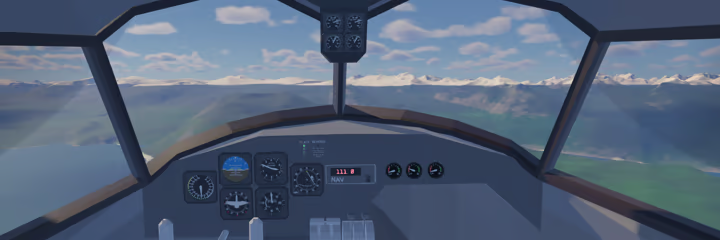
Assemble your twin engine flying boat seaplane from 100+ parts.
Walk around inside your plane! Being in a vehicle doesn't simply lock you into the pilot's seat, even while flying. Roam around the plane, do in-flight repairs, and reconfigure systems. Just watch your step and keep the door closed!
Refuel your plane and deliver cargo to isolated communities around the region.
Detailed plane subsystems with start-up sequences that require attention to detail.
Complex water physics for seaplanes that float, take off, and land like real seaplanes!
A vast map to explore
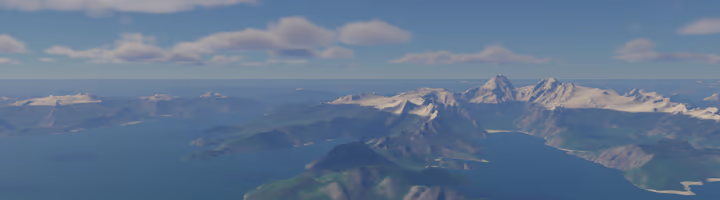
Fly across and explore a mountainous, flooded 360,000 square km (140,000 square mi) map.
Realistic terrain based on real world landscapes.
A challenging, persistent world
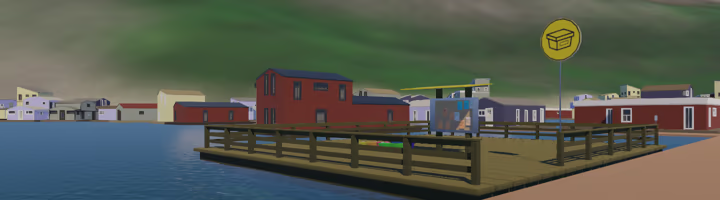
The game doesn't end just because your flight does. Each flight informs the next!
Check the condition of individual plane parts and replace them before they cause in-flight failures... or don't!
Track jobs, run checklists, look up navigational info, and reference assembly instructions with the in-game reference binder.
Fly your way
Support for gamepads, joysticks, yokes, throttle quadrants, and many common flight sim peripherals with detailed control rebinding options.
System Requirements
Will my PC run this? →Minimum
- OS: Windows 10
- Processor: Intel i5-8500
- Memory: 6 GB RAM
- Graphics: NVIDIA GeForce GTX 1060
- Storage: 2 GB available space
- Sound Card: Built-In Stereo
Supported Languages
*languages with full audio support
Latest news
Patch NotesOfficial
Lakehopper 0.4.1: Bugfixes
Hello Pilots! Just a little bugfix update today! I've been on a summer break for most of August, and am getting back into the swing of things with some exciting updates planned for the future! Everything's pretty self-explanatory, so I'll just go straight into the changelog.ChangelogBugfixesAdded Glacier float hatches and power plant hatch cover to the Manypeaks parts shack.Added rudder pedal visual to the Glacier.Made the attach point for the hand truck on the Glacier struts easier to interact with.Fixed a spelling error that's been lurking for more than a year and a half. "Detatch" is now properly spelled "detach."Happy Skies!Read full article on Community Announcements (epic.photongames)AnnouncementsOfficial
Lakehopper 0.4: The Glacier is now available on the main branch!
Hello pilots!I'm happy to announce that the Glacier is now available on the game's main branch! Thank you to everyone who gave it a try on the beta branch and reported bugs and feature requests! Much of this devlog will be familiar to those who have been keeping up with the beta updates, but I'll repeat all that info here for everyone else!The GlacierThis plane is based on a classic real-world bush plane on floats, much beloved for many, many years. It flies like an absolute dream, even better than I expected. The Glacier is intended to serve as an amazing beginner plane and capable bush seaplane. It's a great plane for players new to flight sims in general, and also for experienced flight simmers learning the nuances of operating a seaplane, or who don't often fly multi-engine planes.To give it a try, you can start a new game and choose to start with the Glacier from the main menu. Both a full build and quick start mode are available. You can also fly to Manypeaks, and a stripped-down Glacier fuselage will now be available at the docks for anyone who wants to give it a try in their existing save file. The Glacier is overall smaller than the Lakehopper (the updated name for the familiar twin-engined flying boat in the game), at just over half the weight, and half the horsepower. It flies slower than the Lakehopper, making takeoffs and landings easy and forgiving. Being a floatplane, rather than a flying boat, the hull design is different, with different, gentler takeoff characteristics.The Glacier, having only a single engine, uses an actual water rudder! A switch on the instrument panel will raise and lower the water rudder (though there's no visual for this part yet). Because it represents real hardware, this works regardless of the "fake water rudder" setting in the game settings.The build uses many familiar parts, and some new ones! Basic info for the new Glacier configurations is available in the in-game binder. If you start a new game and pick the Glacier as y...Read full article on Community Announcements (epic.photongames)Patch NotesOfficial
Lakehopper 0.3.10 beta: Binder updates, paint fix, & bugfixes!
Hello pilots!Some more updates to refine the Glacier experience!ChangelogMajor ChangesBinder updates to include Glacier specific info!Each subsystem now has an additional page showing the Glacier specific configuration.There are now separate checklists for the Lakehopper and the Glacier. Eventually these sections will be expanded to have more relevant plane info.ImprovementsExpanded the "Getting Started" section in the binder. It's probably still not very helpful, but I added a few seaplane specific points to the text.BugfixesThe cowling and float hatches will now properly match custom plane colors on the Glacier.Fixed a few typos in the Lakehopper checklistRemoved references to default keyboard keybinds in the binder.Secured the Magnoprop core on the Lakehopper Quick StartFixed some issues related to the debug fly optionFixed an issue where the player was able to move and open tools while loadingFixing this required a change to some important control input code. Keep a look out for any controls/input related bugs, especially when using controller. Let me know if you spot any bugs here and I'll get them fixed.Happy skies!Read full article on Community Announcements (epic.photongames)Patch NotesOfficial
Lakehopper 0.3.9 beta update: Glacier quick start, colors, & plane swap
Hello pilots!Here's what's new in this beta update! A full changelog is at the bottom of this post.Glacier Quick StartYou're now able to select the Quick Start option for the Glacier plane, providing the option for a faster build at the start of the game. I've also updated the UI on the main menu to make picking how you start clearer and it also adds the ability for me to expand on it in the future! Glacier ColorsYou can now recolor the Glacier like you can with the Lakehopper. It's the same UI and works in the same way. I still consider this a placeholder, and more advanced livery customization will be added at some point.As you may notice, the float hatches and engine cowl don't match properly. I know about this issue and will fix it soon, but it ended up being a more involved fix than I'd hoped and got pushed back.Plane SwappingFor the first time, you'll have access to more than one plane at a time! No matter what plane you start with, a Lakehopper and a Glacier will be available at Manypeaks for you to use! Both planes are completely disassembled, so be starting from scratch on them! Pull parts from the part spawners in the parts shack down the dock. There's no complete "set" of parts spawned for each plane, so you'll have to pay attention to complete the builds. Note that this may cause issues with the "Recover Plane" option in the pause menu in the vicinity of Manypeaks. Standing closer to the plane you want to recover should pick the correct one.What's Next?This is still a beta update, so you may ask, what needs to be done to release the Glacier on the main branch? Because the Glacier is meant to be a good plane for beginners to start with, it needs to be as beginner friendly, if not more so than the Lakehopper. The biggest hurdle here is updating the binder to include all the relevant information for the new subsystem configs, as well as Glacier specific checklists. I have some design work to do here, that may involve changing how the binder works, so that's...Read full article on Community Announcements (epic.photongames)Patch NotesOfficial
Lakehopper 0.3.8 beta: Glacier Bugfixes
Hello Pilots!Another quick update on the beta branch with some bugfixes.ChangelogBugfixesFixed an issue where the Rear Magnoprop mount could attach to cargo racks.Fixed an issue where the Glacier's water rudder would often stop working after landing.Added a missing hand truck to the Glacier start.Adjusted the cargo rack attach position in the Glacier to make it easier to see and access all bays.I'm still not happy with this layout and need a better solution, but this makes better use of what's in the game right now.Happy skies!Read full article on Community Announcements (epic.photongames)


