

Screenshots

 Watch trailer on Steam ↗
Texplore
Dustin Garner · Published by Dustin Garner · Official site ↗
Mostly Positive — 78% positive (18 reviews) · 35 achievements
Last updated 28 Sept 2026
Dig deep, die often, come back stronger. Mine, fight, and gamble your way through roguelite runs to build the ship that blasts you off a dying Earth to richer worlds.
£4.59
Lowest price we've ever recorded
View on SteamPrices can lag the live Steam store — always confirm before buying.
Price history
Action, Adventure, Indie, Early Access, Casual · 2026 · More under £5 games
Venture into Texplore, where you mine, fight, and gamble your way through endless runs. Craft the ultimate ship to journey beyond Earth as the game challenges you to dig deep and come back stronger each time.
About this game
Dig deeper. Take risks. Escape the planet — or die trying.
Texplore is a fast-paced roguelite digging and combat game built around high-stakes decisions. Each run pushes you deeper underground, where richer resources, deadlier enemies, and bigger rewards await. Go too far without cashing out, and everything you've gained is lost.
Procedurally generated worlds: randomized caves, enemies, and bosses every run
Cash-out economy: mine, sell, and upgrade for per-run progression
Lucky Roll upgrade wheel: gamble for run-changing boosts, from Common to Legendary
Teleporters & rare items: reposition or escape dangerous situations
Autominer & Factory buildings: craft rocket parts and unlock passive mining
Controller support: fully playable with gamepad across all menus and gameplay
⚠️ Important: Shop upgrades reset each run, but Skill Tree upgrades persist. Learning when to cash out — and when to risk everything — is the key to survival.
Drill through collapsing terrain and mine valuable resources while navigating procedurally generated caves. Every world is different, with randomized ore veins, tunnels, and hidden secrets waiting to be discovered.

Face dangerous enemies and epic bosses lurking beneath the surface. Combat is fast, tense, and rewarding — fight smarter, use the environment, and survive to push even deeper.

Sell your loot at the Shop to improve your drill, jetpack, weapons, and armor for the current run. Gamble with the Lucky Roll wheel for rare, run-changing boosts. Remember: Shop upgrades reset each run — strategy is key.

Even when a run ends, your performance earns Skill Points for permanent upgrades in the Skill Tree. Each new run starts stronger, allowing you to reach deeper levels, take greater risks, and unlock new tools, factories, and rocket parts.

Build the rocket from resources you collect and aim to launch — your ultimate goal. Reach the Moon to face rarer resources, tougher enemies, and a brutal final boss at the bottom of the world.
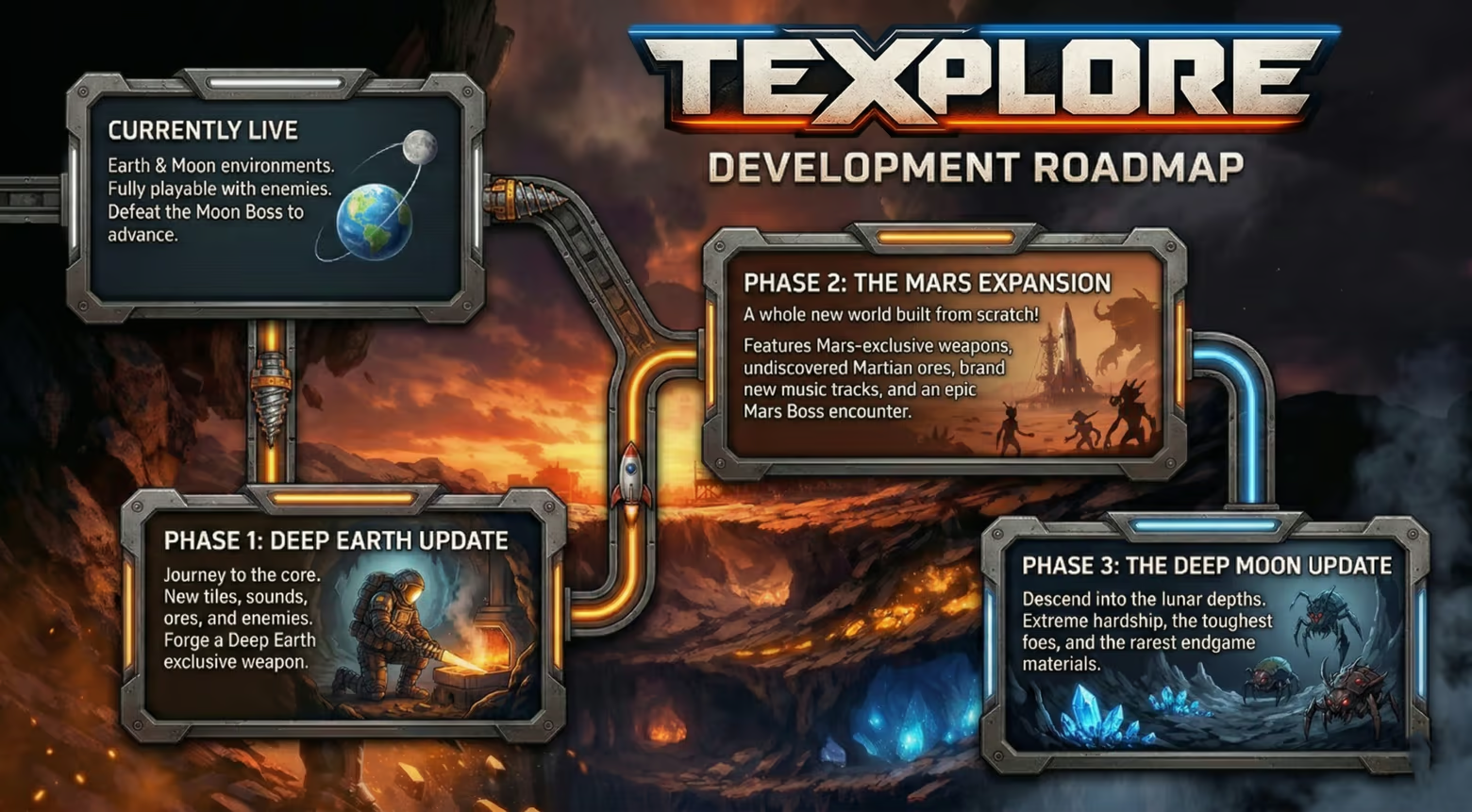
Texplore Roadmap:
System Requirements
Will my PC run this? →Minimum
- Requires a 64-bit processor and operating system
- OS: Windows 10/11
- Processor: Intel Core i5 (6th gen) or AMD Ryzen 3 1200
- Memory: 8 GB RAM
- Graphics: DirectX 11 compatible GPU with 2GB VRAM
- DirectX: Version 11
- Storage: 500 MB available space
- Sound Card: Onboard or equivalent
Recommended
- Requires a 64-bit processor and operating system
- OS: Windows 10/11
- Processor: Intel Core i5-10400 or AMD Ryzen 5 3600
- Memory: 16 GB RAM
- Graphics: NVIDIA GTX 1660 or AMD RX 5600 XT
- DirectX: Version 11
- Storage: 1 GB available space
- Sound Card: Onboard or equivalent
- Additional Notes: SSD recommended for faster load times
Supported Languages
*languages with full audio support
Latest news
Patch NotesOfficial
Big update coming soon!
Hi all,Its been a while and I wanted to let you guys know there is a big change coming soon. Deep earth expansion! This is a totally new place to play after beating the moon boss. We are also making big changes to balancing. Leaderboards will be wiped before the update to give everybody a new fresh start.Read full article on Community Announcements (Dukeduster)Patch NotesOfficial
UI scaling patch
Additional UI scaling enhancementsRead full article on Community Announcements (Dukeduster)Patch NotesOfficial
UI scaling patch
Additional UI scaling enhancementsRead full article on Community Announcements (Dukeduster)Patch NotesOfficial
UI Fixes
Did some heavy work on UI clashing. This should address any resolution issues with the UI going off screenRead full article on Community Announcements (Dukeduster)Patch NotesOfficial
Bug Fixes 0.7.4b
🎮 Fixed Steam Deck crash at 20% loading (both new games and saved runs) Huge thanks to the community member who helped us track this one down! After a lot of back-and-forth troubleshooting, a player noticed the screen would briefly flicker or black out right at the 20% loading mark — right before the crash. That observation turned out to be the key to finding the real cause. What was actually going wrong: The game has an options menu (for resolution, display mode, vsync, etc.) that gets quietly loaded in the background both on the main menu AND in the in-game pause menu. Every time this options menu was created — even while hidden — it would re-apply your display settings, which tells your monitor/compositor to reshuffle the window mode. On most hardware, this caused a brief, mostly-harmless screen flicker you might not even notice. But on Steam Deck, doing this in the middle of a scene transition (while the game was simultaneously tearing down the menu and building the game world) was too much for SteamOS to handle, and it crashed the game every time. This also explained why display settings never seemed to stick between sessions — they were only being applied when the options menu happened to get created, which was inconsistent. What we fixed: Display settings (resolution, fullscreen mode, vsync) now load and apply once when the game starts up, through a dedicated system. They no longer get re-applied every time you change scenes. The options menu no longer triggers display mode changes just from being loaded. It only changes your display settings when you actually hit "Apply" or "Defaults" in the menu. Your resolution, fullscreen, and vsync settings now properly persist between sessions — whatever you had set last time will be active the moment the game launches. Skipped an unnecessary UI rescaling pass during scene transitions when no scaling is needed, for slightly smoother loading. Who benefits: Steam Deck players: The 20% loading crash is fixed for both start...Read full article on Community Announcements (Dukeduster)


