

Screenshots

 Watch trailer on Steam ↗
Battle Hanafuda
SUZUKI PLAN, Yoji Suzuki · Published by SUZUKI PLAN, Yoji Suzuki
7 user reviews — 100% positive (7 reviews) · 51 achievements
Last updated 28 Sept 2026
A modern take on the traditional Japanese card game Hanafuda, featuring both competitive multiplayer and solitaire with intuitive gameplay that's easy for beginners to enjoy.
£7.15
Lowest price we've ever recorded
View on SteamPrices can lag the live Steam store — always confirm before buying.
Price history
Strategy, Early Access, Casual · 2026 · More £5 - £15 games
Dive into strategic duels and solo challenges in Battle Hanafuda. Developed by SUZUKI PLAN, this 2026 release offers a modern twist on the classic Japanese card game, perfect for beginners and seasoned players alike.
About this game
Battle Hanafuda is a video game based on the traditional Japanese card game Hanafuda.
Experience the depth and fast-paced excitement of Hanafuda with maximum accessibility and ease of play.
🎴 Key Features
Supports the popular Hanafuda games Koi-Koi, the thrilling Oicho Kabu, and Hana Klo (solitaire).
Designed so that even complete beginners can enjoy Hanafuda from their very first match.
Features such as hand highlights, automatic card recognition, and intuitive visual guidance help you learn naturally while playing.
Easily see when you're just one card away from completing a scoring hand and enjoy the excitement of strategic decision-making.
Supports Online Multiplayer. (Koi-Koi)
🎴 Differences Between the Full Version and the Demo
In addition to everything included in the demo, the full version includes:
Online Multiplayer (always available)
Arcade Mode
Watch Mode (spectate AI vs. AI matches)
Hard Mode (challenge a stronger AI)
No-Sake Mode (CPU matches with the Sake Cup card disabled)
Oicho Kabu - A blackjack-inspired game played with Hanafuda cards.
Hana Klo - A Klondike-inspired solitaire game played with Hanafuda cards.
Steam Achievements
Steam Leaderboards
Steam Cloud Saves
Mouse and Steam Deck touch input support
Music Room
In-game rule reference for both Koi-Koi, Oicho Kabu and Hana Klo
🎴 Arcade Mode Beta (Currently in Development During Early Access)
A stage-based single-player mode.
Earn money by winning matches and spend your funds to continue after defeat.
Manage your resources carefully and aim to clear all stages.
Current Beta Content: Stages 1–3 are available.
🎴 Free Play Mode
Play the following games:
Koi-Koi (Nintendo-style rules plus an optional No-Sake variation)
Oicho Kabu - A blackjack-inspired game played with Hanafuda cards.
Hana Klo - A Klondike-inspired solitaire game played with Hanafuda cards.
Detailed rules for each game can be viewed from the in-game Configuration menu.
🎴 Watch Mode (AI vs. AI Spectator Mode)
Watch matches between the Normal and Hard AI.
Recent match logs can be viewed in watch.log inside the save directory via Steam's Browse Local Files option.
The log contains various metrics showing why the Hard AI selected each move.
You might even enjoy analyzing watch.log using generative AI tools.
Note: The Hard AI is still being refined and will continue to receive improvements throughout Early Access.
We welcome feedback and analysis from the community.
🎴 Online Multiplayer
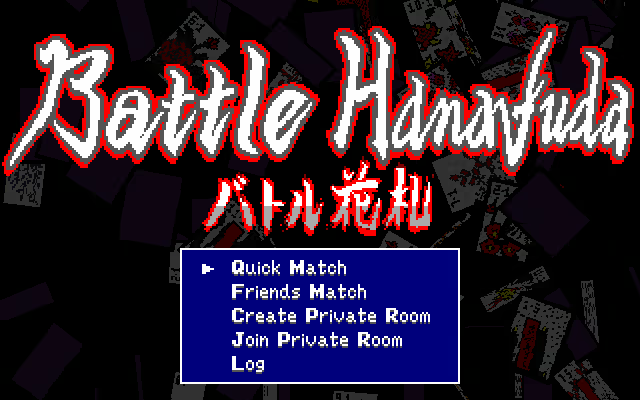
Quick Match
Match with a random opponent online.Friends Match
Match online with players on your Steam Friends list.Create Private Room
Create a private room using a custom ID and invite other players to join.
(Share the room ID via chat or other means.)Join Private Room
Join an existing room by entering its ID.Log
View the results of your last 12 online matches and check your opponents’ Steam profiles.
A Private Room ID is created by choosing any 6-character code.
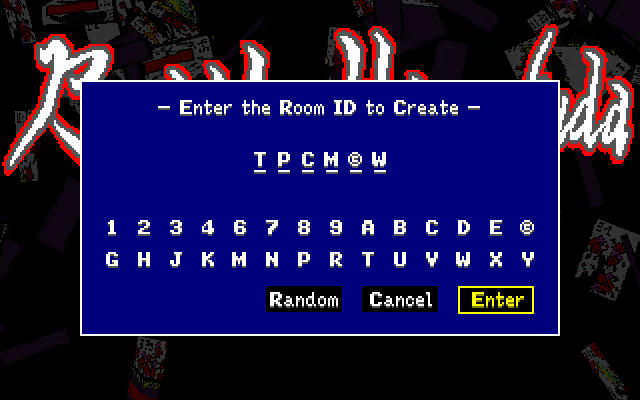
During online matches, to maintain a fast-paced experience, the pause function and hand list are disabled, and all inputs are subject to a time limit.
🎴 Music Room
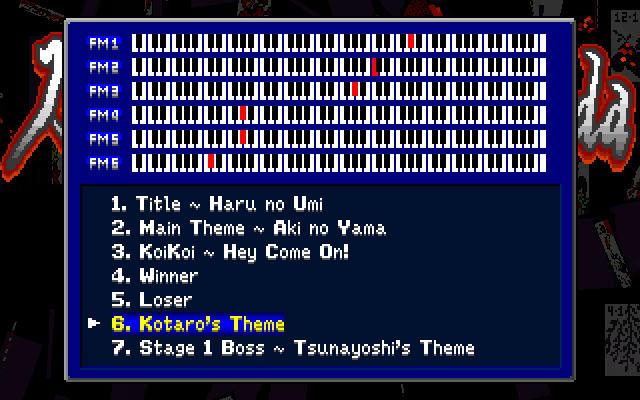
The game's soundtrack is powered by the YM2612 (OPN2) sound chip used in the VGS-X platform.
The Music Room allows you to preview tracks while viewing a piano-style keyboard display.
🎴 Recommended For
Beginners who’ve always wanted to try Hanafuda
Players looking for a quick, two-player battle game
Fans of Japanese-style, strategy, and mind-game experiences
People who enjoy tabletop games like poker or mahjong
🎴 Content Usage Policy (Streaming & Media)
You are free to create and publish content using this game (including gameplay videos, live streams, articles, social media posts, and fan works / derivative works) without obtaining prior permission.
This applies to both commercial and non-commercial use, including monetized content.
However, redistribution or reuse of in-game assets (such as graphics, audio, or music files) as standalone materials is not permitted.
Credit Example: Battle Hanafuda © 2025-2026 SUZUKI PLAN
System Requirements
Will my PC run this? →Minimum
- OS: Windows 11
- Processor: Intel® Core™ i5
- Memory: 4 GB RAM
- Graphics: Intel HD Graphics 5000
- DirectX: Version 9.0c
- Storage: 20 MB available space
- Sound Card: Possible with typical sound cards
Recommended
- OS: Windows 11
- Processor: Intel® Core™ i7
- Memory: 16 GB RAM
- Graphics: Intel® Iris® CPU Xe Graphics
- DirectX: Version 9.0c
- Network: Broadband Internet connection
- Storage: 20 MB available space
- Sound Card: Possible with typical sound cards
Supported Languages
Latest news
AnnouncementsOfficial
Version 0.36: Custom KoiKoi Rules in Online Battles
This update lets the room host configure rules equivalent to Custom KoiKoi when creating a Private Room in Online Battle.Other Match Types Keep Their Existing RulesOnline matches outside Private Rooms (Quick Match / Friends Match) will continue to use the following fixed rules:Rounds = 4Hand Cards = 8Field Cards = 8Hanami/Tsukimi = 5ptsKoiKoi Calls = OnceKoiKoi Scoring = StandardNetwork CompatibilityThis update changes the network protocol used for online play.As a result, Battle Hanafuda Version 0.35 and earlier cannot play online with Version 0.36 and later.If matchmaking does not complete successfully, please make sure both players have updated Battle Hanafuda to Version 0.36 or later.Read full article on Community Announcements (suzukiplan)AnnouncementsOfficial
Version 0.35: Customizable Keyboard Mapping (keymap.ini)
This update adds customizable keyboard mapping.If you prefer WASD controls or use a Dvorak keyboard layout, give it a try!Where keymap.ini is savedAfter updating and launching the game, a keymap.ini file is automatically created in the game's installation directory. To open this directory, right-click the game in your Steam Library and select Manage → Browse local files.Edit keymap.ini to change the keyboard mappings.Configuration formatkeymap.ini defines one keyboard mapping per line in the format BUTTON = KEY.BUTTON valuesBUTTONDescriptionUPUp on the directional padDOWNDown on the directional padLEFTLeft on the directional padRIGHTRight on the directional padAA button (confirm)BB button (cancel)XX button (auxiliary button 1: fast-forward, etc.)YY button (auxiliary button 2: scoring-combination list, etc.)STARTSTART buttonKEY valuesKEYDescriptionA-ZLetter keys (A-Z)SymbolAn ASCII punctuation character that can be typed without a modifier keyUpUp Arrow keyDownDown Arrow keyLeftLeft Arrow keyRightRight Arrow keyEnterEnter keyReturnEnter keyEscapeEsc keyEscEsc keyTabTab keySpcSpacebarSpaceSpacebarLShiftLeft Shift keyRShiftRight Shift keyNotesBUTTON and KEY names are case-insensitive.Number keys, function keys, and characters that require modifier keys cannot be assigned.KEY values follow the active keyboard layout; they do not refer to physical key positions.After leading spaces and tabs are removed, lines beginning with ; are ignored as comments.A semicolon can still be used as a KEY value (example: B = ;).To restore the default mappings, delete keymap.ini and launch the game again.Default configuration; Keyboard mappings use BUTTON = KEY. Button names and key names are case-insensitive.; Buttons: UP, DOWN, LEFT, RIGHT, A, B, X, Y, START.; Keys: A-Z, an unmodified ASCII punctuation character, up/down/left/right,; enter/return, esc/escape, tab, spc/space, lshift, or rshift.; Number keys, function keys, and characters requiring modifiers are not supported.; Values foll...Read full article on Community Announcements (suzukiplan)AnnouncementsOfficial
Version 0.34: KoiKoi - Custom
We have added a new game mode, "KoiKoi - Custom," which lets you customize the rules of Koi-Koi.SettingsSettingDescriptionAISelect your opponent's AI behaviorRoundsSelect the number of roundsHand CardsSelect the number of cards in each player's starting hand (6/8/10)Field CardsSelect the number of cards in the starting field:When Hand Cards is not set to 10: 6/8/10/12When Hand Cards is set to 10: 6/8Hanami/TsukimiSet the points awarded for the sake yaku (Hanami-zake and Tsukimi-zake)5pts: Standard rules3pts: Reduced points0pt: Disable these yakuKoiKoi CallsSet how many times Koi-Koi may be called:Once: Once per round (standard rules)Multiple: Any number of times per roundKoiKoi ScoringSet the scoring bonus applied when Koi-Koi is calledStandard: If a player calls Koi-Koi and then loses the round, the opponent's score is doubled (standard rules)Rising Stakes: Each Koi-Koi call increases the score multiplier for both playersSpecial Combination (Multiple + Rising Stakes)When KoiKoi Calls is set to "Multiple" and KoiKoi Scoring is set to "Rising Stakes," each Koi-Koi call increases the score multiplier to 2x (first call), 4x (second call), 8x (third call), and up to 16x (fourth call).If the double-score rule for scores of 7 points or more also applies, the score multiplier can reach a maximum of 32x.A single yaku can be worth more than 200 points, making for a thrilling match.The "Multiple + Rising Stakes" combination is generally best suited to shorter matches.You can also use it in longer matches, but they may take considerably more time to complete.Read full article on Community Announcements (suzukiplan)AnnouncementsOfficial
We're Considering a Customizable Koi-Koi Rules Mode
We're currently considering adding a new game mode, "KoiKoi - Custom," that will let you customize the rules of koi-koi.The customization options currently under consideration are:Opponent difficulty: Normal / HardNumber of rounds: 2 / 4 / 6 / 12Cards in the starting hand: 6 / 8 / 10Cards on the table at the start: 6 / 8 / 10 / 12 (6 or 8 when starting with 10 cards in hand)Sake yaku score: 5 points / 3 points / Disabled (0 points)Koi-koi declarations: Once (one declaration only) / Multiple (multiple declarations allowed)Koi-koi scoring: Standard (if the player who was called against wins, their score is doubled) / Rising Stakes (the winner's score is doubled, regardless of who declared koi-koi)When Rising Stakes and Multiple are combined, we're considering a rule where the multiplier increases with each koi-koi declaration: ×2 → ×4 → ×8 → ×16, capped at ×16 from the fourth declaration onward.This feature is not planned as paid DLC. We plan to release it as a free update for everyone who owns Battle Hanafuda. Development is underway, with an early August release as our target.Read full article on Community Announcements (suzukiplan)Patch NotesOfficial
Version 0.33
This update applies only to the macOS and Linux versions. On these platforms, the game uses SDL2 to render a 640×400 texture to the screen at 60 FPS. We discovered that the texture buffer (framebuffer) was incorrectly allocated for only 399 rows (640×399), and have fixed the issue. This bug could cause crashes and other problems. We believe this update resolves them, but since we do not have access to hardware on which the issue can be reproduced, we cannot guarantee that the fix is complete. If you encounter any further issues, we would greatly appreciate it if you could report them on the Community forum.Read full article on Community Announcements (suzukiplan)


