

Screenshots

CHESS.0
dbug · Published by dbug
Last updated 28 Sept 2026
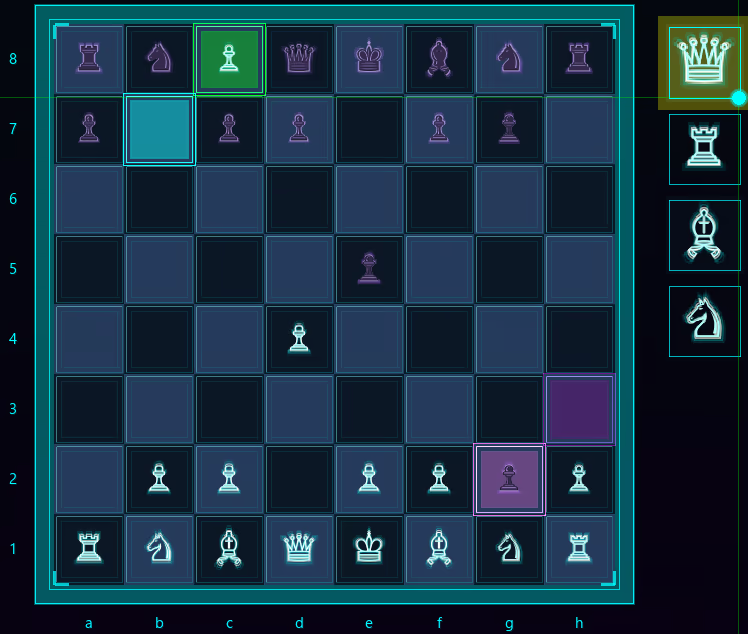
CHESS.0 is a modern take on classic chess, featuring a neon-styled interface, smooth controls, a responsive chess engine, and immersive synthwave sound design that enhances every move for a visually and audibly engaging experience.
Indie, Strategy, Casual · More free games
Discover a modern twist on classic chess from dbug, where neon aesthetics blend with responsive gameplay and engaging audio to create a unique strategy experience.
About this game

CHESS.0 is a modern, neon-styled take on classic chess, blending traditional strategy with a sleek retro aesthetic.
Features:
Futuristic Interface: Play classic chess with a stylized retro-neon interface that elevates the traditional game.
Intelligent Chess Engine: Smooth, strategic move selection with a toggleable CPU mode for solo play or local two-player matches.

Local Play: Turn off the chess engine to enable two-player versus mode.

Responsive Controls & Visual Feedback: Precise mouse tracking with hover highlights and piece description tooltips, intuitive move selection, move highlights, last-move indicators, and available captures all work together to create immersive, real-time visual feedback.
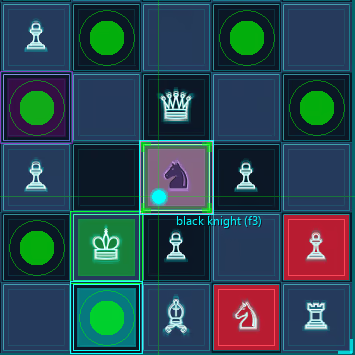
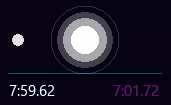
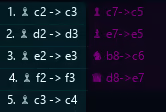
Game State & Scoring: Turn timers, a detailed move log, captured pieces, and real-time material tracking keep you fully informed of the game’s progress at every moment.


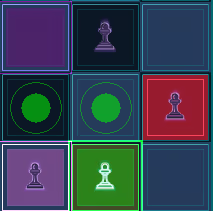
En Passant Capture: Includes classic en passant move, allowing pawns to capture opponents in this special, strategic circumstance.
Immersive Audio: Synthwave-inspired sound design provides responsive audio cues for every move, perfectly paired with neon retro visuals and glowing UI effects for a fully cohesive experience.
Pawn Promotion:
When a pawn reaches the farthest rank on the board, it can be promoted to a stronger piece, giving players new tactical opportunities and adding depth to strategic play. This classic chess mechanic has been fully implemented, allowing for traditional promotions during matches.
System Requirements
Will my PC run this? →Minimum
- OS *: OS: Windows 7 or later (64-bit recommended)
- Processor: Processor: Quad-core 2.5 GHz or better
- Memory: 4096 GB RAM
- Graphics: Graphics: DirectX 11 compatible, 1 GB VRAM
- DirectX: Version 11
- Network: Broadband Internet connection
- Storage: 1 GB available space
- Sound Card: DirectX compatible
- VR Support: VR devices not supported.
- Additional Notes: Gamepad optional.
Recommended
- OS: OS: Windows 10 (64-bit)
- Processor: Quad-core 2.5 GHz or better
- Memory: 4096 GB RAM
- Graphics: DirectX 11 compatible, 1 GB VRAM
- DirectX: Version 11
- Network: Broadband Internet connection
- Storage: 1 GB available space
- Sound Card: DirectX compatible
- VR Support: VR devices not supported.
- Additional Notes: Gamepad optional.
Supported Languages
Latest news
Patch NotesOfficial
CHESS.0 – Position Editor & Hanging Pieces Update
CHESS.0 – Position Editor & Hanging Pieces UpdateCHESS.0 just received another update, adding new tools for testing, and analyzing custom positions.Board EditorAdded a fully integrated Board Editor connected directly to the CHESS.0 engine.Freely place, remove, and modify pieces to create custom positions.Hanging Pieces PanelAdded a new Hanging Pieces panel for better visibility of vulnerable and overloaded pieces.Provides a clearer overview of the position to help with decision-making during analysis.Rebuilt Move Maprebuilt the Move Map for better visibility and readability.Replaced the previous energy-block style with a cleaner presentation.New Board DesignAdded a new Board Design that better matches the current CHESS.0 visual style.Replaced the previous board from earlier builds with a cleaner, more refined design that fits the newer version of the game.Testing EnvironmentAdded movable pieces for testing in a separate game environment.This is currently experimental and may not make it into the final build or demo.Continued DevelopmentMore updates are coming as additional systems are built and refined.Read full article on Community Announcements (VampireLee66)Patch NotesOfficial
CHESS.0 – Major Game Modes Update & Overall Polish
CHESS.0 – Game Modes & PolishCHESS.0 just received one of its larger updates to date, introducing new playable game modes alongside board logic, UI presentation, audio feedback, and overall interface consistency.New Game ModesAdded new piece-specific game modes allowing games centered around Queens, Rooks, Bishops, Knights, or Pawns, each paired with a King.All new modes continue to use the core chess movement and game logic, while changing the available piece types on the board.Added dedicated UI controls to quickly switch between the different game modes. UI & PresentationContinued refining the overall visual language and presentation of the CHESS.0 interface.Audio & FeedbackImproved stalemate feedback so the alert is now accompanied by an audible sound instead of only activating the visual indicator.Added a new minor UI click sound, separating major UI clicks from smaller UI interactions, removing piece selection from the larger UI click sound and giving it its own unique audio identity for a clearer audible cue.Promotion PanelReworked the Promotion Panel as part of the broader UI and interaction improvements.Timers & Turn Indicator Reworked the timers and turn indicator for a more readable and clearer visual cue.Continued DevelopmentDevelopment on CHESS.0 will continue.Read full article on Community Announcements (VampireLee66)Patch NotesOfficial
CHESS.0 – Move Map Update
CHESS.0 – Move Map & Visual UI UpdateCHESS.0 just received an update focused on board understanding and history tracking.Move MapAdded a dedicated Move Map for a clearer visual reference of the current board position.Board History CarouselCleaned up the carousel visuals for a more consistent and readable interface.Position Evaluation ToolCleaned up the Evaluation tools visuals for a more consistent and readable interface.Continued DevelopmentDevelopment on CHESS.0 continues as I complete more core systems and refine the overall experience.Demo BuildA fully functional demo build is ready, but I’ve intentionally held off on releasing it through Next Fest while I continue completing systems and bringing CHESS.0 up to the standard I’m aiming for.More development and updates are on the way.Read full article on Community Announcements (VampireLee66)Patch NotesOfficial
CHESS.0 – UI & Interaction Polish Update
CHESS.0 – UI & Interaction UpdateCHESS.0 just received a focused polish update improving piece selection, prediction controls, and UI interaction.New FeaturesAdded improved title-screen piece hover highlights.Fixes & ImprovementsFixed mouse tooltips, hover highlights, and hover sounds from being active while the Reset screen or Menu is open.Fixed piece selection from working while the Reset screen or Menu is open.Fixed prediction marks and prediction highlights from workin while the Reset screen or Menu is open.Fixed gameplay mouse input from passing through the Reset screen or Menu to the chess board.CHESS.0 now has cleaner UI interaction and better control.Read full article on Community Announcements (VampireLee66)AnnouncementsOfficial
CHESS.0 – New Piece Highlight Preview
CHESS.0 – Piece Highlight Preview UpdateCHESS.0 just received an update to the Piece Highlight Preview system, adding a more detailed visual reference for the currently selected or engine-controlled piece.Piece Highlight PreviewAdded a dedicated preview panel above the board for the currently selected piece.When no piece is selected, the panel displays a lime-green “UNSELECTED PIECE” indicator.The preview uses the same neon rendering style as the main board, including layered glow effects and breathing animations.White and Black pieces use their respective cyan and magenta visual treatments.The system displays the piece type, such as KNIGHT, ROOK, QUEEN, or PAWN.Added real-time board-coordinate tracking, displaying the piece's exact position such as a8, c5, or d4.The coordinate system uses the piece's actual board-array position rather than relying on the visual screen position.Added board-flip awareness, allowing the displayed coordinate to remain synchronized with the board when the perspective changes.Engine-controlled pieces can automatically appear in the preview during the engine's turn.The preview is generated directly from the current board state, keeping the displayed piece, type, and location synchronized with gameplay.The new system provides a clearer technical reference for the active piece while adding another layer of visual feedback to the CHESS.0 interface.Read full article on Community Announcements (VampireLee66)


