

Screenshots

 Watch trailer on Steam ↗
Nekotype Keyboard Cat Simulator
G-GAME · Published by G-GAME
Very Positive — 100% positive (60 reviews) · 10 achievements
Last updated 28 Sept 2026
Hi there! I'm NEKO, your tiny typing buddy - a super fast keyboard companion. Every time you type, I type along. I don't just type for fun, I'm here to bring a bit of cuteness and energy to your workspace. Keep typing, and together we'll create every line, every idea ♥
£3.39
Lowest price we've ever recorded
View on SteamPrices can lag the live Steam store — always confirm before buying.
Price history
Indie, Simulation, Casual · 2025 · More under £5 games
Join NEKO, your tiny typing buddy, as you create lines and ideas on this unique 2025 indie simulation game. Type along with the adorable cat to bring cuteness and energy to your workspace.
About this game
Hi master !
I'm NEKO - your tiny typing buddy - a super fast keyboard companion !!! ദ്ദി/ᐠ。‸。ᐟ\
Every time you type, I type along, working hard like a little cat in training. I don't just type for fun, I'm here to bring a bit of cuteness and energy to your workspace.
Keep typing, and together we'll create every line, every idea.
Your keystroke are the beat of my heart, ♥ ♥ ♥
ฅ^>⩊<^ ฅ
STORY
This is an interactive keyboard simulation and decoration game. Your little cat Neko loves playing with the mechanical keyboard and small decorative items. Help Neko customize the keyboard and arrange the decorations around him in the most beautiful way possible.
Beside, you can create and upload your own decorations, including static or animated images. We look forward to your creativity.
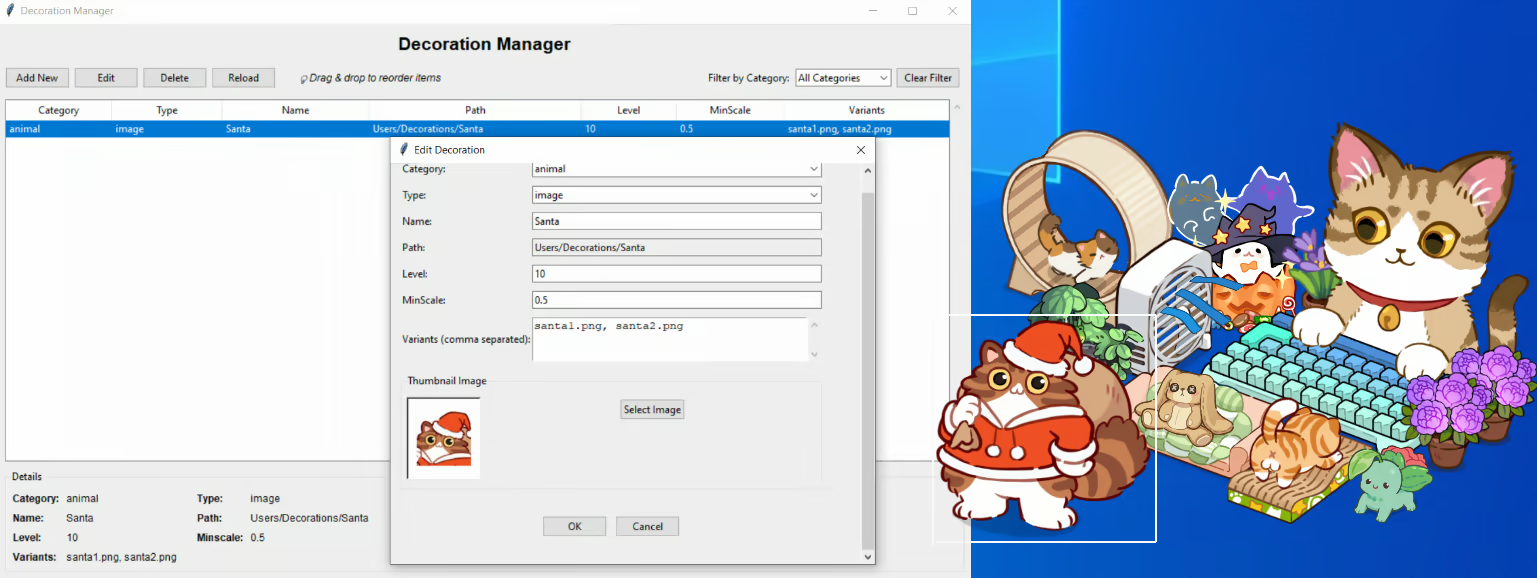
GAME FEATURES
Customize the keyboard, including its shape, color, and size.
Customize the sound of each key press on the keyboard.
There are hundreds of decorative items to choose from.
Customize and arrange the decorative items around it.
Create and upload your own unique decorations to the game.
Choose a representative character.
Each time you press any key, Neko will gain experience points to level up, unlocking new decorative items and features.
[Important Notice]
We only respond to game key requests sent from verified curator, press, or business email addresses.
Due to an increasing number of impersonation and scam attempts, requests sent from free or unverifiable email addresses may not receive a response.
If you are a curator or content creator, please make sure your email address is clearly listed on your official Steam Curator page, website, or social media profile.
System Requirements
Will my PC run this? →Minimum
- OS: win 10, 11
- Processor: 1.2 GHz
- Memory: 1 GB RAM
- Graphics: DirectX 9 compatible graphics card
- Storage: 200 MB available space
Recommended
- OS: win 10, 11
- Processor: 1.2 GHz
- Memory: 1 GB RAM
- Graphics: DirectX 9 compatible graphics card
- Storage: 300 MB available space
Supported Languages
*languages with full audio support
Latest news
Patch NotesOfficial
Update 2.0.0 introduces mouse usage and mouse pad customization
Hello everyone. After a period of research and testing, we are pleased to release update version 2.0.0 with many major changes:The raccoon character has been added.Added mouse control mode. This mode is currently experimental and is only available for one character. For certain reasons, the character can temporarily use the mouse with the left hand only. After a period of testing, we will extend this feature to other characters if you wish.Added the ability to select and customize the mouse in the game. Different parts of the mouse can have their colors changed according to your preference. More mouse models will be added to the game in the near future.Added the ability to select mouse cursors for the game. Some cursors may appear quite small; you can adjust the cursor size in Windows (open the Windows settings and search for “change mouse pointer size”). More cursors will be added soon.Added the ability to select and customize mouse pads. Similar to the features above, you can change some basic textures of the mouse pad as well as the colors of its parts.Added the ability to create custom mouse pads in the game using the Nekotype_Manager.exe application. Similar to the custom decoration feature, mouse pad textures can be uploaded to the game by users.This update took quite a long time to complete, and we sincerely hope you will enjoy it. There may still be missing features or bugs, so we would greatly appreciate it if you report them to us ːheart_eyes_yetiːːheart_eyes_yetiːːheart_eyes_yetiːRead full article on Community Announcements (ToRung)AnnouncementsOfficial
Version 1.0.4 and 1.0.5
- Added a new keyboard typing effect - A new character has been added - Added grouping and object locking features, making it easier to organize decorations - The game now can launches with Steam - Decoration_manager.exe has been renamed to Nekotype_manager.exe, and you can now upload GIF files into the game - Fixed some minor bugsRead full article on Community Announcements (ToRung)AnnouncementsOfficial
Nekotype Keyboard Cat Simulator – Version 1.0.3
Hello everyone, We have just released version 1.0.3 on December 15, 2025, featuring many new decorations added for Christmas 2025, including:Added many new types of food, wall paintings, and several small decorative items.Cloud, rain, and bubble effects.Christmas-themed items.Steam Workshop is now officially live.A tutorial video on how to use decoration_manager.exe has been uploaded to the game’s store page. You can watch it to learn how to upload your own custom-made decorations.Once again, thank you very much for supporting our game. We will continue to update Nekotype regularly with new items and new characters. Thank you, and we wish you happy typing!Read full article on Community Announcements (ToRung)


