

Screenshots

 Watch trailer on Steam ↗
Ephemeral Art: Shapeweaver
EtchWeave Interactive · Published by EtchWeave Interactive
3 user reviews — 100% positive (3 reviews)
Last updated 28 Sept 2026
Create, destroy, and discover. Ephemeral Art: Shapeweaver is a 2D digital playground where you can let your creativity run wild. Whether you're an aspiring artist or just looking for an art sandbox game, Shapeweaver offers a unique and engaging experience for everyone.
Indie, Free To Play, Casual · 2025 · More free games
Dive into Ephemeral Art: Shapeweaver, where creativity reigns supreme. Craft your art or tear it apart in this free-to-play, 2D digital sandbox from EtchWeave Interactive.
About this game
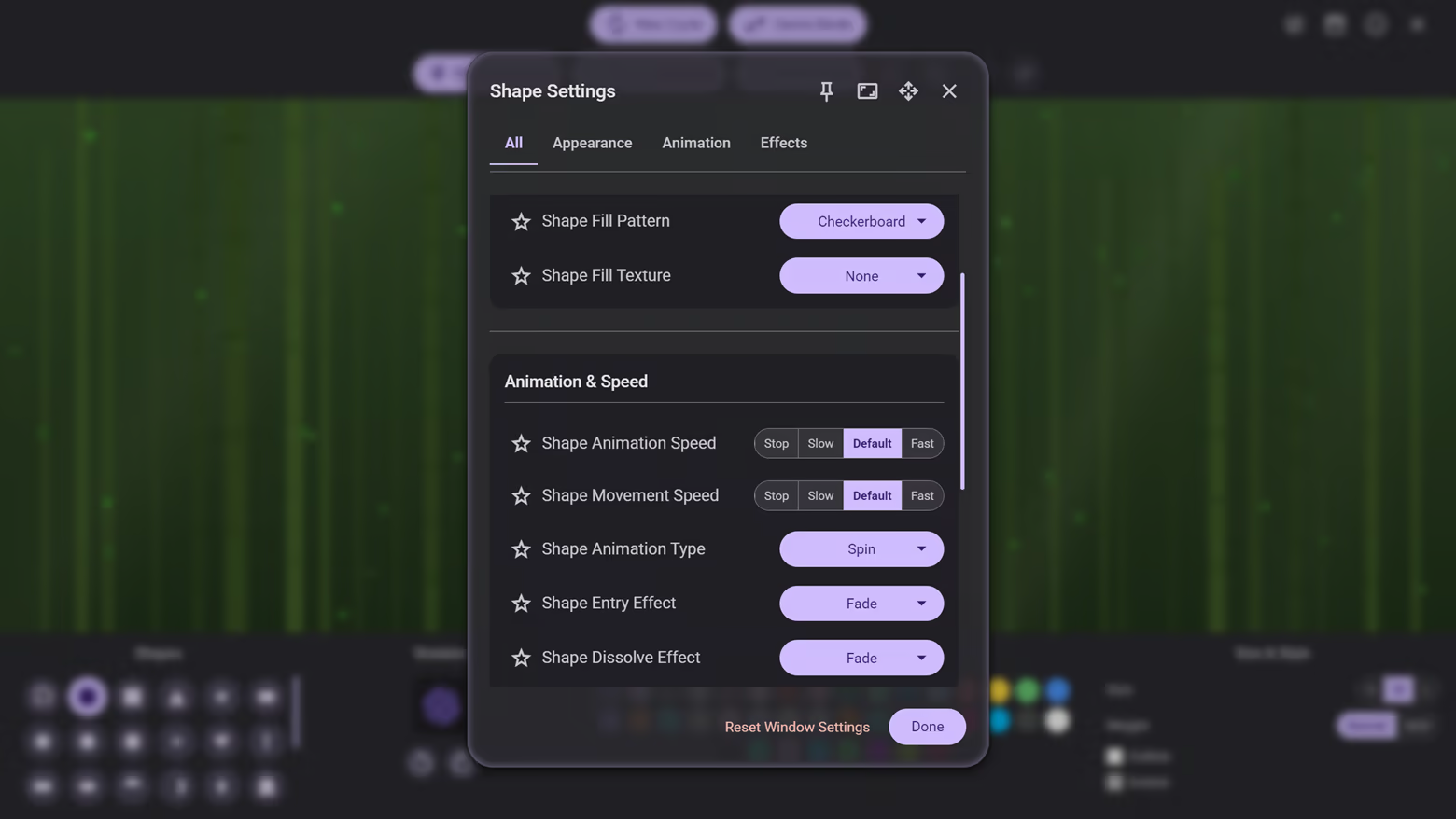
Ephemeral Art: Shapeweaver is a unique art sandbox game where you create interactive artwork with shapes. It's designed for anyone curious to explore and play — no artistic skill required. With simple controls and endless possibilities, this 2D world of color, shapes, and motion is your personal creative playground.
Your creations are temporary, destined to fade, giving you the freedom to experiment without limits. Unleash the artist within by crafting a relaxing visual spectacle, or embrace chaos — flinging shapes across the canvas and combining special effects for spectacular results. The choice is yours; there's no wrong way to play.
A Universe of Customization at Your Fingertips
Endless Shape Variations:
Choose from a wide variety of shapes, including circles, squares, triangles, stars, hearts, and many more.
Customize your shapes with a vast color palette, or let the game cycle through colors for a dynamic visual experience.
Adjust the size, style, and weight of your shapes. Make them bold, outlined, or even dotted for a unique look.
Apply different fill patterns and textures to give your creations a distinct personality.
Over 30 Animated Backgrounds:
Set the mood over 30 unique animated backgrounds to choose. Each background reacts to your clicks when placing shapes onto the canvas, creating a truly immersive experience. From tranquil starry nights to vibrant, pulsating nebulae, there's a background for every mood and style.
Unleash Your Inner Artist with Powerful Tools:
Grab Shape Tool: Take direct control of your creations! A simple click selects a shape, while a long press and drag allows you to select multiple shapes. Once selected, edit your shapes, move them to the perfect spot, or even fling them across the screen and watch them bounce off the canvas and other shapes.
Undo and Redo: Experiment without fear! Instantly reverse any action with the Undo and Redo buttons, giving you the freedom to explore every creative possibility.
Gravity and Physics: Bend the laws of physics to your will! Apply gravitational forces to your shapes and watch them interact in fascinating ways. Make them fall, orbit a central point, or float weightlessly in your digital canvas.
Breakable Shapes: Introduce an element of controlled chaos with breakable shapes. Watch as your creations shatter into pieces upon impact.
Fuse and Unfuse: Combine multiple shapes to create complex and intricate designs. The fuse tool allows you to merge shapes into a single, cohesive object, while the unfuse tool lets you break them apart again.
Custom Animations: Control the lifecycle of your shapes with customizable Entry and Dissolve effects. Have shapes bounce, spiral, or construct themselves onto the canvas, and watch them fade, pixelate, or shatter into pieces when they disappear.
Special Effects: Elevate your art with a plethora of special effects. Make your shapes glow with a neon aura, imbue them with elemental powers like fire and ice, or make them transparent for a ghostly effect.
Tailor Your Creative Space:
Flexible Interface: Make the game truly yours by customizing the user interface. Choose from a variety of themes, adjust text sizes and styles, and even change the position of the control panel to best suit your workflow.
Resizable & Pinnable Windows: Adjust the size of settings windows to fit your needs, and pin them to the screen for easy access while you continue to create and edit shapes on the canvas.
Sculpt Your Atmosphere:
Full Edit Mode: Take your creativity to the next level with Full Edit Mode. This feature pauses all shape animations and movements, allowing you to fine-tune your creations with precision and ease.
Canvas Settings: Perfect your masterpiece with a range of canvas settings. Apply special filters for extra visual flair, add a blurred background to make your shapes pop, and adjust the scene lighting to create the perfect atmosphere. With HDR support, the vibrant colors of your shapes and the dynamic animated backgrounds will truly pop, creating a stunning visual experience.
Personalize Your Experience:
Favorite Your Settings: With so many customization options, you're bound to find your perfect setup. Favorite your most-used settings for quick and easy access in any creative session.
Curate Your Soundtrack: Love a particular song? Add it to your favorites list to create a personalized playlist that perfectly matches your artistic vibe.
Steam Cloud Support: Your personalized game settings are saved to the Steam Cloud, so you can pick up right where you left off on any computer.
Capture Your Masterpiece:
Photo Mode: Become the director of your own digital gallery. Freeze the action to compose the perfect shot, and independently manipulate background and shape movements to align effects precisely how you want them — even while time is paused.
Professional Composition: Use the Zoom and Pan tools to frame your art perfectly. Choose from stylish Canvas Frames like Classic Gold, Neon Cyber, or Rustic Wood to give your screenshot a polished, professional look.
Visual Filters: Transform the mood instantly with artistic Canvas Filters (Sepia, Vignette, etc.) or inject a dose of nostalgia with retro Screen Filters like CRT Scanlines, Dot Matrix, and Pixelate.
High-Fidelity Exports: Photo Mode automatically shifts the game into Quality Mode, ensuring every screenshot is captured with maximum particle counts and the sharpest resolution possible.
Game Modes for Every Playstyle
Regular Mode: Challenge yourself against the clock in this classic mode. Create as much as you can before time runs out and your masterpiece begins to dissolve.
Creative Mode: Unleash your creativity without any time pressure. This mode is a pure sandbox where you can experiment, explore, and create to your heart's content.
More Than a Game
Screensaver Mode: Activate Screensaver Mode to sit back, relax, and enjoy a seamless, ever-changing showcase of the game's animated backgrounds with multiple timer options. Or you can interact with the animated backgrounds by clicking on them for the full Screensaver Mode experience.
Features
Intuitive and easy-to-learn interface.
Two distinct game modes to suit your playstyle.
A chill collection of music to accompany your creative journey.
A vast array of shapes, colors, and customization options.
Over 30 unique animated backgrounds.
Powerful tools including Grab Shape, Undo/Redo, gravity settings, breakable shapes, and shape fusion.
A dedicated "Full Edit Mode" for complete control over your creations.
Photo Mode gives you a comprehensive suite for capturing high-quality screenshots with zoom, frames, and filters.
Customizable Entry and Dissolve animations for your shapes.
A wide variety of special shape effects to make your creations pop.
Fully customizable user interface, including themes, text styles, window management, and layout options.
Various canvas settings like special filters, blurred backgrounds, and scene lighting.
HDR support for stunning, vibrant visuals.
Steam Cloud support ensures your game settings are always saved and available.
Favoriting system for quick access to your preferred settings and songs.
Screensaver Mode allows you to enjoy the animated backgrounds with ease.
Whether you want to create a breathtaking work of 2D art with shapes or just have fun playing with physics, colors, and animated backgrounds, Ephemeral Art: Shapeweaver is the perfect digital canvas for you. Get ready to shape your imagination!
System Requirements
Will my PC run this? →Minimum
- OS: Windows 10
- Processor: Dual-core processor, 2.0 GHz or faster
- Memory: 4 GB RAM
- Graphics: A graphics card that supports WebGL
- Storage: 300 MB available space
Supported Languages
*languages with full audio support
Latest news
AnnouncementsOfficial
📢 Shapeweaver is now FREE TO PLAY! Unleash Your Art, No Purchase Required.
Fellow Shapeweavers,We have an exciting, game-changing announcement:Ephemeral Art: Shapeweaver is officially Free-to-Play on Steam starting today!You can now download the complete, core creative engine and all fundamental tools absolutely free — no time limits, no paywalls on essential features. Our goal is to make Shapeweaver the ultimate accessible art playground for everyone.🎨 What is FREE? The Unrestricted Base GameThe entire core experience that defines Shapeweaver is now available to every player, forever. This is not a demo; it's the full, powerful art sandbox.ALL Core Creation Tools: Enjoy the Grab, Fuse/Unfuse, Undo/Redo, and the dedicated Full Edit Mode for total control over your creations.Complete Physics Sandbox: Apply gravity, make shapes orbit, float weightlessly, and even introduce the chaos of Breakable Shapes and fusion—all for free.Vast Core Library: Access a wide variety of shapes (circles, stars, hearts, etc.), the full customizable color palette, and all basic animation/effect types (Bounce, Spiral, Fade, Neon Aura).Customizable Interface: Tailor your workspace with a flexible, resizable, and pinnable UI to optimize your creative flow.30 Animated Backgrounds: A huge selection of unique animated backdrops are included for free to set the mood for your art.🚀 Monetizing Passion, Not NecessityWe are transitioning to a DLC model to fund future development while keeping the core experience free. Paid content is purely for expansion and personalization for the dedicated artist:FREE Base Game (The Engine)PAID DLC (The Expansions)All core tools, physics, and saving.Customization Pack #1: Expands effects, gravity types (Vortex, Repel), and premium textures (Circuit, Brick, Gravel).All core shapes and the full color palette.Themed Background Packs: Unlock 10+ premium animated backdrops (e.g., Holiday Festive, Digital & Sci-Fi, Nature & Serenity).Basic visual effects and animations.Advanced Visual Overhauls: New canvas filters (Retro TV, Noir, Watery) and ...Read full article on Community Announcements (EtchWeave Interactive)Patch NotesOfficial
Update: Capture the Magic with the New Photo Mode! 📸
We are thrilled to introduce a powerful new way to experience and share your creations: Photo Mode.With Photo Mode, you become the director of your own digital art gallery. Pause the action, refine the composition, and export high-resolution captures of your favorite moments.🖼️ Frame the Perfect ShotPhoto Mode isn't just a pause button — it's a creative suite.Zoom & Pan: Get up close to appreciate the fine texture details or zoom out to capture the full scope of your creation.Canvas Frames: Give your shot a professional finish with stylish borders like Classic Gold, Neon Cyber, Instant Photo (Polaroid style), Cinema Film, or Rustic Wood.Dynamic Layout: Move the game logo to any corner or hide it entirely to let your art speak for itself.🎨 Total Visual ControlEven while your masterpiece is "paused," you have complete control over the atmosphere:Manipulate Time & Motion: Want the background swirling but the shapes stationary? You can toggle Background Movement and Shape Movement independently. Let the background effects run until they align perfectly with your frozen shapes!Lighting & Atmosphere: Change the mood instantly by adjusting the Scene Lighting or applying a Background Blur to make your foreground shapes pop.📼 Retro & Artistic FiltersTransform the vibe of your screenshot with a suite of post-processing effects:Canvas Filters: Apply artistic color grades like Sepia, Vignette, Cool/Warm, or go bold with Cartoon and Invert.Screen Filters: Inject a dose of nostalgia with CRT Scanlines, Dot Matrix, Pixelate, or Grid overlays for that retro-tech aesthetic.✨ High-Fidelity CaptureWhen you enter Photo Mode, the game automatically shifts into Quality Mode, ensuring your screenshot is rendered with the highest particle counts and sharpest resolution possible.Jump in today and start sharing your creations with the world!Read full article on Community Announcements (EtchWeave Interactive)AnnouncementsOfficial
📣 OUT NOW: Two New DLC Packs to Expand Your Canvas!
We are incredibly excited to announce that two brand-new DLC packs are available right now!Whether you want to cozy up with seasonal vibes or take your toolset to the next level, we have something special for you today. To celebrate the double launch, both packs are available with a 15% Launch Discount for the next 7 days!Here is a look at what’s waiting for you in the store:🎄 Holiday Festive Background PackEmbrace the seasons and set the perfect mood.Transform your creative space with a collection of 10 beautiful, animated backgrounds dedicated to your favorite times of the year. From the spooky fog of Halloween to the warmth of a crackling Christmas fire, this pack brings your shapes to life in new environments.Includes:Winter & Holiday: Cozy Christmas Fireplace, Silent Night Snowfall, Midnight Fireworks, Champagne BubblesAutumn & Spooky: Jack-o'-Lantern's Glow, Spooky Graveyard Fog, Autumn Farmstead, Amber EmberglowSpring: Spring Blossom Drift, Pastel Egg Flutter👉 Get the Holiday Festive Background Pack Here🎨 Customization Pack #1Unlock a new universe of possibilities.For those who love to tweak every detail, this pack massively expands your creative toolkit. We've added new ways to style your menus, manipulate physics, and add flair to every shape you place.Includes:15 New Text Styles to make your messages pop.5 New Menu Themes to skin your UI.10 New Fill Patterns/Textures for intricate shape designs.New Effects: 5 Canvas Filters, 5 Gravity Effects, 5 Entry Effects, 5 Dissolve Effects, and 5 Animation Types.👉 Get Customization Pack #1 Here🏷️ Special Launch OfferBoth packs are 15% OFF starting today for the first week of release!We can't wait to see the incredible art you create with these new tools and backdrops.Happy Shapeweaving!Read full article on Community Announcements (EtchWeave Interactive)AnnouncementsOfficial
Ephemeral Art: Shapeweaver is OUT NOW + Free Demo & Launch Discount! 🎉
We are incredibly excited to announce that Ephemeral Art: Shapeweaver is officially launched on Steam! Dive into a mesmerizing 2D digital playground where you can create interactive, physics-driven art with shapes, color, and motion — no artistic skill required!🚀 Launch Offer: Grab Your Discount!To celebrate our launch, we're offering a special deal! For a limited time, you can get Ephemeral Art: Shapeweaver on a great discount!Offer Ends: November 14th, 2025Don't miss this chance to unleash your inner artist (or chaos-creator!) at a fantastic price.✨ Try Before You Buy: The Free Demo is Live!Curious to see what the Shapeweaver is all about? We've also launched a FREE Demo on Steam!Experience the core sandbox mechanics.Play with a selection of shapes, tools, and effects.See how easy it is to craft relaxing visual spectacles or chaotic, colorful explosions!The demo gives you a taste of the endless possibilities awaiting you in the full version.Download the Demo: Just head to the Steam page and hit the "Download Demo" button!🎨 What Awaits You in Shapeweaver?Endless Creation: Use over a dozen tools to draw, fuse, unfuse, break, and animate shapes.Physics Sandbox: Control gravity, set shapes in orbit, or let them float weightlessly.Customization: Tailor your experience with over 30 animated backgrounds, customizable UI, and unique visual effects.Relax & Experiment: With creations destined to fade, there's no pressure — just freedom to explore and create something ephemeral and beautiful.We can't wait to see what you Shapeweavers can come up with!➡️ Play the Demo or Buy Now:Read full article on Community Announcements (EtchWeave Interactive)


