

Screenshots

 Watch trailer on Steam ↗
DJ Life Simulator: Learn to DJ for Real
One Day Code Games · Published by One Day Code Games · Official site ↗
Positive — 95% positive (39 reviews) · 5 achievements
Last updated 14 Oct 2026
Plug in a REAL USB DJ controller or Mouse/Keyboard and learn professional mixing techniques while playing! Rise through a career of epic gigs, and master skills you can use on real decks — the only game where fun truly turns you into a professional DJ.
£17.75
Lowest price we've ever recorded
View on SteamPrices can lag the live Steam store — always confirm before buying.
Price history
Indie, Simulation, Early Access · 2026 · More £15 - £30 games
Dive into the world of professional DJing with DJ Life Simulator. Mix like a pro using your USB controller or mouse/keyboard, and climb the ranks in this unique simulation game.
About this game
About the Game
DJ Life Simulator is the first simulation game that doesn't just let you play as a DJ, it teaches you how to become one in real life using the same techniques employed by professional DJs.
Built on a solid technical and educational foundation, the game recreates the real fundamentals of professional DJing.
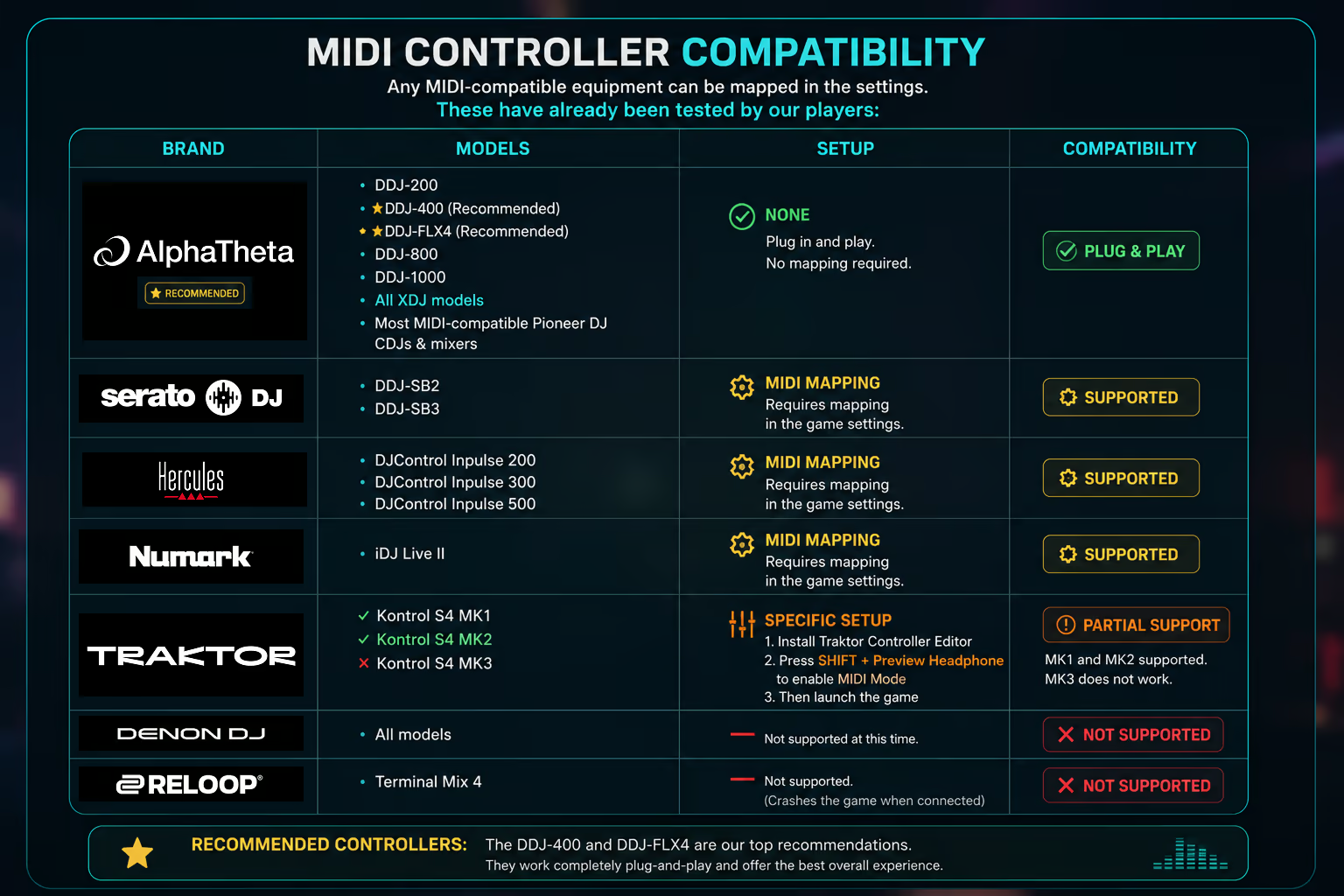
You can play using a mouse and keyboard or connect a compatible USB/MIDI DJ controller for an authentic mixing experience, just like using real equipment. Check the "Compatibility" section below to see the list of supported controllers.
The game only supports importing music in MP3 and WAV formats. Other audio formats (such as FLAC, M4A, AAC, AIFF, and others) are not supported yet.
Every mechanic was designed to be applicable outside the game. Here, you don't just play, you learn, practice, and grow as a real DJ.
Compatibility
DJ Life Simulator supports a wide range of MIDI-compatible DJ controllers.
Pioneer DJ (AlphaTheta) controllers work plug-and-play, with no configuration required. Controllers from Serato, Hercules, Numark, and supported Traktor models are also compatible and only require a one-time MIDI mapping or setup.
Check the compatibility table below to see the current list of tested devices.
If your controller isn't listed, download the free demo and give it a try. If you need any assistance, our community on Discord is always happy to help.
Please note: Controller support is still under active development during Early Access. Core mixing features are fully supported, but some hardware-specific functions—such as headphone cue (pre-listening), Performance Pads, and Beat FX—are not yet available. These features are planned for future updates.
Academy Mode: Learn for Real
Enter the DJ Academy and master the essential foundations of the profession.
Learn about:
• Beatmatching and beat counting
• Crossfader transitions
• Volume Fader transitions
• EQ and frequency contro
• Master Volume control
• Using effects
• Harmonic Mixing• Loops
• Ending a Set
• Track selection
All lessons are fully gamified and structured step by step, allowing beginners to start from zero and progress with confidence.
Every skill developed here is 100% transferable to real equipment.
Career Mode: From House Parties to Massive Festivals
Start your journey at small parties and work your way up to massive festival stages.
Complete missions, earn money, gain fans, unlock new gigs, and build your reputation as a rising DJ.
Your progression reflects the real growth of a DJ: bigger events require better technique, better Track selection, and a stronger ability to read the dancefloor.
The better you perform, the faster your career progresses.
You will also face several Minigame challenges based on the difficulties DJs experience, helping you develop your attention and multitasking skills!
Performance Statistics
At the end of each Set, receive a detailed analysis of your performance.
Analyze:
• Transition quality
• Beat accuracy
• Completed missions
• Most used effects
• Technical mistakes
The system shows exactly where you improved and where you still need to get better, helping you grow with every session.
Dynamic Crowd: Learn to Read the Dancefloor
The crowd in DJ Life Simulator is not just a background animation. It is alive and reactive.
Each person on the dancefloor has musical preferences based on the clothing styles they wear.
Play the right Tracks to keep the energy high, experiment to win over different types of people, and truly learn how professional DJs read the dancefloor.
The crowd's reaction directly reflects your technical and musical decisions through their dancing and the aura indicators.
Your Style, Your Journey
Customize your DJ to reflect your identity by fully customizing the body and clothing using the money earned from gigs.
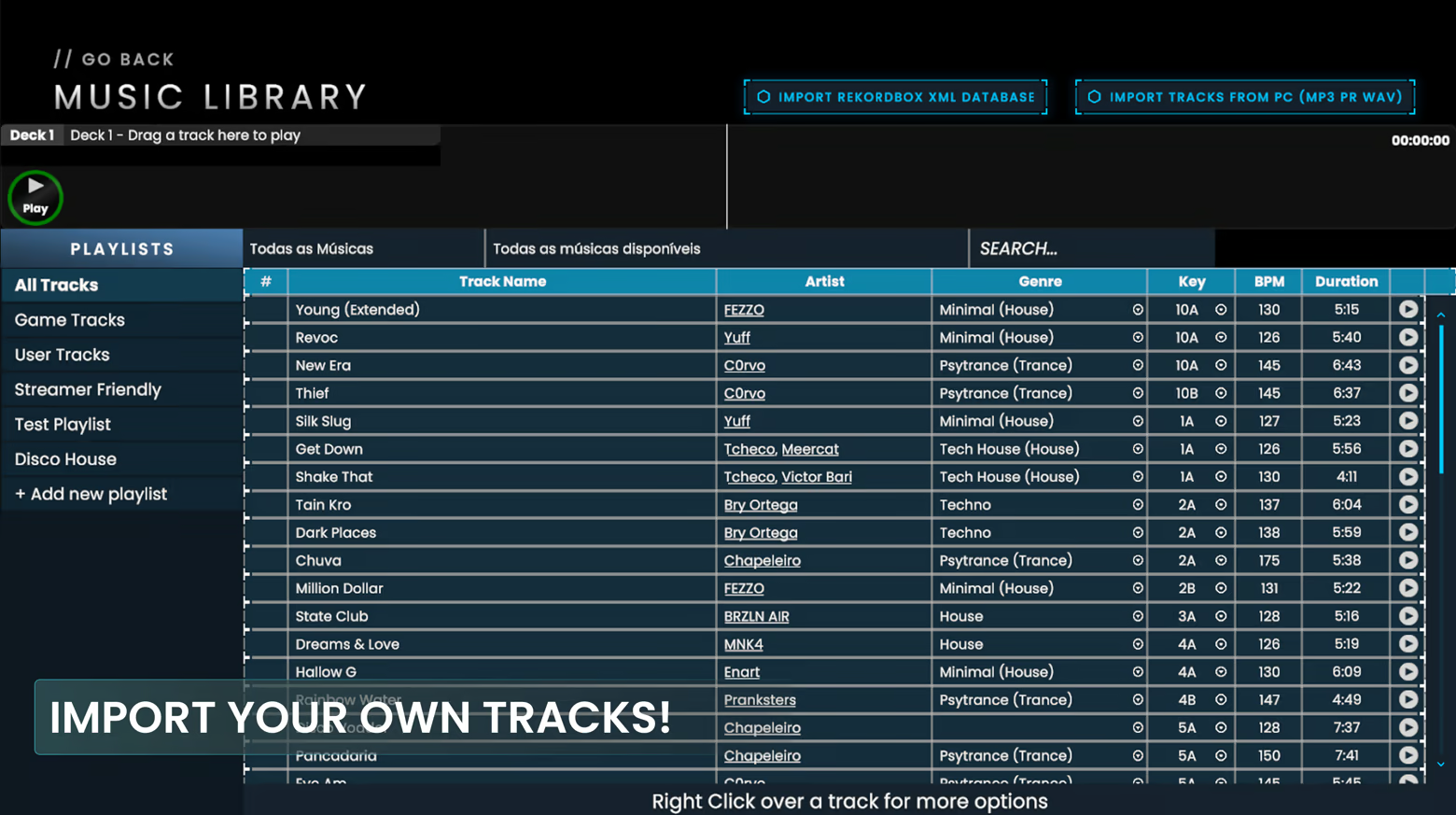
Import Your Own Music (MP3 and WAV)
Import your own music to create custom sets and practice with the tracks you already know.
Important: The game only supports audio files in MP3 and WAV formats.
You can:
• Import individual MP3 or WAV tracks from your computer
• Import an entire folder containing MP3 or WAV tracks
• Import your Rekordbox XML library (the referenced tracks must also be in MP3 or WAV)
We have a tutorial on our YouTube channel.
Add It to Your Wishlist
Add DJ Life Simulator to your wishlist and begin your journey to becoming a real DJ.
System Requirements
Will my PC run this? →Minimum
- OS: Windows 10 / 11
- Processor: Intel Core I7
- Memory: 16 GB RAM
- Graphics: Intel HD Graphics 4000
- Storage: 5 GB available space
- Sound Card: Integrated
Recommended
- OS: Windows 10 / 11
- Processor: Intel Core i7
- Memory: 16 GB RAM
- Graphics: NVIDIA GeForce GTX 3050
- Storage: 5 GB available space
- Sound Card: Integrated
Supported Languages
*languages with full audio support
Latest news
AnnouncementsOfficial
🎉 New Club, New Clothes, and New Lessons!
🎉 New Club, New Clothes, and New Lessons!Time to refresh your wardrobe, sharpen your skills, and take over a brand-new club! 🎧 This update brings more control over your mixes, new challenges, and over 100 new clothing items to make your DJ stand out.🎛️ New FeaturesNew Right-Side MenuToggle visual aids, including the 1–2–3–4 beat indicator, warnings, and alignment guides.Switch between stacked, side-by-side, and hidden waveform views. Mix your way!Master Tempo: Speed up or slow down your tracks while preserving their original key! 🎵Gain Control in Expert Mode: Take control of each track’s gain with the new trim knobs.Gain Level Indicators: New flashing indicators on each deck help you spot when your track’s volume is too low, balanced, or too high.Headphone Cue: Activate the headphone cue buttons to significantly reduce crowd noise and focus on your tracks, just like putting on headphones in real life! 🎧Play Indicator Setting: Want a cleaner interface? You can now hide the Play Indicator in Settings.🌃 New Stage: New Year Neon ClubStep into the neon lights and face two new challenges!🎚️ Gain Minigame: Forgot to prepare your tracks? Each one loads with a random gain level! Adjust it after loading each track to keep your levels balanced and avoid losing points.🎧 Headphone Cue Minigame: The crowd is screaming, and you can barely hear your music! Activate the correct headphone cue buttons to reduce the noise and keep your mix under control.🚀 Performance ImprovementsGet ready for smoother sets!Changing the graphics quality before a stage starts now has a much greater impact on performance.If you change the quality during a set, crowd-related changes will take effect on the next stage.🎓 New LessonsExpand your DJ skills with two new lessons!Beat FX: EchoHeadphone Cues➡️ Next Lesson IndicatorKeep your learning flowing! After completing a lesson, the Next Lesson button now displays the name of the upcoming lesson.👕 Over 100 New Clothing Items!Give your DJ a fresh look with ove...Read full article on Community Announcements (onedaycodegames)Patch NotesOfficial
DJ Life Simulator - New Update: 100+ Missions, New Lessons, Russian & More!
🎁 New Special Skin GiftGet an exclusive Fresnel Animated Skin!Rate the game on SteamSend a screenshot to our Discord admin @onedaycodeWait for confirmation and receive your special animated skin in-game!🌎 Russian LanguageDJ Life Simulator is now available in Russian!💻 Very Low Graphics OptionWe've added a new Very Low graphics quality option, making the game more accessible for lower-end PCs.🎥 New Tutorial VideoWe've added a new Custom MIDI Mapping Tutorial to help you set up your controller:🎛️ MIDI CacheWhen using a physical MIDI controller, knobs, volume faders, and tempo sliders now remember their positions between sessions.Your controller settings will remain consistent even after closing and reopening the game.🕺 More Realistic AudiencesCrowds are now much more diverse and randomized!Clothing, height, faces, and other visual characteristics are randomized to make each audience feel more natural and realistic.💃 Dance Radial Wheel ImprovementsThe Dance Wheel now always appears in front of the UI instead of being hidden behind the waveforms.Performing a dance move can now give you +5 Crowd.This bonus can be earned once every 60 seconds.🎓 Academy ImprovementsWe've added a new mouse-assist feature for knobs!When dragging knobs with the mouse, important positions can now snap into place, making precise actions much easier to perform.📚 3 New LessonsCue Rhythm Practice4 Cues + PlaySync OFF & Volume Transition🎮 2 New MinigamesThe Party Must Go OnLast DJ SUCKED✨ New TricksFilter Before DropFilter Volume TransitionEcho Before DropEcho Volume Transition🎯 Over 100 Missions!DJ Life Simulator now features over 100 missions that can be randomly selected while you play!This brings much more variety to Career Mode, with more objectives and challenges to complete during your journey from your bedroom to the mainstage.🔧 Fixes & ImprovementsFixed an issue where, after playing Episode 2, the minigame that automatically increases the volume could incorrectly start during Academy lesso...Read full article on Community Announcements (onedaycodegames)Patch NotesOfficial
Update 1.161: Music Library, New Lessons & Controller Fixes
Update 1.161Update 1.161 brings improvements to the Music Library, Academy, controls, physical DJ controllers and more!🎵 Music LibraryRekordbox Genre ImportTrack genres are now imported from rekordbox.MultiselectionYou can now select multiple tracks to edit and organize your library faster.SHIFT + Click selects a range of tracks.CTRL + Click selects or deselects individual tracks.Add or remove multiple tracks from playlists at once.Change the Genre or Artist Name of multiple tracks at once.🎛️ UI & ControlsIncreased knob sizes.Improved Main Menu feedback when hovering over options.Double-click a knob to reset it to the center.Waveform Zoom now has more zoom levels.🎓 AcademyNext LessonAdded a Next Lesson option, allowing you to continue directly to the next lesson without returning to the Academy menu.New LessonsLow Pass FilterHigh Pass FilterHigh Filter Before Section🏆 New TricksFiltersHigh Pass Filter for 4 BeatsLow Pass Filter for 4 BeatsCUEPress CUE on BeatPress CUE + Slide Mouse to Play and ReleaseWithout SyncPlay on Time Without SyncAlign BPMs ManuallyAlign Two Tracks ManuallyRepeating the same Trick now uses a single notification with an increasing counter.🎚️ Controller Connection FixFixed an issue where a detected controller could show:MidiInWinMM::openPort: error creating Windows MM MIDI input port.If it still happens, go to Settings and click Refresh Device Connection.🐛 Bug FixesFixed the mouse scroll wheel unintentionally scrolling the Music Library.Thanks for all the feedback and reports! ❤️Read full article on Community Announcements (onedaycodegames)Patch NotesOfficial
Update 1.160 - Hot Cues, Beat FX & More!
Update 1.160 is here! 🎧This is one of our biggest updates yet, bringing several major new features and improvements to DJ Life Simulator!With this update, all of the game's main systems and core features are now available. From this point forward, future updates will focus primarily on expanding the game with new Lessons, Missions, Episodes, Minigames, Clothes, and more content!⚡ Faster Track LoadingTrack loading has been significantly improved.You no longer need to wait several seconds for a track to load. Tracks should now be ready almost instantly!🎵 New Audio FormatsYou can now import your own tracks in even more formats:MP3WAVFLACAIFFM4A🔥 Hot CuesHot Cues are finally here!You can now mark specific points in a song and instantly jump back to them while mixing.Add Hot Cues directly to your tracksImport existing Hot Cues from rekordboxSee Hot Cue markers directly on the waveform previewsClick Hot Cue markers to instantly jump to that positionMap Hot Cues to physical DJ controllersActive Hot Cue LEDs will stay lit on supported controllers🎛️ Beat FXBeat FX have been added!Switch your controller layout to Expert to access a brand-new FX section inspired by the workflow of controllers such as the DDJ-400 and DDJ-FLX4.Beat FX also work with physical DJ controllers and can be custom mapped.When Beat FX are enabled, the corresponding LED will blink on supported controllers.Currently available FX:EchoReverbMore effects will be added in future updates!🔒 Lock/Unlock CrossfaderDon't use the Crossfader in your mixing style? You can now disable it!Simply click the Lock/Unlock button below the Crossfader to enable or disable it whenever you want.🔁 Improved Loop ControlsLoops are now more flexible!After setting a Loop, you can now:Halve its lengthDouble its lengthThis makes it much easier to adjust your Loops on the fly while mixing.🎚️ Controller Mapping ImprovementsController mapping has received several improvements!The Controller Mapping menu now includes a dropdown with ready...Read full article on Community Announcements (onedaycodegames)Patch NotesOfficial
New Update: Improvements, Tweaks & Bug Fixes 1.159
A new DJ Life Simulator update is now available! 🎧This build brings new control options, improvements to lessons and synchronization, and several fixes based on community feedback.🆕 New FeaturesAdded Jog Sensitivity Adjustment under Menu → Controls.Added Progressive genre to the music database for Stancke tracks.Added mouse wheel navigation to change the currently selected track.🔧 ImprovementsImproved loop synchronization when both tracks are playing to prevent small alignment issues.Adjusted Crossfader Too Fast detection to be less sensitive and avoid unfair transition mistakes.Improved Lesson 1 behavior:Sync is now automatically enabled when the lesson starts.Sync cannot be disabled when required by the tutorial.The game now checks if a track is already loaded on Deck 2 before continuing.New playlists are now added to the bottom of the playlist list instead of the top.The language selector now automatically displays the currently active language when opening Settings.Added all supported languages to the Troubleshooting window.Updated the online patch system to make patch information appear correctly for all players.🐛 Bug FixesFixed an issue on macOS where opening Settings would switch the game to Windowed Mode.Fixed the game language randomly changing when launching the game.Fixed DJ School trial codes not working correctly.Fixed the DEMO text appearing incorrectly.Fixed Graphics Quality settings not being saved between sessions.Fixed custom MIDI mappings not appearing correctly inside the game.Fixed Main Menu music playing twice with certain connected audio devices.Fixed BPM adjustments occasionally skipping 0.1 BPM increments.Fixed the Fire on Amps event displaying the wrong title and remaining active after leaving the minigame.Fixed scoring incorrectly removing Track Sound Before Section points when the opposite deck wasn't producing sound.Fixed camera clipping inside the character's head during the Drunk People minigame.Fixed the Techno audience not reacting c...Read full article on Community Announcements (onedaycodegames)


