

Screenshots

 Watch trailer on Steam ↗
Bit Buddy
Salt Fish Studio · Published by Salt Fish Studio
Overwhelmingly Positive — 99% positive (556 reviews) · 38 achievements
Last updated 28 Sept 2026
Bit Buddy reacts to your keyboard, mouse, and even your voice in real time. Collect decorations as you use your computer, customize your workspace, explore over 3,000 community-made buddies and decorations through Steam Workshop, or create and share your own.
£1.26
£1.69Lowest price we've ever recorded
View on SteamPrices can lag the live Steam store — always confirm before buying.
Price history
Casual · 2025 · More under £5 games
Bit Buddy invites you to personalize your workspace while collecting unique decorations. Salt Fish Studio’s casual game lets you dive into a world where every click counts, offering endless exploration through Steam Workshop.
About this game
Create Your Own Bit Buddy
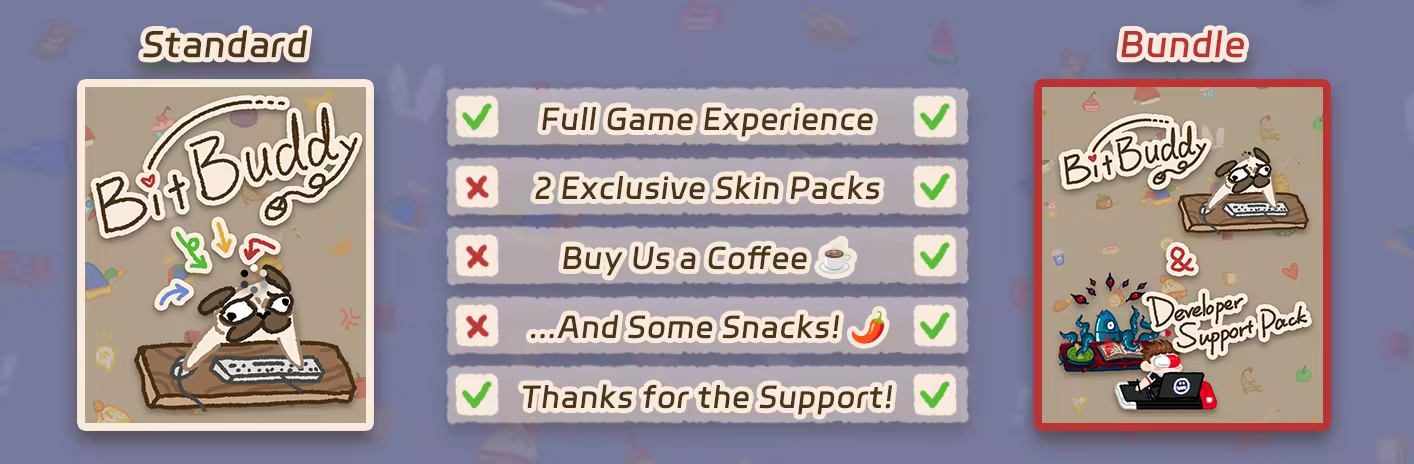
Special Edition
About the Game
Bit Buddy reacts in real-time to your keyboard and mouse activity. Every click and movement brings an adorable response from your little companion. Even better, each interaction gives you a chance to unlock new decorations, with no extra effort required!
With 600+ unique accessories and pet skins to collect and customize, you can give your Bit Buddy a one-of-a-kind look that matches your style.
Bit Buddy automatically logs your daily and historical keyboard and mouse activity, so you can easily track how much you’ve typed or clicked.
Whether you're working or studying, Bit Buddy stays by your side on your screen—your loyal digital coworker, always there with you.
💻 Instantly responds to your mouse and keyboard actions:
🎤 Reacts to your microphone input in real time:
🎁 Each use of your keyboard or mouse may reward you with decorations, no extra steps needed!
And finally, want to see your character in Bit Buddy? Join our Discord and let’s make it happen together!
Privacy Policy
Bit Buddy does not collect any of your device or personal information.
Any keyboard or mouse usage data is stored locally on your own device and is never uploaded anywhere.
Other than the required communication with Steam (for things like purchase verification, achievements, or cloud save), the game does not perform any other network communication.
System Requirements
Will my PC run this? →Minimum
- Requires a 64-bit processor and operating system
- OS *: Windows 7/8/10/11 (64-bit)
- Processor: Dual-core CPU (Intel/AMD, 2.0 GHz)
- Memory: 200 MB RAM
- Graphics: OpenGL 3.3 compatible GPU
- Storage: 200 MB available space
Recommended
- Requires a 64-bit processor and operating system
Supported Languages
Latest news
Patch NotesOfficial
Bug Fixes & Optimizations
Optimized clickable area calculation logic to improve performanceFixed an issue that prevented some players from launching the game properlyRead full article on Community Announcements (咸鱼佐一)Patch NotesOfficial
Bug Fixes / Optimizations
Fixed an issue where some visual elements could be incorrectly clipped.Fixed an issue where microphone input would not prevent Buddy from entering sleep mode.Optimized Steam stats synchronization to reduce unnecessary requests.Optimized clickable area calculations to improve performance.Thanks everyone for all the recent feedback and bug reports! This update mainly focuses on fixes and optimizations based on your feedback. Thank you for your continued support of Bit Buddy!Read full article on Community Announcements (咸鱼佐一)AnnouncementsOfficial
Microphone Tracking is Here!
🎙️ Bit Buddy Can Hear You Now!With microphone tracking enabled, Bit Buddy will move its mouth in sync with your voice whenever you speak. Whether you're chatting with friends, streaming, or just talking to yourself at your computer, Bit Buddy can now “talk” along with you!Currently, the vast majority of Buddies have been adapted with mouth animations. However, due to the design or animation structure of certain Buddies, a small number of them couldn't be adapted and therefore won't respond to microphone input.You can enable and configure microphone tracking in the settings.🛠️ Workshop Editor UpdateBit Buddy Workshop Editor has also been updated with microphone tracking support!You can now configure mouth images for your own Buddy directly in the editor. Once configured, your Workshop Buddy can respond to microphone input just like the official Buddies.If you've already created and published a Buddy, you can simply reopen the project and add mouth images to make it compatible with the new microphone tracking feature!Other Changes:Optimized the game's clickable area. The clickable area now follows the actually visible area much more closely, greatly reducing cases where transparent areas block mouse interactions with windows and other elements on your desktop.Thank you, as always, for all your feedback and suggestions!Microphone tracking has been one of the most requested features, and we're really happy to finally bring it to Bit Buddy.Now go say something to your Buddy!Read full article on Community Announcements (sixeven67[排骨]💊)AnnouncementsOfficial
Steam Trading Cards Are Now Available!
Bit Buddy now officially supports Steam Trading Cards!As you play the game, you'll now be able to collect:Steam Trading CardsBadgesProfile BackgroundsEmojisThank you all for your continued support. Reaching this milestone wouldn't have been possible without our amazing community.Happy collecting, and we hope you'll enjoy decorating your Steam profile with Bit Buddy!P.S. If you've already spent plenty of time with Bit Buddy, your card drops should start appearing automatically the next time you play.Read full article on Community Announcements (sixeven67[排骨]💊)Patch NotesOfficial
Summer Update!
The Summer Update is now live! This update brings new summer-themed content, an AFK animation, public multiplayer lobbies, and a variety of improvements and fixes.New ContentAdded new summer-themed skins and decorationsAdded an AFK animationAdded a public multiplayer lobby listAdded a maximum player count setting for multiplayer lobbiesAdded an "Auto Hide Gift Packs" optionAdded a "Show Game Mode Hint Text" optionAdded a Buddy transparency adjustment settingAdded support for new languages:Serbian (Latinica)Serbian (Српски)Improvements & FixesFixed an issue where presets could be lostImproved the in-game Steam Workshop pageDeveloper Support Pack outfits are now synchronized and visible in multiplayerOptimized window size to prevent hats and decorations from being clipped on certain skinsThank you for your continued support and feedback. We hope these new features and improvements make your experience even more enjoyable. Special Redeem Code:1000+ Workshop Items Achieved!!"You Did It" — Enter this special code to claim an exclusive hat made just for the community! Special ThanksSpecial thanks to rammba for providing Serbian translations for Bit Buddy, helping more players enjoy the game in their native language.Read full article on Community Announcements (sixeven67[排骨]💊)


