

Screenshots

 Watch trailer on Steam ↗
Keyboard Quest
Resonance Games · Published by Resonance Games · Official site ↗
Positive — 84% positive (19 reviews)
Last updated 28 Sept 2026
Use your keyboard to assist Princess Tilda in her quest to retrieve the ancient Runekeys. Discover various keyboard-themed foes, cast spells and vibe along to some incredibly catchy tunes in this short but sweet project from Resonance Games!
Indie, Free To Play, Casual · 2025 · More free games
Embark on Princess Tilda's quest to retrieve ancient Runekeys using your keyboard. Battle unique foes and cast spells as you vibe along to upbeat music, all in a short but engaging project from Resonance Games.
About this game
Join Princess Tilda on her Keyboard Quest!
In this cute bite-sized game, players will use their keyboard keys to protect the Princess throughout her journey - playing the role of the kingdom's mighty Scroll-Lock.
Cast two powerful spells using your keyboard to help defend the Princess
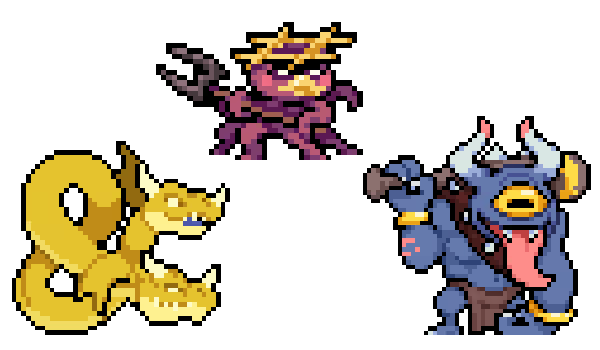
Go up against menacing keyboard-themed enemies: the Octothorpe, Ampersand and Hyphiend, each with their own behaviours and abilities
Protect Princess Tilda as she traverses the world and collects ancient Runekeys
Win or Lose - each game is quick and provides unique challenges each playthrough
Supports UI in English, French, Italian, Farsi, Russian, Mandarin, Japanese, Brazilian Portuguese, and SA Spanish

Keyboard Controller
Cast spells to defend Princess Tilda, and help her recover three ancient runekeys before making it back to the safety of her castle.
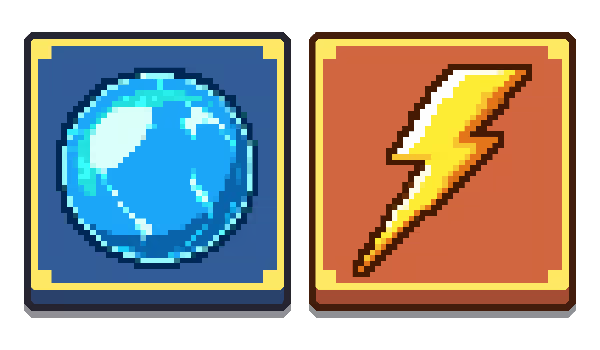
You will use your physical keyboard to defend the Princess - pressing keys to shock foes with lightning or bounce them around with bubble magic!
Cute and Quirky Keyboard Characters
You'll face up against some particularly nasty monsters as Tilda travels, including the common Octothorpe, the quick-flying Ampersand and the terrible Hyphiend.
Each enemy behaves a bit differently, and so learning those differences may be the key to winning or losing!
Micro Gaming
This is a Resonance Games micro-game. Once you get the hang of it, it should only take you about five minutes to play. So take a seat, enjoy the music and visuals and see if you can get the Princess to safety! The Keyboard Kingdom depends on it~
System Requirements
Will my PC run this? →Minimum
- Requires a 64-bit processor and operating system
- OS *: Windows 7
- Processor: Dual Core CPU
- Memory: 4 GB RAM
- Graphics: Geforce GTX 1060
- Storage: 100 MB available space
Recommended
- Requires a 64-bit processor and operating system
- OS: Windows 10
- Processor: Quad Core CPU
- Memory: 8 GB RAM
- Graphics: Geforce GTX 1080
- Storage: 100 MB available space
Supported Languages
Latest news
Patch NotesOfficial
Update 1.2 - August 18, 2025 - Fixing Major Issues and Quality of Life Updates
Hey Keyboard Questers! Resonance Games here with a quick but important update~ First of all, thank you all so much for playing. It means the world to us to see people enjoying our first ever micro-game and helping Princess Tilda on her first quest! Now let's get to the changes. First and most importantly: Game will no longer randomly lock your spell controls. This issue was something we thought we'd fixed earlier - but it reared its ugly head and caused many to wonder what they'd done wrong to prevent them from casting spells. You should no longer experience this problem - and will be able to Keyboard Quest to your heart's content! Now for the other changes: Enemies shouldn't appear to hit Tilda from more than one key away. There may be some rare instances where this still occurs, but far less than before. Tilda and enemies should not appear to clip with the environment nearly as often. The environment on each key has been adjusted to avoid as much collision as possible. Resolution settings drop-down should now look and function as intended. (Note: there may still be issues when using 1920x1200 monitors. We're looking into it!) Added shadows underneath the Ampersands to more clearly relay which key they were on. Previously, some players would confuse them as being on the key above the one they actually were on. Enemy positions on the key have been adjusted to look better and be more centred. Setting Menus and Credit Menu should cause less issues when opening and closing. The Fullscreen//Borderless Fullscreen//Windowed settings should now properly function. Fonts on the Setting Menu should be more consistent - especially in regards to language settings. Fixed an issue in which a red/purple line would appear in the centre of the Keyboard Kingdom when a Hyphiend or Ampersand were present. When Tilda has collected all three runekeys, the next objective should now appear on the Space key to represent her journey back home. And that's about it for this update. All in all,...Read full article on Community Announcements (Grand Maestro)AnnouncementsOfficial
Keyboard Quest is LIVE - Important Updates!
Hi everyone~ Keyboard Quest is finally live and playable!It's a very exciting time for our team: launching our first game on Steam hasn't been without its hardships, but we've finally done it and it's certainly worth celebrating.Keyboard Quest was always a micro-game since its inception. Something arcade-y that you could play on and off for a few minutes, full of cute charm and catchy visuals and music. But in its creation, we found that there was something endearing and timeless about the characters and theme. Perhaps, with enough traction, we could turn this micro-game into a... macro-game?Also, for those just hopping in, we wanted to address one particularly frustrating bug people have come across. During the game, you may find yourself unable to use the keys or switch spells. If the game ever becomes unresponsive in this way - please press the ESC key to open the menu, and then close it again. This should fix the issue as it currently stands.It's an unfortunate quirk of game development, that these types of bugs can slip in (we'd thought we'd actually killed this on in particular). We're working at this very moment to address this and some other issues we've noticed, and will hopefully be releasing a new patch soon to fix them. Thank you for your patience and understanding!From the Resonance Games team to all of you: thank you for your support - and we sincerely hope you can assist Princess Tilda in her Keyboard Quest!Read full article on Community Announcements (Grand Maestro)


