

Screenshots

 Watch trailer on Steam ↗
Hiragana Flashcards
FlapBox Studios · Published by FlapBox Studios · Official site ↗
Positive — 100% positive (12 reviews) · 51 achievements
Last updated 28 Sept 2026
A small introduction to Japanese. ⛩️🌸🍙 Hiragana is the most common alphabet, used for native words. Our flashcards show each character, its sound, and example words. Progress through fun Challenge Lessons, meet new kana, and reinforce what you’ve learned, step by step!
£0.89
Lowest price we've ever recorded
View on SteamPrices can lag the live Steam store — always confirm before buying.
Price history
Indie, Casual · 2026 · More under £5 games
Discover Japanese basics with Hiragana Flashcards, a casual indie game that teaches you this essential alphabet through engaging challenge lessons. Meet new kana and progress at your own pace.
About this game

Hiragana Flashcards
A small introduction to Japanese. ⛩️🌸🍙
While Japanese uses three writing systems (Hiragana, Katakana, and Kanji), Hiragana is the most common alphabet, used for most native Japanese words. Hiragana Flashcards introduce you to each HIragana character with it's sound and pairs some common example words.
In this game, you progress through carefully crafted Challenge Lessons, each introducing a new group of Hiragana or helping you reinforce the ones you’ve already learned.
🌸 INCLUDES
Challenges - Play through level-based kana sets and earn medals for performance.
Practice Mode - Build custom decks and focus on the kana you need most.
All 71 basic kana included.
Native pronunciation - Audio for every character.
Stroke order animations - Helps you write correctly.
Progress tracking - Visualize your growth.
Full controller support - playable with keyboard & mouse or controller.
Achievements - Go for Gold on every group and earn Achievements for your accomplishments.
Phrasebook - Learn kana through real Japanese sentences with the new Phrasebook (Since in Patch 1.04)
Whether you're reading your first Japanese word, preparing for a trip to Osaka, or testing your memory skills, Hiragana Flashcards makes learning engaging, visual, and fun.
🌸 Practice Mode / Build Your Own Decks
Train exactly what you want. Pick and mix sets, target weak spots, combine your favorite kana groups, or jump in for a quick refresher whenever you have a few minutes.
🌸 Card introductions
Learn new kana with clean, focused cards and native audio. Browse freely, view cards in any order, and study at your own pace before jumping into practice.
🌸 In-Game Cards
Play the way you prefer. Use a controller to choose answers from an on-screen grid, or type the phonetic english directly with your keyboard.
🌸 Challenges / Lessons
Learn new kana, review the ones you know, and take on big tournament-style checkpoints. A mix of challenge types keeps your progress steady and engaging.
🌸 PDF for printing Hiragana (Free Download)
I also made a bonus resource for offline learning. Print the cards single-sided, then cut or fold them as needed. Each card include some folding flaps that can be folded inward and glued shut to create a sealed flashcard.
Download PDF by clicking the "View the quick reference" link in the sidebar.
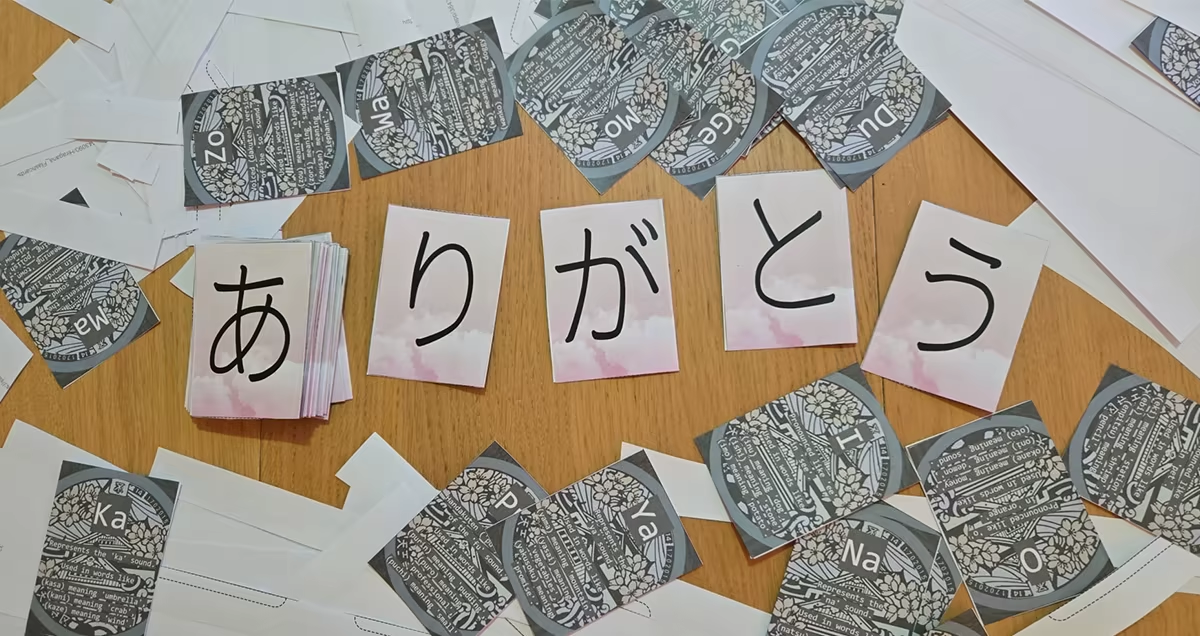
Every kana you master is progress you can feel. Step by step, Hiragana Flashcards helps turn unfamiliar symbols into something you can read, recognize, and truly understand. ❤️🌸❤️
System Requirements
Will my PC run this? →Minimum
- OS: Windows 10
- Processor: 1GHz Processor
- Memory: 1 GB RAM
- Graphics: Luminoveau engine compatible graphics
- Storage: 250 MB available space
- Sound Card: Luminoveau compatible soundcard
Recommended
- OS: Windows 10
- Processor: 2GHz Processor
- Memory: 2 GB RAM
- Graphics: Luminoveau engine compatible graphics
- Storage: 300 MB available space
- Sound Card: Luminoveau compatible soundcard
Supported Languages
*languages with full audio support
Latest news
Patch NotesOfficial
Patch Release - 1.04 - Phrasebook! ⛩️📖🌸
One of the best ways to learn kana is by actually reading simple Japanese sentences, so in Patch 1.04 we added the new Phrasebook feature so you can do exactly that within the game 💜There is now a new “Phrasebook” button in the Main menu.The Phrasebook contains beginner-friendly sentences together with romaji pronunciation and extra explanation notes about grammar, particles, pronunciation, and small bits of cultural context.The sentence order is designed to slowly build up your Japanese step-by-step.It starts with greetings and introductions so you can instantly begin reading and using real Japanese. From there, the Phrasebook slowly introduces more polite expressions and gradually moves into more descriptive sentences.As you continue, the sentences begin introducing grammar concepts like question particles, sentence structure, and i-adjectives used for colours and descriptions.The goal is to make learning kana feel more natural by combining reading practice with actual Japanese usage instead of only memorizing symbols.I would love to expand further on that in future updates. 🌸Read full article on Community Announcements (FlapBox)Patch NotesOfficial
Patch Release - 1.03 - Darkmode! ⛩️
Since our March 11 release, we’ve seen the biggest influx of new players we’ve ever had, which has been awesome to see. Thanks to everyone who tried the game out and shared feedback. The reception has been mostly positive, and it’s helped us understand how the game performs across a much wider range of setups.From this, we picked up a lot of useful insights. In this led to a bunch of bug fixes and general improvements in this patch.As for the main addition this time; you can now switch between light and dark mode! Since this is the kind of game people like to play at night to get some learning in before bed, this felt like a really important feature to add.If you want to enable dark mode, just head into the Settings menu, find the “Theme” option, and switch between Light (day) and Dark (night) depending on what you prefer. (The setting is automaticly saved ofcource.)Here are some samples 💜💜💜Hope you all enjoy this patch!And ofcource, thanks again for all the support!~ VeldinRead full article on Community Announcements (FlapBox)AnnouncementsOfficial
🎉 Hiragana Flashcards is Out Now!
⛩️🌸🍙 If you’ve ever wanted to start learning Japanese, this is a simple and engaging way to begin 🍙🌸⛩️Making the release announcement post for a new game release is always one of the biggest highlights of working on such big projects, and this time is no different. We have spent a lot of time working to bring everything together and create a game that I am truly proud of. So seeing the big green button on the Steam store is a really special moment for me.A huge thank you to Bixxy for all the amazing work on the engine that powers the game. Your engine made this project possible.I also want to thank everyone who tried the game during Steam Next Fest and shared feedback with us. It was incredibly helpful to see people play, comment, learn, and suggest real improvements.Oh, and this is just the beginning! We already have more content and ideas planned, including new combos, themes, and other improvements we’re excited to bring to the game in future updates.To sign off, I want to say that I truly hope you all enjoy playing Hiragana Flashcards as much as I enjoyed creating it.~ Veldin ⛩️🌸🍙Read full article on Community Announcements (FlapBox)Patch NotesOfficial
Steam Next Fest patch 0.23
Second Steam Next Fest Update!With Steam Next Fest now underway, we’ve been getting awesome feedback from players—and this update focuses on turning that feedback into real improvements across the game.Victory Screen ImprovementsThe victory screen now includes a dedicated Continue button. Previously, progressing required a keyboard or controller input, but now it’s fully consistent with the rest of the UI.This means you can navigate every menu using only your mouse, making the experience more intuitive and accessible.Improved Key VisibilityWhen using your keyboard to guess kana, the displayed keys previously used random colors, which could sometimes be hard to read.We’ve introduced a new color generation technique that guarantees contrast on light backgrounds, making keys easier to read at a glance.Faster Font LoadingFont loading has been optimized with a new font cache system.The cache is built the first time you run the game, resulting in significantly faster startup times on subsequent launches.Card Rendering Performance BoostWe’ve made major improvements to how cards are rendered by reducing the number of draw calls per card from 6 down to just 2, while also implementing prebaked textures for more efficient rendering. This significantly improves performance, especially when many cards are on screen at once.So big stacks of cards should now have far less impact on FPS, leading to a smoother overall experience.Read full article on Community Announcements (FlapBox)Patch NotesOfficial
Steam Next Fest patch 0.22
With Steam Next Fest starting tomorrow, we’ve been hard at work polishing the build to make sure we’re showing the game (and i'ts engine) at its very best.So this last update before the fest is one of the biggest technical improvements since the project began. We’ve upgraded to the latest version of our custom engine, rebuilding and improving core systems behind the scenes. This includes major changes to how sprites are mapped in memory, resulting in better performance and a more stable experience overall. (Shoutout Bixxy, the low level engine designer for luminoveau.)Pretty Font renderingUsing the newest version of the engine we completely overhauled how fonts are rendered. With the introduction of MSDF rendering, text now stays sharp and clean at any size (without eating more system resurces). This means better-looking UI, smoother scaling, and improved performance, even when text is scaled or transformed.High resulution screensSupport for HiDPI displays has been added as well, making the game look crisper and more detailed on high-resolution screens.Volume system changesFinally, we’ve adjusted the volume system to better match how we naturally perceive sound. While the settings still use the same options, their ranges have been refined. Medium and low volumes are now softer than before, giving you more control and making volume differences feel more natural.Overall, this update is all about making the game feel better, look sharper, and run more reliably as we head into Steam Next Fest!Hope everyone enjoys our game!Read full article on Community Announcements (FlapBox)


