

Screenshots

 Watch trailer on Steam ↗
BiColor - Vision Trainer
Binary Brain Games · Published by Binary Brain Games · Official site ↗
7 user reviews — 86% positive (7 reviews)
Last updated 28 Sept 2026
BiColor Vision Trainer is a game-based vision therapy app for lazy eye training at home. Designed for children and adults, it uses interactive mini-games and anaglyph glasses to support eye coordination, binocular vision, and modern lazy eye therapy without patching.
£8.50
Lowest price we've ever recorded
View on SteamPrices can lag the live Steam store — always confirm before buying.
Price history
Indie, Casual · 2025 · More £5 - £15 games
Train your eyes with engaging mini-games designed by Binary Brain Games. BiColor - Vision Trainer supports both children and adults in improving binocular vision, all from the comfort of your own home.
About this game
⚠️ IMPORTANT: Anaglyph Glasses Required 🔴🔵
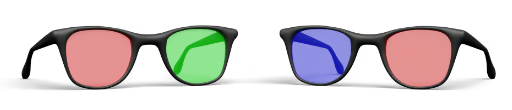
BiColor Vision Trainer is designed to be used only with anaglyph glasses (red–blue or red–green).
Without anaglyph glasses, the vision training will not function correctly.
🔵 BiColor Vision Trainer – Game-Based Vision Therapy for Lazy Eye
BiColor Vision Trainer is a game-based application created to support lazy eye therapy through structured visual training at home.
It is designed for both lazy eye in children and lazy eye in adults, focusing on binocular vision, eye coordination, and balanced visual processing.
The app offers interactive lazy eye exercises at home, helping users stay consistent with training in a familiar and comfortable environment.
BiColor can be used as a complementary tool alongside vision therapy for lazy eye recommended by an eye care professional.
🧠 What Is BiColor?
BiColor transforms traditional lazy eye exercises into short, engaging mini-games.
Instead of repetitive clinical tasks, users train visual coordination through interactive gameplay while wearing anaglyph glasses.
Each eye receives a separate visual signal, encouraging the brain to combine both inputs more effectively.
This approach is commonly used in lazy eye treatment, binocular vision training, and modern amblyopia rehabilitation.
BiColor is suitable for:
Lazy eye games for kids and family-guided practice
Home-based support for amblyopia in children
Visual training for adults exploring whether improvement is still possible later in life
Many users ask questions like can games help lazy eye or does vision therapy work for lazy eye.
BiColor is designed around these game-based training principles.
🔴🔵 How Anaglyph Glasses Work
Anaglyph glasses use color-filtered lenses:
One eye perceives red elements
The other eye perceives blue elements
BiColor displays game objects using color separation so that each eye sees a different image.
This encourages binocular fusion, eye teaming, and visual coordination — key elements of lazy eye therapy and adult amblyopia treatment.
🎮 Key Features
👁️🗨️ Dichoptic visual training with color separation
🕹️ Lazy eye computer games designed for coordination and attention
🎯 Adjustable difficulty for children and adults
📊 Session-based progress tracking
🏠 Designed for lazy eye exercises at home
🧠 Supports binocular vision and eye teaming
🔴🔵 Compatible with red–blue and red–green anaglyph glasses
🧸 Mini-Games Included
🧱 Bricks
A classic falling-block puzzle where you move and rotate pieces to complete horizontal lines. Trains spatial reasoning, visual attention, and binocular coordination.
🦀 Star Crab
Trains visual attention, reaction speed, spatial orientation, and movement control through collecting stars, avoiding mines, and jumping over obstacles.
🎈 Balloons
Improves focus, visual tracking, and attention through ordered target selection.
🦆 Duck Runner
Enhances reaction time, spatial awareness, and binocular coordination.
🎨 Paint
Develops precision, fine motor control, and color perception through guided drawing tasks.
⚠️ Important Notes ⚠️
Anaglyph glasses are required (not included).
BiColor is not a medical device.
This application does not replace professional diagnosis or treatment.
Always consult an eye care specialist before starting or modifying vision therapy.
System Requirements
Will my PC run this? →Minimum
- Requires a 64-bit processor and operating system
- OS: Windows 10 (64-bit)
- Processor: Dual-core Intel/AMD 2.0 GHz
- Memory: 2048 MB RAM
- Graphics: Any DirectX 11-compatible GPU
- DirectX: Version 11
- Storage: 200 MB available space
- Sound Card: Any
Recommended
- Requires a 64-bit processor and operating system
- OS: Windows 10/11 (64-bit)
- Processor: Quad-core Intel i3-8100 / AMD Ryzen 3 or better
- Memory: 4096 MB RAM
- Graphics: Any DirectX 12-compatible GPU
- DirectX: Version 12
- Storage: 200 MB available space
- Sound Card: Any
Supported Languages
Latest news
Patch NotesOfficial
Update 1.3 — New Bricks Minigame!
Update 1.3 — New Bricks Minigame!I'm happy to present Update 1.3! A new minigame has been added, Balloons has gained new options, and anaglyph glasses settings are now even more flexible.New Minigame — BricksBiColor now features a new minigame — Bricks, a classic falling-block puzzle.Move and rotate the pieces, complete horizontal lines, and earn points. As your level increases, the pieces fall faster, gradually making the game more challenging.Bricks’ visuals are adapted for use with anaglyph glasses and apply your selected color distribution settings.Starting Level Selection in BalloonsBefore starting a game of Balloons, you can now choose the starting level. Your selection determines how many balloons appear on the playing field at the beginning of the game.This allows you to choose a gentler start or jump straight into more action-packed gameplay.Expanded Anaglyph Glasses SettingsAn opacity option has been added to the anaglyph glasses settings. You can now fine-tune the display to suit the glasses you use and your personal preferences.This new option will help you find the most comfortable image and make gameplay more enjoyable.Thank you to everyone who plays BiColor! I’d love to hear your thoughts on the new minigame and the other changes in Update 1.3.Read full article on Community Announcements (BinaryBrainGames)Patch NotesOfficial
Update 1.2.0 — Star Crab, New Glasses Settings, and Chinese Language
BiColor – Vision Trainer update 1.2.0 adds a new mini-game, expands the anaglyph glasses settings, adds support for Simplified Chinese, and brings small improvements to existing modes.New Mini-Game: Star CrabA new mini-game has been added to BiColor: Star Crab.This is a dynamic mini-game featuring a crab character, stars, obstacles, and dangerous mines. The player needs to collect stars, choose a safe route, change movement direction at the right time, and jump over obstacles.The mini-game is designed to train visual attention, coordination, reaction speed, spatial orientation, and movement control.Expanded Glasses SettingsThe glasses settings have been expanded and made more flexible.The color of in-game objects now depends on the selected lens colors. This makes it possible to adapt object visibility more accurately to the anaglyph glasses being used.A background brightness setting has also been added. It helps adjust the image for different monitors, screen brightness levels, and specific glasses.Simplified Chinese AddedBiColor now supports Simplified Chinese.The game interface is now available in one more language.Small ImprovementsIn the Duck Runner mini-game, coins no longer overlap with other objects.The countdown timer sound before the start of the game has been replaced.Thank You for Supporting BiColor – Vision TrainerThank you to everyone who uses BiColor – Vision Trainer and follows the development of the project. Update 1.2.0 expands the selection of mini-games, improves settings for different glasses and screens, and makes BiColor more accessible to new users.Read full article on Community Announcements (BinaryBrainGames)Patch NotesOfficial
BiColor v1.1.1 Update – Stability & Settings Fixes
🛠️ BiColor Update 1.1.1 This update focuses on improving stability, reliability, and clarity in game settings and mini-games.✅ Fixes & ImprovementsFixed an issue with game duration sliders not behaving correctlyResolved a problem where mini-game settings were not saved properlyAdded a native display resolution indicator in screen settingsFixed timer behavior in the Duck Runner and Paint mini-gamesMore improvements and new content are coming!Read full article on Community Announcements (BinaryBrainGames)Patch NotesOfficial
🎉 Major Update 1.1.0 — BiColor Vision Trainer
🔹 General ImprovementsCompletely redesigned user interface The interface is now cleaner, more modern, and more comfortable for regular use.Updated UI sounds Soft and unobtrusive sounds for a more comfortable experience.Updated fonts Improved readability and visual consistency.New main menu music A calm and neutral atmosphere before starting training.Extended anaglyph glasses settings Now available:individual color selection for each lens;weak eye selection.Updated results table Clearer presentation of progress and training results.🎈 Balloons — Therapy FocusColored balloons and background selection have been removed. This decision was made to strengthen focus on the core mechanism of the program — anaglyph glasses training, without misleading visual elements.Therapy mode selection: weak eye or both eyesNew stages addedSimplified settingsUpdated music🦆 Duck Runner — More DynamicsTherapy mode selection: weak eye or both eyesImproved graphicsCollectible coins addedUpdated music🎨 Paint — Faster and More ComfortableTherapy mode selection: weak eye or both eyesImproved graphics with higher template resolutionAutomatic image switching when the similarity threshold is reachedUpdated music🚀 What This Update Means for YouA smoother and more modern user experienceMore focused and understandable therapyImproved gameplay across all mini-gamesThis is not just a patch — it’s a step toward a more mature and refined version of BiColor.Thank you for using BiColor ❤️Read full article on Community Announcements (BinaryBrainGames)Patch NotesOfficial
Security Update
The internal Unity engine has been updated to the latest version containing important security fixes. This update prevents potential vulnerabilities and improves the stability and reliability of the application.Read full article on Community Announcements (BinaryBrainGames)


