

Screenshots

 Watch trailer on Steam ↗
Mini Cozy Room: Lo-Fi
nugem studio, Tesseract Studio · Published by Tesseract Studio · Official site ↗
Overwhelmingly Positive — 97% positive (3,766 reviews) · 14 achievements
Last updated 4 Oct 2026
Create Your Own Cozy Workspace! Mini Cozy Room : Lo-Fi is a productivity game blending relaxing Lo-Fi music with room decoration. Cute avatars, pets, desktop memos, to-do lists, and a Pomodoro timer help boost your focus. Feeling lonely? Work together with friends in multiplayer mode.
£3.49
Lowest price we've ever recorded
View on SteamPrices can lag the live Steam store — always confirm before buying.
Price history
Indie, Casual · 2025 · More under £5 games
Design your dream cozy room with cute avatars and pets in Mini Cozy Room: Lo-Fi. Boost focus with a Pomodoro timer while working solo or teaming up with friends online.
About this game
『Mini Cozy Room : Lo-Fi』is a productivity game that blends calming Lo-Fi music with creative room decoration.
Cute avatars and pets, along with convenient desktop tools like memos, to-do lists, and a Pomodoro timer, are designed to boost your focus and efficiency.
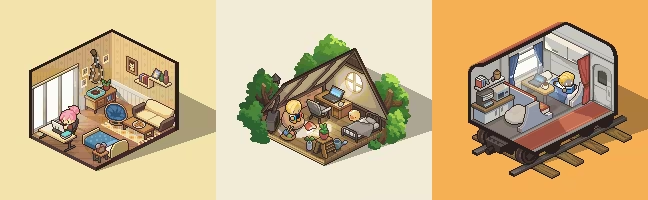
1. Your Own Cozy Workspace
Create the workspace you’ve always dreamed of!
Choose from a wide variety of rooms, furniture, and decorations.
The beautiful workspace you design will help enhance your concentration and productivity.
2. Soothing Lo-Fi Music & Ambience
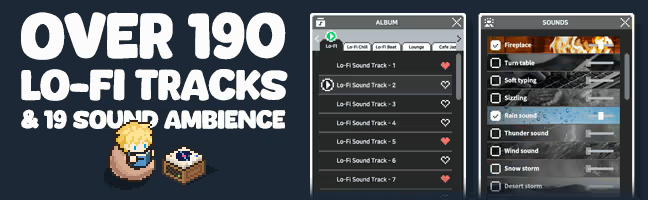
Fill your workspace with diverse Lo-Fi music genres and calming ambient sounds.
You'll soon find yourself relaxed and deeply immersed in your tasks.
3. Multiplayer Mode
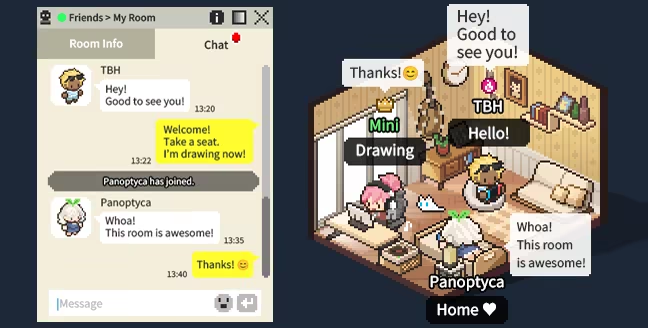
Feeling lonely while working alone?
Work together with your friends!
Invite friends to your workspace, or visit rooms shared by other players.
Chat freely with people from around the world using text, emojis, and mini notes.
For those who prefer a quieter environment, a Focus Mode is also available.
4. Innovative Desktop UI and Mini Mode
Freely reposition and resize notes and to-do lists on your desktop.
Feeling overwhelmed by the large game screen?
Switch to Mini Mode and conveniently place it in your taskbar!
5. Cute Avatars and Pets
Express your unique style with diverse fashion options, hairstyles, and accessories.
Move adorable avatars to chairs, beds, or beanbags and assign tasks.
Lovely pets like cats, dogs, and hedgehogs will keep you company.
6. Key Features
Enjoy Lo-Fi music across various genres
Mix different ambient sounds to create your perfect atmosphere
Use productivity tools such as Memo, To-Do List, and Pomodoro Timer (with both count-up and count-down modes)
Customize your own avatar with various hairstyles and outfits
Design your personal workspace with different wallpapers and furniture
Add external music files (MP3, WAV, etc.) to create your own playlist
Bookmark your favorite channels using the YouTube embedded player for easy access
Earn experience by listening to music. As you level up, gift deliveries arrive in your room
Level up to unlock new items and content
System Requirements
Will my PC run this? →Minimum
- OS: Windows 10 (64-bit)
- Processor: Intel Core i3-2100 / AMD FX-6300
- Memory: 4 GB RAM
- Graphics: NVIDIA GTX 650 / AMD Radeon HD 7750 (DirectX 11 compatible)
- DirectX: Version 11
- Storage: 2 GB available space
Supported Languages
*languages with full audio support
Latest news
AnnouncementsOfficial
Mac Version Playtest Now Open!
Hello, everyone! We are the development team of . Since the game's release, we have received many requests from players asking for Mac support. We've been following your feedback closely and working to make Mini Cozy Room available on Mac. We're excited to finally announce that development has reached a stage where we're ready to let you try the Mac version! Before officially adding Mac support, we're opening a Mac Version Playtest. \ This Playtest is being held to test whether the game runs properly and remains stable across a variety of Mac devices and environments, as well as to identify any issues we may have missed before officially supporting Mac. There is no separate application or participant selection process. Anyone can freely join through the Playtest store page. ▶ Join the Mac Version Playtest You can participate by clicking the Playtest join button on the Steam Store page below. 🔗 Mini Cozy Room : Lo-Fi — Steam Store Page \ The Mac test version is provided as a separate Playtest app, independent from the existing Windows version. This means you can participate in the Playtest even if you do not own . We hope this will be a great opportunity for those who have wanted to try Mini Cozy Room but haven't been able to because they only use a Mac. If you know any Mac users who have been interested in Mini Cozy Room, please share the news with them! Please note that DLC content is not included in the Playtest version. Only the base game content is available. \ Because the Mac Playtest is provided as a separate app from the main game, existing Windows players will also start the Mac Playtest from the beginning. The main game and Mac Playtest use separate Steam Cloud storage, so progress from the two versions will not be merged automatically. When official Mac support is added to the main game in the future, Steam may display a Steam Cloud conflict prompt. Therefore, if you currently play the Windows version, please make sure to back up your save data before part...Read full article on Community Announcements (qaz730)Patch NotesOfficial
[Hotfix] Update 1.06.03
Hello, everyone. This is the development team of Mini Cozy Room : Lo-Fi. We've discovered a few bugs in the game and have released an update to fix them.\1. Fixed an issue where character presets would not be applied after leaving and re-entering a multiplayer room two or more times.2. Fixed an issue where character sprites would disappear during multiplayer.3. Bed and “Turn Play” previews will no longer be displayed in multiplayer camp rooms without a roof.4. The Activity tab will now be disabled when no furniture has been placed in a multiplayer room.5. Fixed an issue where furniture positions would display incorrectly when moving between multiplayer and single-player rooms.6. Fixed an issue where the Bean Bag (Empty) had to be purchased in the second room.7. Fixed an issue where a furniture icon appeared in the pet pop-up and replaced it with the correct pet icon.8. Fixed an issue where some bean bags appeared in incorrect positions in the square room.Your bug reports are a huge help to the development team. If you happen to find any bugs while playing, we'd appreciate it if you could let us know on our Discord.Once again, we sincerely apologize for the inconvenience.Thank you.Read full article on Community Announcements (yunalee)Patch NotesOfficial
[Hotfix] Update 1.06.02
Hello, everyone. This is the development team of Mini Cozy Room : Lo-Fi. We've discovered a few bugs in the game and have released an update to fix them.\Fixed an issue where the buttons on the main screen would occasionally not respond when launching the game.Fixed an issue where the UI and background images would occasionally appear in incorrect positions when launching the game.Fixed an issue where adjusting the volume while muted did not disable mute, causing the game to become silent again after restarting.Fixed an issue where the character would briefly appear incorrectly when switching presets in the Wardrobe.Fixed an issue where the heart hairpin icon was displayed incorrectly.Fixed an issue where another player's character hair would appear incorrectly when switching from Mini Mode to normal mode during multiplayer.Fixed an issue where the character would not display correctly after pressing the multiplayer character preset button.Updated the game so that when a room is closed in multiplayer, the reason is displayed in a pop-up window.Fixed an issue where, after the host returned from sleep mode, guests would be removed while the host remained alone in the empty room.Fixed an issue where the host would remain in the room even after losing their internet connection in multiplayer.Your bug reports are a huge help to the development team. If you happen to find any bugs while playing, we'd appreciate it if you could let us know on our Discord.Once again, we sincerely apologize for the inconvenience.Thank you.Read full article on Community Announcements (yunalee)Patch NotesOfficial
[Hotfix] Update 1.06.01
Hello, everyone. This is the development team of Mini Cozy Room : Lo-Fi. We've discovered a few bugs in the game and have released an update to fix them.\Fixed an issue where the purchase status of furniture bought in a new room would be reset.Fixed an issue in multiplayer mode where hairstyles would display incorrectly when wearing certain hats.Fixed an issue where the "Launch at startup" setting did not work properly.Your bug reports are a huge help to the development team. If you happen to find any bugs while playing, we'd appreciate it if you could let us know on our Discord.Once again, we sincerely apologize for the inconvenience.Thank you.Read full article on Community Announcements (nugemstudio)Patch NotesOfficial
New Content, To-Do List & Optimization Update (Ver 1.06.00)
Hello, everyone!This is the development team of Mini Cozy Room : Lo-Fi.A new room, new outfits, a revamped To-Do List, and optimization improvements have been added to Mini Cozy Room : Lo-Fi.We'd like to sincerely apologize for the long gap since our last update. Our team is continuing development according to our second update roadmap, and we'll do our best to deliver future updates more quickly.Here are the update details:■ New ContentAdded a new room that supports up to 6 players in Multiplayer Mode.Added new furniture to existing rooms.Added new outfits.■ New FeaturesThe To-Do List has been revamped.Added a folder feature. (Up to 2 levels)Added the ability to move to-do items between groups.Added an Undo (Ctrl+Z) feature.Increased the maximum number of to-do items per group to 1,000.To-do items are now saved even if you close the window without pressing Enter.Added an option to set whether new to-do items are added to the top or bottom of the list.Added an option to move completed to-do items to the bottom of the list.Added a filter for completed/incomplete to-do items.Added a To-Do List export feature (CSV). (Group List > Export)MemoAdded a file export feature (TXT). (Group List > Export)Added an Undo (Ctrl+Z) feature.■ OptimizationOptimization has been carried out, reducing memory and CPU usage.■ Bug FixesFixed an issue where the game would occasionally freeze while dragging the Memo window.Fixed an issue where XP was gained even when no music, ambient sounds, or embedded music was playing.Fixed an issue where a shortcut icon would appear in the Start Menu when launching the game and disappear when closing it.Fixed an issue where achievements would not complete properly.Fixed an issue where the room navigation buttons would occasionally disappear.Fixed an issue where the music list in local albums would occasionally disappear or fail to load.Fixed an issue where hyperlinks were not displayed in the Multiplayer Mode notice.Fixed an issue where some text was dis...Read full article on Community Announcements (nugemstudio)


