

Screenshots

 Watch trailer on Steam ↗
Kinetic
Lowraiz Games · Published by Lowraiz Games · Official site ↗
Positive — 93% positive (44 reviews) · 15 achievements
Last updated 3 Oct 2026
A first-person platform game with smooth and responsive movements designed for speedrunning. In Kinetic you will jump, surf and bounce through 50 levels, switch dimensions with portals and challenge yourself on the online leaderboards!
£6.69
Lowest price we've ever recorded
View on SteamPrices can lag the live Steam store — always confirm before buying.
Price history
Action, Indie, Sports, Racing · 2025 · More £5 - £15 games
Navigate through Kinetic’s high-speed levels as you jump, surf, and bounce across dimensions. Challenge yourself and others on the online leaderboards for a thrilling action-packed experience from Lowraiz Games.
About this game
Kinetic is a first-person platform game with smooth and responsive movements. It's all about optimizing trajectories, using momentum and portals to complete each level as quickly as possible.
Dimensions
You move through three different environments:
The concrete dimension, with its standard first-person parkour moves.
The ice dimension, which lets you glide at speed, much like you would on a skating rink. This dimension is inspired by Counter Strike's surf mode and Urban Terror's icy mode but is beginners friendly.
The bounce dimension, which lets you bounce on any surface without losing momentum.
Once you've unlocked the dimensions, you'll be free to switch from one to the other whenever you like using the portal.
Leaderboards
Each level has its own leaderboard, which stores the best times of all players. It also has a “friends” section so you can compare yourself only with them!
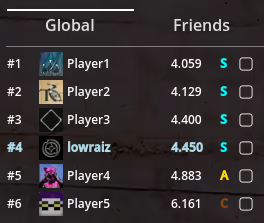
Finally, there is a global leaderboard that groups together all the times for all levels.
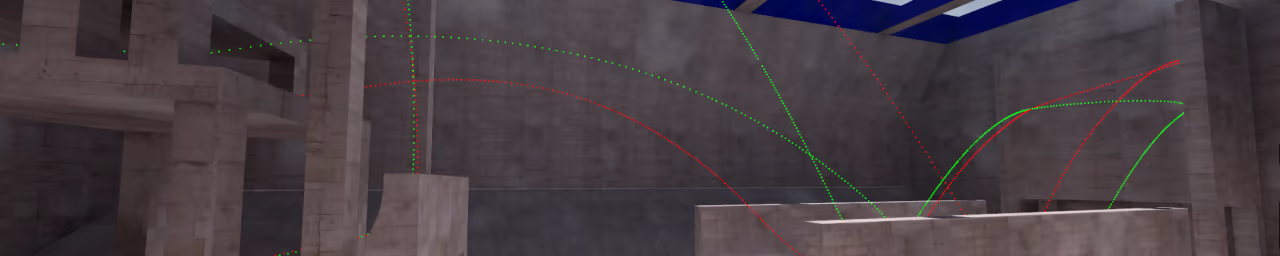
Traces / Trajectories
In a level, you can see other players trace by checking the box next to any player leaderboard entry.
Level editor
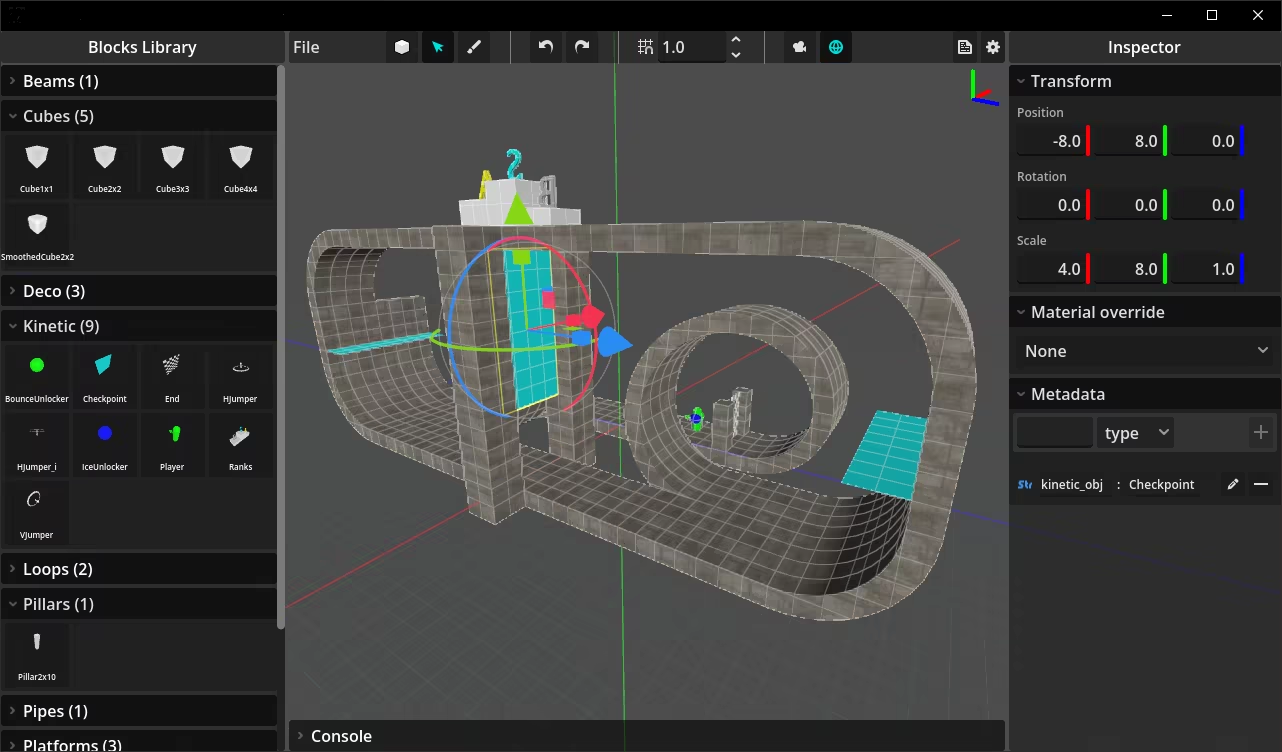
Build, share and play community maps with the integrated level editor and Steam workshop.
System Requirements
Will my PC run this? →Minimum
- Requires a 64-bit processor and operating system
- OS: Windows 10
- Processor: 2.3 GHz
- Memory: 4 GB RAM
- Graphics: 2GB VRAM, Vulkan support
- DirectX: Version 12
- Storage: 2 GB available space
Recommended
- Requires a 64-bit processor and operating system
- OS: Windows 11
- Processor: 3 GHz
- Memory: 8 GB RAM
- Graphics: 4GB VRAM, Vulkan support
- DirectX: Version 12
- Storage: 2 GB available space
Supported Languages
Latest news
AnnouncementsOfficial
Level editor and Workshop
The level editor is a standalone app that you can launch from the new "Community levels" section (Main menu).How to play community levels?Browse Kinetic workshop from Steam or directly in the game in the "Community levels" section then subscribe to the level you want to play.How to create a level?Run the level editor from the "Community levels" section and build your level using the available blocks.The editor has 3 mode:- Block mode: Quick placement on a grid- Select mode: Gizmo and inspector for more precise placement, custom textures and metadata- Paint mode: Quick placement on already placed blocks (usefull for ferns)Blocks are stored in a folder as glb files.If you want to, you can add your own blocks (glb files) in the BlocksLibrary folder and textures in the TexturesLibrary folder.("GameFolder"/LevelEditor/BlocksLibrary and "GameFolder"/LevelEditor/TexturesLibrary)It is recommanded to backup you custom blocks outside the game folder to prevent issues when updatating the game from Steam.You can also copy/paste the level editor folder elsewhere as it does not require steam to work.Export and play locallyFrom the editor: Export your level to your Documents folder in Kinetic/MyMaps.In the game: Browse your local levels from the Community levels section. You should see your level name!Click your level to play it.You can reload the level you are currently testing from the pause menu without comming back in the level selection.Publish or update a levelFrom the Community levels section, you can publish or update a level.Fill the publish form and your level will be available from the workshop with a its own leaderboard.Read full article on Community Announcements (Lowraiz Games)Patch NotesOfficial
Update Notes For Jan 21
Level editor / glb format supportRead full article on Community Announcements (Lowraiz Games)Patch NotesOfficial
Update Notes For Jan 12
Cut fix on level 19Read full article on Community Announcements (Lowraiz Games)Patch NotesOfficial
Update Notes For Dec 17
\ Level 51\ Level 52\ Finish in any dimension\ Free camera UI was blocking mouse clicksRead full article on Community Announcements (Lowraiz Games)Patch NotesOfficial
Update Notes For Dec 12
\ Fly mode / Free camera (default: 'F')\ Horizontal mirror (default: 'M')\ Portals will no longer go through the finish\ Ranks in the level selection are now automatically updated\ Ranks color in the level selection. So you can easily see your best and worst ranks\ Show/Hide crosshair from the settings\ Leaderboard requirements text\ Crosshair visibility\ Start was not consistent while pressing jump key\ Gem and jumper sounds were not impacted by effects volume\ Locked levels could be accessed from the pause menu and end screen\ Level 29 : Ferns visible in the wrong dimensionRead full article on Community Announcements (Lowraiz Games)


