

Screenshots

 Watch trailer on Steam ↗
Non-Euclidean Minesweeper
CTRL Studio · Published by CTRL Studio
Positive — 97% positive (38 reviews)
Last updated 3 Oct 2026
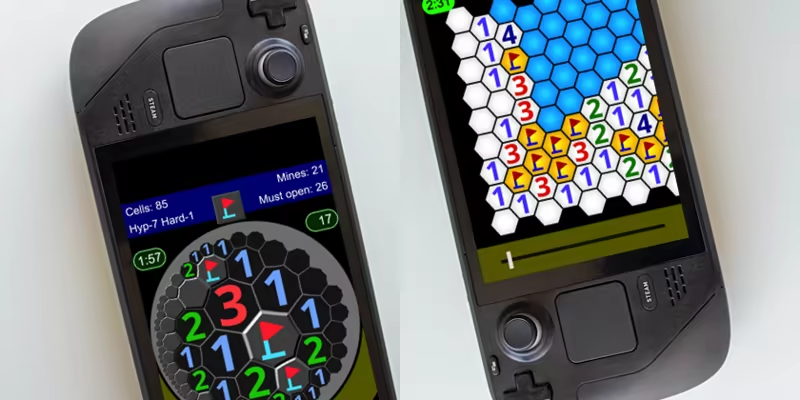
Touch interface has been supported! Non-Euclidean Minesweeper is a minesweeper game played in hyperbolic and Euclidean spaces. All the problems are absolutely solvable by logic alone. No guessing is required.
£1.59
£2.65Lowest price we've ever recorded
View on SteamPrices can lag the live Steam store — always confirm before buying.
Price history
Indie, Strategy, Casual · 2024 · More under £5 games
Navigate through challenging puzzles in Non-Euclidean Minesweeper, a strategy game where every path is solvable by logic alone. Developed by CTRL Studio, the touch interface supports intuitive gameplay across unique spatial environments.
About this game
Dive into M.C. Escher's world!
Non-Euclidean Minesweeper is a puzzle game set in non-Euclidean space, solvable using logic alone.
It is powered by a custom renderer developed for hyperbolic geometry and an original solver optimized for Minesweeper puzzles.
Players can enjoy the nostalgic classic in a warped environment and solve every challenge without relying on guesswork.
Gameplay Features
• Easy-to-understand animated tutorials.
• Pentagonal and heptagonal grids in non-Euclidean space.
• Square and hexagonal grids in Euclidean space.
• Undo feature to prevent accidental mistakes.
• Auto-save functionality for game progress.
• Light, dark, classic, and modern themes.
• Touch interface support for handheld gaming consoles.
• TATE mode support.
System Requirements
Will my PC run this? →Minimum
- Requires a 64-bit processor and operating system
- OS: Windows 10, 11
- Processor: Intel x64, AMD x64
- Memory: 4 GB RAM
- Storage: 20 MB available space
- Additional Notes: Early Windows 10 requires a runtime library. See “Community Hub > WebView2 Runtime”.
Recommended
- Requires a 64-bit processor and operating system
Supported Languages
Latest news
Patch NotesOfficial
2.7.24 Released
Improved user interface.Read full article on Community Announcements (NeDev)Patch NotesOfficial
2.7.23 Released
Improved user interface.Read full article on Community Announcements (NeDev)Patch NotesOfficial
2.7.22 Released
Improved user interface.Read full article on Community Announcements (NeDev)Patch NotesOfficial
2.7.21 Released
Improved user interface.Read full article on Community Announcements (NeDev)Patch NotesOfficial
WebView2 Runtime
To users of early versions of Windows 10: On Windows 10 PCs Microsoft Edge WebView2 Runtime needs to be installed. 1. Search “Start > Settings > Apps > Apps & features” for “Microsoft Edge WebView2 Runtime”. 2. If it's not found there, download “Evergreen Bootstrapper” from the following URL: https://developer.microsoft.com/microsoft-edge/webview2 3. Right-click the downloaded file and select “Run as administrator” to execute it.Read full article on Community Announcements (NeDev)


