

Screenshots

 Watch trailer on Steam ↗
Sticks Aim Trainer
Dragon Flame Games LLC · Published by Dragon Flame Games LLC
6 user reviews — 83% positive (6 reviews)
Last updated 2 Oct 2026
Master controller aim with Sticks - the ultimate aim trainer built specifically for controllers. Fine-tune your skills with unmatched customization, replicate any game's feel, and share settings via cross-platform workshop. Warm up properly, dominate from match one.
£8.50
Lowest price we've ever recorded
View on SteamPrices can lag the live Steam store — always confirm before buying.
Price history
Action, Simulation · 2025 · More £5 - £15 games
Sticks Aim Trainer hones your skills for perfect controller gameplay, offering unmatched customization to match any game's feel. Perfect your aim before every match.
About this game
STICKS: THE ULTIMATE CONTROLLER AIM TRAINER
Eliminate those frustrating "warm-up matches" forever. Sticks is the first aim trainer built from the ground up for controller players, offering unprecedented customization to match the exact feel of any shooter.
WHY CONTROLLER PLAYERS CHOOSE STICKS
While other aim trainers treat controllers as an afterthought, Sticks puts controller precision first with:
Unrivaled Customization - Over 130 controller-specific settings with input curve precision at every 1% of analog movement
Game-Matching Perfection - Replicate the exact feel of any shooter with our advanced Curve Editor
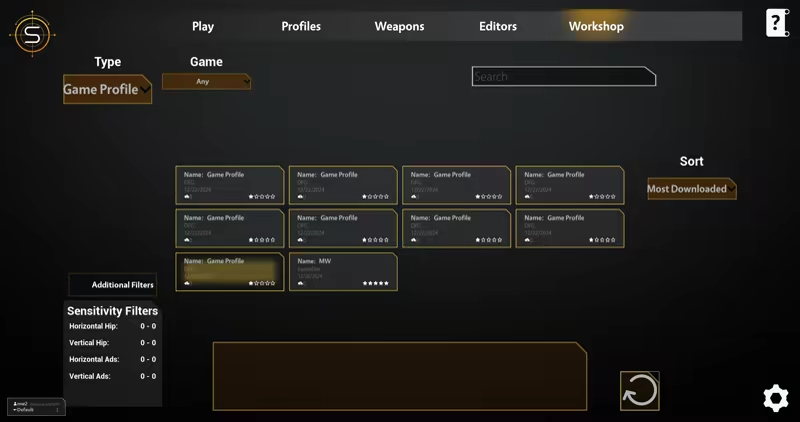
Cross-Platform Workshop - Share and discover community-crafted settings, recoil patterns, and training routines
Complete Aim Assist System - Master friction, magnetism, motion tracking, and aim compensation mechanics
TRAIN EXACTLY HOW YOU PLAY
Whether you're a first-person or third-person shooter enthusiast, Sticks adapts to your style:
Create custom input curves matching any game's unique controller feel
Design pattern-based or procedural weapon recoil for authentic practice
Build structured training playlists for consistent improvement
Configure aim assist variables to match your favorite titles
POWERED BY THE COMMUNITY
With only two developers behind Sticks, our cross-platform workshop is the heart of the experience. Players across PC and console can share optimal settings for different games, aiming styles, and training routines—creating a constantly evolving ecosystem of controller excellence.
FOR CONTENT CREATORS & COMPETITIVE PLAYERS
Share custom profiles and training routines with your audience
Achieve consistent performance across multiple games
Create and distribute specialized playlists through the Workshop
SEAMLESS INTEGRATION
Fine-tune your settings in real-time alongside your favorite games. With dual-screen support or Windows Snap, make adjustments that instantly transfer to your gameplay experience.
START DOMINATING FROM YOUR FIRST MATCH
Why waste time "warming up" in actual matches? Spend 15-30 minutes in Sticks before your gaming session and hit peak performance from the moment you launch your favorite shooter.
Elevate your controller game. Master your aim with Sticks.
System Requirements
Will my PC run this? →Minimum
- Requires a 64-bit processor and operating system
- OS: Windows 10 (64-bit)
- Processor: Intel Core i3-6100 / AMD Ryzen 3 1200
- Memory: 8 GB RAM
- Graphics: NVIDIA GTX 1060 / AMD Radeon RX 580 (4 GB VRAM)
- DirectX: Version 11
- Storage: 10 GB available space
- Additional Notes: Requires a controller for optimal performance
Recommended
- Requires a 64-bit processor and operating system
Supported Languages
*languages with full audio support
Latest news
AnnouncementsOfficial
Battlefield 6 Converter Now Live!
Patch NotesBattlefield 6 Converter!Go to Game Profiles and create a Battlefield profile.Currently only supports standard and linear curves; more curves will be added as they are mapped and tested.Aim assist sliders will be added after more thorough testing.Quality of LifeSimple UI has returned! To use it, please create a new profile — we couldn’t convert old profiles due to lost advanced settings.Increased scoring scalar so 100k is more attainable.BugsFixed FPS showing as 35 in new tasks.Fixed random crashes when completing a task.Fixed workshop saying "tasks" instead of "game profiles" when creating a new game profile.RoadmapContinue to analyze player task performance for leaderboards, scoring system adjustments, and feedback system improvements.Read full article on Community Announcements (Dragon Flame Games LLC)AnnouncementsOfficial
Task and Analytics Overhaul
Patch Notes Tasks System Overhaul!We have converted to using Sticks Studio for all new tasks going forward so now the community can build and share tasks! The old tasks are still available, but analytics may be inconsistent.We have 20 tasks that come pre-installed, players can delete them if they don’t like them and go get different ones from the workshop as players upload tasks.Modifiers had a complete overhaul, and players can now adjust scale, health, speed and game time. There are also dynamic versions of all of these settings so players can set a minimum and maximum value for the target to use when spawning. Adaptive values are on the roadmap!Modifiers are percentage based so players should be able to adjust them to their needs for optimal training.Tasks use the new analytics system. New Analytics System!Overhauled the analytics system. Note: Legacy tasks may have inconsistent results as this was built with the new task system in mind.There is now a dedicated analytics menu that shows all task historical values along with individual task history charts.Flicking analytics include accuracy, time to target, under and overshoot values, precision, and more.Tracking analytics now include accuracy, average time on target, bot juke recovery times, under and overshoot times, and more.We also now track analog stick input per frame and display that in a chart to show stick input usage throughout a task.We are analyzing all of these analytics over the next few months to get a good baseline for future calibration level, ranking, and leaderboards. Sticks Studio Now Live!Added the ability to upload tasks, bots, and levels to the workshop now.Tasks now have a required tag for upload either flicking or tracking. This lets the system know what analytics and scoring system to use. So, tag your task accordingly!Levels now have an optional “Open Source” tag that will allow others to reupload the level after making changes. We wanted to try and eliminate from someone stealing others...Read full article on Community Announcements (Dragon Flame Games LLC)Patch NotesOfficial
May Update
Patch Notes Quality of Life Players can now skip tasks in the playlist from the pause menu. Removed menu drop downs and now show them as submenus, hopefully that makes locating menus easier. Removed workshop menu when creating curve and playlists. Users can go directly to the workshop screen for that now. Custom and workshop playlists show first when going to select a playlist to play. Resized parts of the workshop screen to remove UI clipping. Adjusted workshop info screen to wrap text to better handle long names and multiple tags. Sticks Studio Changes and Fixes Changed how tasks work so now when deleting a task it should not overwrite the task above it. Fixed an issue where the first 2 bots would be bugged. Updated descriptions for bot flying movement. Fixed issue when selecting test task that default values would be loaded on the first launch. Fixed issue where multiple bots assigned to a group would not save and load correctly. Bugs Fixed not being able to navigate from featured to favorite task. Fixed an issue when going to edit or make a crosshair that R3 would prompt to delete crosshair on all menus. Updated all prompts to now show the correct name and description instead of the default “character” description. Fixed an issue on Steam where users would lose navigation if creating a new profile and pressing the space button. Fixed first playlist in the playlist profiles list losing its save name. Fixed issues where random playlists would be overwritten when uploading to the workshop. Fixed last crosshair not saving when closing and relaunching the game. Roadmap Implement feedback from Stick’s Studio Beta. Rework playlist system. Add Apex Legends ALC converter. Rework scoring system to give better analytical feedback and work with Stick’s Studio.Read full article on Community Announcements (Dragon Flame Games LLC)AnnouncementsOfficial
Steam Release!
Sticks Studio Beta! Create Custom Bots Create bots that navigate waypoints or have strafing behaviour such as random, mirror, or counter strafing. Choose whether you want the bot to fly or be on the ground walking then setup jump and crouching behaviour. Create Custom Levels Create new levels in game and designate spawn points, waypoints, and more. Create Tasks Make a task using the bots and levels created. Tasks, bots, and levels are all independent of each other so therefore interchangeable. Bugs Fixed not being able to navigate back to featured tasks if there are favorited tasks. Fixed an issue where Black Ops 6 was not converting square input correctly. Roadmap Implement feedback from Stick’s Studio Beta Rework playlist system Add Apex Legends ALC converter Rework scoring system to give better analytical feedback and work with Stick’s StudioRead full article on Community Announcements (Dragon Flame Games LLC)AnnouncementsOfficial
Rivals and BO6 Converters!
Patch Notes New Converters! Marvel Rivals Rivals is now available as a game profile. Black Ops 6 Black Ops 6 and the new Warzone settings are now available as a game profile. We did leave the legacy settings just shifted it down further towards the bottom. Game Improvements Added a view mode option in Hipfire settings. This will allow players to select whichever view mode they prefer (1st or 3rd Person) and this is set automatically when creating a game profile. Added more detailed stick input information in the curve editor level. This will now show raw input to 2 decimal places and input going into the curve. This should allow for more accurate curve adjustment. Bugs Fixed audio settings not making any change to the SFX and UI channel.Read full article on Community Announcements (Dragon Flame Games LLC)


