

Screenshots

 Watch trailer on Steam ↗
Drone Sector
Icosphere · Published by MicroProse Software · Official site ↗
Content notice: Military combat involving firearms and explosions, resulting in enemy casualties. There is no depiction of blood, gore, or sexual content. Players engage in tactical missions where combat is between military forces. The game does not include depictions of drug or alcohol abuse, sexual assault, or self-harm.
Very Positive — 89% positive (389 reviews)
Last updated 2 Oct 2026
Drone Sector is a futuristic gunship game. Provide close air support by firing variety of weapons at the enemies and guide your allied troops via commands. Keep your troops alive, complete objectives, collect resources and recruit engineers. Research better weaponry for the gunship and the troops.
£13.72
£15.25Lowest price we've ever recorded
View on SteamPrices can lag the live Steam store — always confirm before buying.
Price history
Action, Simulation, Strategy, Early Access · 2026 · More £5 - £15 games
In Drone Sector, pilot your gunship through strategic missions while managing allied troops. Use a variety of weapons to support your squad and advance by collecting resources and recruiting engineers.
About this game
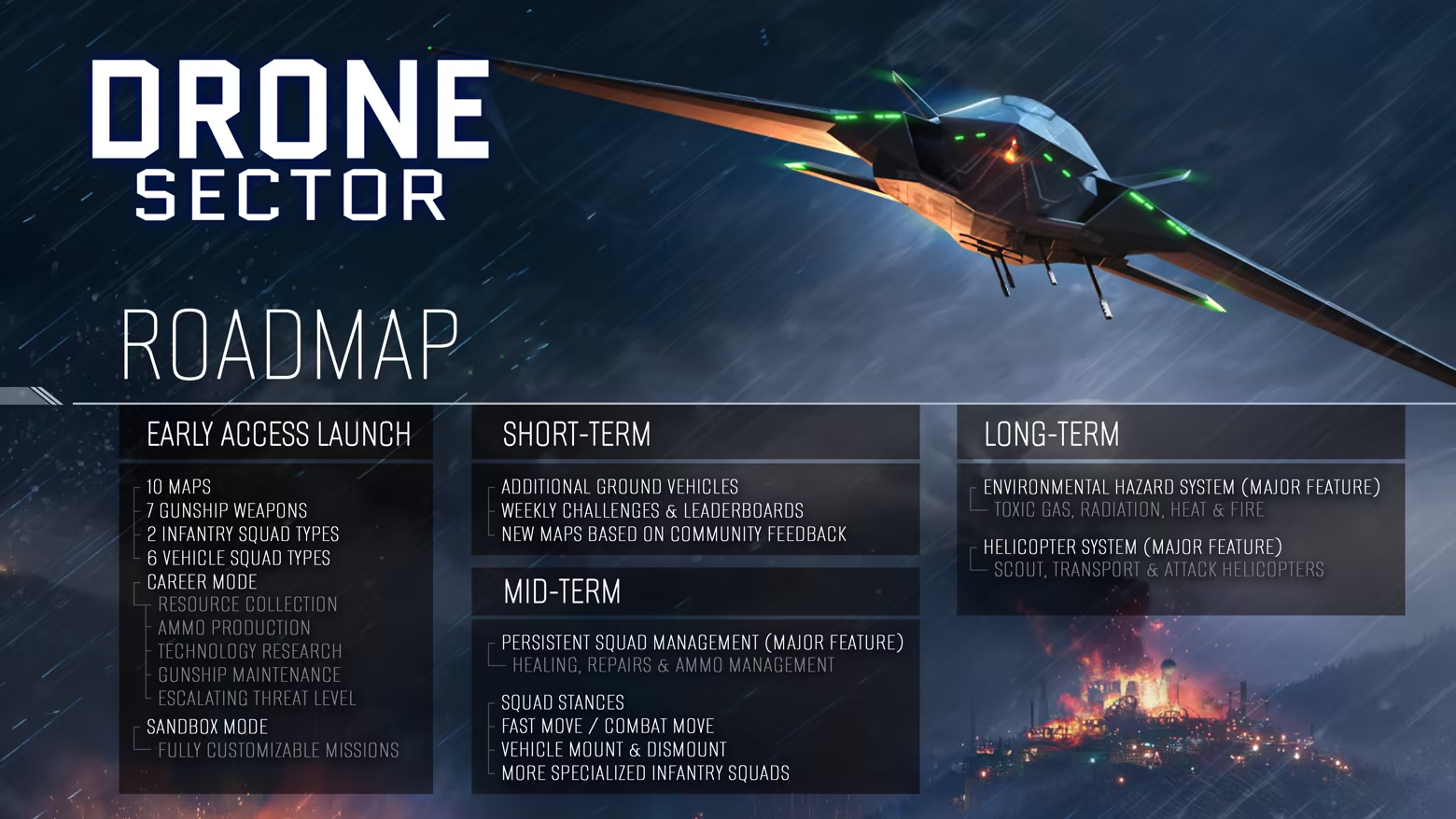
Roadmap
About the Game
Futuristic Drone Gunship
Drone Sector fuses the gunship close air support role with the drone's observation and mission command. Inspired by the real-life AC-130 gunship and MQ-9 Reaper drone, it merges these powerful roles in a futuristic setting, where advanced technology and heavier firepower enable you to take on more complex and dangerous missions. While not a pure military simulator, the focus remains on tactical planning and execution, with greater flexibility in mission design and weaponry.
Mission Control
Guide your squads as they advance through hostile environments to achieve mission objectives. Command with precision, helping them avoid traps and eliminating high-priority threats with your overwhelming firepower. Outnumbered by enemy forces, you’ll need to maximize your technological superiority to turn the tide.
Mission-to-Mission Progression
During each mission, you’ll need to make strategic decisions about resource gathering. Send your ground squads into buildings or key areas to collect vital resources and research documents—but this comes with risk. Stay too long, and you may lose your squad to overwhelming enemy forces. Decide when to extract and when to push your luck for valuable rewards.
Between missions back at base, upgrade your gunship, squads, and weapons. Manage your ammo production and research new technologies to improve your chances in the field.
Key Features
Fluid, responsive gunship weapon controls
Multiple camera modes: color, night vision and thermal vision
Commanding self-sufficient squads on the ground
A variety of infantry and armored unit types
Resource collection and ammunition management
Weapon research and manufacturing
Squad building and upgrades
Handcrafted levels with randomized missions
System Requirements
Will my PC run this? →Minimum
- OS: Win 10, 11 (64 bit)
- Processor: AMD Ryzen 5 2600X / Intel Core i5-8600K
- Memory: 8 GB RAM
- Graphics: 4 GB VRAM, AMD Radeon RX 480 / Nvidia GeForce GTX 1650
- DirectX: Version 11
- Storage: 5 GB available space
Recommended
- OS: Win 10, 11 (64 bit)
- Processor: AMD Ryzen 5 5600X / Intel Core i5-12600
- Memory: 16 GB RAM
- Graphics: 8 GB VRAM, AMD Radeon RX 6700 / Nvidia GeForce RTX 3060
- Storage: 5 GB available space
Supported Languages
*languages with full audio support
Latest news
Patch NotesOfficial
v0.4.2 - Reinforcement Hotfix
Some maps had issues with reinforcement spawning when allied forces were present. These changes should make reinforcement spawning more reliable on affected missions.ChangedAdded more reinforcement spawn points to Dry Foothills to better support missions with allied forces.Expanded the available landmass and road network on Coastal Refinery, allowing for more reinforcement spawn points and better support for allied forces.FixedCareer missions now only generate frontline layouts that leave valid spawn and reinforcement points available for both sides.Read full article on Community Announcements (Klimbi123)Patch NotesOfficial
v0.4.1 - Hotfix
v0.4.1 - HotfixThis hotfix fixes allied anti-air vehicles being able to engage the player's gunship in Career mode.ChangedAllied forces in Career mode now use a separate unit composition from enemy forces. This will generally result in slightly smaller allied forces.FixedAllied forces no longer spawn anti-air vehicles in Career mode.As an additional safeguard, allied anti-air vehicles will no longer target the player's gunship.Read full article on Community Announcements (Klimbi123)AnnouncementsOfficial
v0.4.0 - Allied Defense
Ally TroopsSo far, Drone Sector has mostly been limited to missions where a small number of player squads are heavily outnumbered. The gunship helps even the odds, but it still means the player has to keep a close eye on their squads and react quickly whenever enemies start surrounding them.To open up more types of missions, I added computer-controlled allied troops.They operate very similarly to enemies on the map and are not under player control. Depending on the mission, there can be quite a few of them. This means the allied force can keep the enemy occupied while your own squads focus on objectives, flanking, ambushes, or other support tasks.It also gives the player more room to focus on the gunship. Your own squads are still the ones you need to keep safe, while the allied troops can take part in larger firefights without requiring constant attention. You can support them with the gunship when useful, but you don't need to keep every allied unit alive.Missions with allied troops also show an expected frontline on the pre-planning map, separating the areas held by each side.Protect ObjectivesI also added a new objective type: Protect.Destroy and Capture objectives give the player quite a lot of freedom over when and how to complete them. Protect objectives are more restrictive. Once one becomes active, the target has to survive for several minutes, and the objective fails if the enemy destroys it.Unlike Capture objectives, there is no way to speed up the timer by sending more troops. Once it starts, the player has to hold the area until the objective is complete.Enemies will actively push towards Protect objectives and destroy them if given the chance. Most Protect objectives are placed inside allied territory, so the enemy should not immediately be on top of them. There is also a short 20-second grace period before enemies can start attacking the target, giving the player time to react if hostile units are already nearby.This creates a different kind of combat...Read full article on Community Announcements (Klimbi123)AnnouncementsOfficial
v0.3.0 - Spotting & Accuracy
Spotting & AccuracyOne of the biggest issues infantry has had in Drone Sector is dying too quickly. In some situations that makes sense. They aren't super soldiers, and if a shell lands next to them, they will probably die.The problem was broader than that, though. In infantry-to-infantry firefights, entire squads could get wiped out within seconds, even at ranges over 100 meters. A big reason was that infantry effectively always hit their shots and dealt considerable bullet damage. The system did not really account for the fact that most shots in a firefight should miss.The new system has a few layers to it.Before any shooting happens, units first have to spot potential targets. Previously this was mostly just a line of sight check. If an enemy was visible and within a certain distance, they were spotted almost immediately, regardless of what the target was doing or how visible it actually was.Now line of sight is only the prerequisite. From there, visibility depends on the target itself. Moving units are easier to detect, while prone and stationary infantry are harder to spot. Large vehicles are naturally much easier to see than individual soldiers. Firing a weapon also makes a unit much easier to detect for a short time.Spotting also depends on the observer. A stationary unit can focus more on watching its surroundings, while a unit on the move takes longer to detect targets.This also gives me more room to differentiate units in the future. For example, troops with NVGs could spot enemies faster at night, while suppressed weapons could make firing less revealing.Once an enemy is spotted, accuracy uses a separate but similar system. The longer a target has been observed, the easier it becomes to hit. Firing at the same target also gradually improves accuracy against that specific target. If an AT crew misses its first shot at a tank, it should have a much better chance of landing the second one.Movement matters here too. Moving targets are harder to hit, and firin...Read full article on Community Announcements (Klimbi123)Patch NotesOfficial
v0.2.1 - HUD & Vehicle Improvements
v0.2.1 - HUD & Vehicle ImprovementsImproved unit tracking and HUD readability, alongside better vehicle driving and collision avoidance.AddedUnit type icons now appear when zooming far out, making it easier to see what enemy types are where.Icons of the same unit type merge into larger grouped icons when close together.Replaced the old unit icons with a new, simpler set designed specifically for HUD use. The new icons are also packed into a shared texture atlas for better performance and smaller file size.ChangedUnit tracking boxes now fade out when zooming far out, keeping the new unit icons clear and readable.Objective markers are smaller to reduce HUD clutter and conflicts with unit tracking icons.Removed water kill zones for vehicles. Vehicles that enter water now attempt to drive out or, if necessary, teleport back out. Accidental water deaths were more frustrating than useful. Water hazards may return later once vehicle navigation around water is more reliable.FixedImproved vehicle driving, especially turning confidence and behavior around obstacles such as trees.Improved vehicle collision avoidance. Stationary vehicles are now treated as fully blocked paths, while nearby moving vehicles are considered together when determining how to navigate around traffic.TechnicalReworked unit tracking box rendering. Much of the work has moved from the CPU to the GPU, improving performance when many tracked units are visible.Tracking boxes are now rendered procedurally instead of using UI textures, making the system more flexible for future HUD changes. Their appearance has changed slightly as a result.Read full article on Community Announcements (Klimbi123)


