

Screenshots

 Watch trailer on Steam ↗
Kill The Lights!
Bonsai LLC · Published by Bonsai LLC
1 user reviews — 100% positive (1 reviews) · 22 achievements
Last updated 28 Sept 2026
How many clicks does it take to Kill The Lights?!?!
DJCTQ lFull Controller Support
£3.39
Lowest price we've ever recorded
View on SteamPrices can lag the live Steam store — always confirm before buying.
£3.39
Price history
4 Sept 2026Lowest: £3.39 · Highest: £3.399 Oct 2026
Strategy, Casual · 2024 · More under £5 games
Engage in strategic clicks to outwit the darkness in Kill The Lights!, a casual puzzle game from Bonsai LLC that tests your tactical thinking.
About this game
Kill The Lights! is a puzzle game where you toggle blocks in a particular pattern in hopes of turning them all off. Clicking one spot toggles on or off all the lights around it in a specific pattern like a "+" or "x". Relax and get your flow on by clicking blocks until all the lights are out in Normal mode. But if you're up for a challenge, take on the computer who turns on blocks while you're turning them off. With 6, yes, 6! difficulty modes, can you beat what is labeled as "Literally Impossible?"
In Kill the Lights! When you click on a block that block and all blocks around it, in a particular pattern, will toggle.
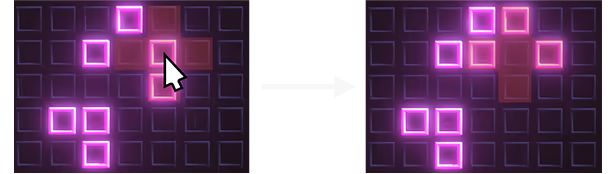
By clicking on the square in the middle of the example, the blocks to the left, above, and right turn on, while the middle and bottom turn off.
Each one provides a unique challenge. Can you beat them all?
You can play in two exciting Game Types, Arcade and Normal.
If you're up for the challenge (I dare you), you can take on the computer in various difficulty levels ranging from "Very Easy" to "Literally Impossible." At your disposal though are three purchasable special moves.
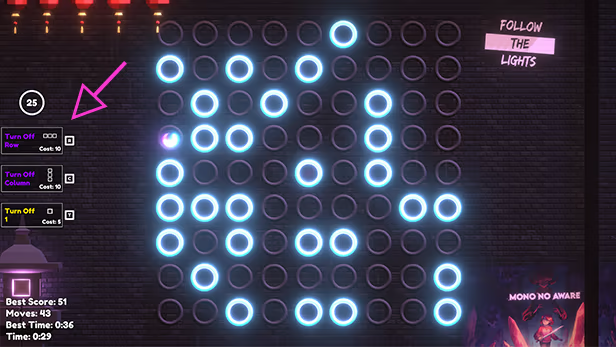
As you play you will gain up to 25 moves to spend on these specials. How many moves will it take you to beat the computer? I dunno, you're just gonna have to find out!
Note that 50% of all profit will be donated to various Environmental Organizations
How Blocks Work:
In Kill the Lights! When you click on a block that block and all blocks around it, in a particular pattern, will toggle.
By clicking on the square in the middle of the example, the blocks to the left, above, and right turn on, while the middle and bottom turn off.
Shapes:
There are 4 different shape puzzles.- Plus
- X
- Plus Across The Board
- X Across The Board
Each one provides a unique challenge. Can you beat them all?
Game Types
You can play in two exciting Game Types, Arcade and Normal.
- Arcade - The devilish computer explodes bombs in all kinds of shapes to keep you from turning everything out
- Normal - Relax (kinda) and try to turn off all the lights without any evil interruptions.
Arcade Mode
If you're up for the challenge (I dare you), you can take on the computer in various difficulty levels ranging from "Very Easy" to "Literally Impossible." At your disposal though are three purchasable special moves.
- Turn Off Row - Turns off all blocks in a single row
- Turn Off Column - Turns off all blocks in a single column
- Toggle 1 - Toggles 1 block on or off
As you play you will gain up to 25 moves to spend on these specials. How many moves will it take you to beat the computer? I dunno, you're just gonna have to find out!
System Requirements
Will my PC run this? →Minimum
Minimum:
- OS: Windows 10
- Processor: Intel Core i5 or AMD Equivalent 64-bit
- Memory: 4 GB RAM
- Graphics: Intel HD Graphics
- Storage: 500 MB available space
Recommended
Recommended:
- Storage: 500 MB available space
Supported Languages
English
Latest news
AnnouncementsOfficial
Happy Official Launch Day!
Woot! Today we celebrate the launch of the first (of many) games for Bonsai LLC! The goal of our company is to make fun, cool, interesting, and/or thought provoking games and donate half our profit to Environmental Organizations. The more games we sell the more we can help our planet in crisis! Check out some great Environmental Organizations we plan on donating to while your here! Clean Air Council Sunrise Movement Clean Air Task Force Terra PraxisRead full article on Community Announcements


