

Screenshots

 Watch trailer on Steam ↗
Chess Twist
Guillaume Fradin · Published by Guillaume Fradin · Official site ↗
Last updated 28 Sept 2026
A mind-bending chess game, where straight lines turn and diagonals fork. Hundreds of different boards with new strategies hidden in plain sight.
Free
Strategy, Casual · More free games
Explore mind-bending strategies in Chess Twist, where every move challenges your thinking. Navigate through diverse boards designed by Guillaume Fradin to uncover hidden tactics in this casual yet strategic game.
About this game

What Is Chess Twist?
It is a chess variant on an irregular grid.
The moves are the same, but the board is very much not the same. Forget straight lines, it's distortion all the way down.
Features
- Hundreds of procedurally generated boards
- Play against a bot
- Play with a timer
- Multiplayer on the same device
- Multiplayer online in public lobbies
- Multiplayer online with private links you can share with friends
- Preview your moves
Hundreds of Boards
Generate new boards on the fly until you find one you like.
And you can always preview your moves, to help strategize:
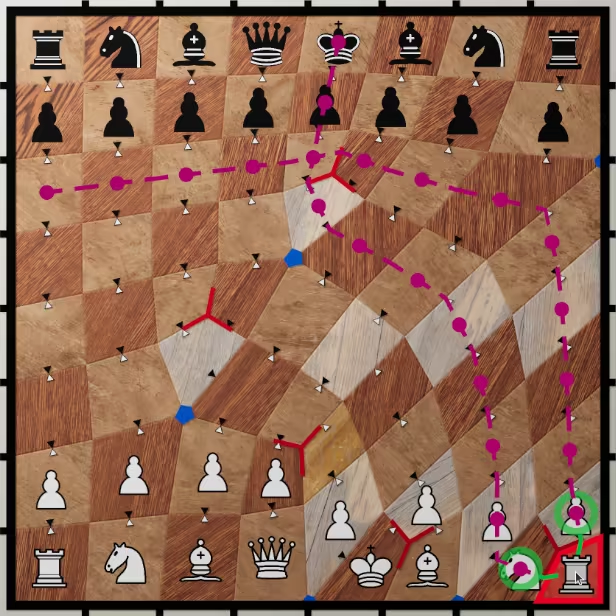
Look at how twisted some moves can be
The white rook can potential put the opponent in check by just moving a pawn and knight:
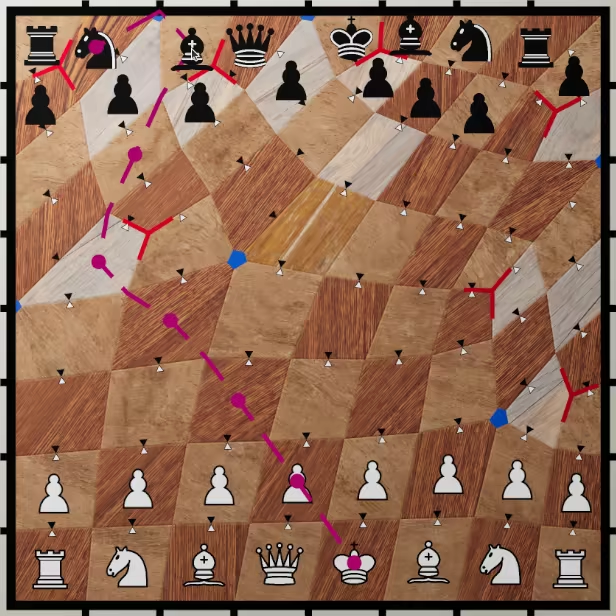
And only a pawn protects the king from the black bishop:
Multiplayer
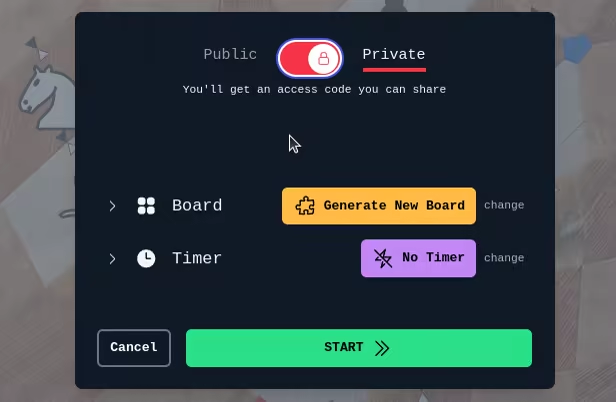
You can play together on the same device, or online in public or private.
Become a stronger Chess player
An unconventional game is perfect to help you develop unconventional strategies.
- Improve your skill of detecting new moves.
- Get out of the habit of relying on past/learned games.
- Notice new types of attacks before they capture your pieces.
Remember how Rocky ran on top of a mountain to train for his match against Drago? In the same way, play Chess Twist to defeat Magnus!
System Requirements
Will my PC run this? →Minimum
Minimum:
- OS: 10
- Processor: all
- Storage: 300 MB available space
- Additional Notes: it's a very light game, it should run just fine
Supported Languages
English
Latest news
AnnouncementsOfficial
You now have Puzzles!
I've just added puzzles to Chess Twist. Those will allow you to play quick games, without requiring the same time commitment as a typical chess game. There are currently 1200 different ones, of various difficulties. And I plan to add many more in the coming weeks and months. Some puzzles should be really easy, giving a good taste of the new strategies in Chess Twist. And others should really challenge your gears. For instance, in this one below, you can checkmate with black in 4 moves or less. Can you see how? {STEAM_CLAN_IMAGE}/44841690/1c26061f49fecfd05bb45aba3a7372003e7ba8d1.jpgRead full article on Community Announcements (gui)Patch NotesOfficial
Demo Update #2
Hey hey. I'm still working on the feedback received from the demo last week. Pawn moves One that stood out was regarding the movement of the pawns. My initial reaction was not to change what was already in place, as it seemed to me to be working just fine. How pawns moved before? The way it worked was that the pawns would follow the exact same rules as classic chess, which is that they can only move forward. And the forward direction in the boards generated here was toward the edge of the tile that was the most facing the opposite end of the board. One drawback of that is that some tiles are placed in a way that makes it hard to see which edge it is. So I added arrows on every tile to show that direction. It worked, but it also made the board visually cluttered. That's no good. The suggestion The suggestion that was brought up to resolve that is to make the pawns not move forward, but instead follow the track on which they start, similarly to a rook. If that tracks reaches the opposite end of the board, it's great, the pawn can promote to a piece just fine. But if the track does not reach it, and instead reach the left or right side of the board, then the pawn can turn and follow the next track starting at that tile, until it can then reach the opposite end. What is a pawn captures? And if the pawn captures, it automatically changes track. Although that's where it can get ambiguous, as there can be multiple tracks it can follow. When that happens, the track that can reach the end with the least number of moves will be the one. And there are actually cases those multiple tracks can reach in the end in the same number of moves. In those rare cases, the pawn will have a choice on which it can take when it moves. Phew, it wasn't an easy update. But it should hopefully make more sense when you play it. We still need arrows Now, it still isn't clear which direction pawns can move when you just look at the board. You still need arrows. But a good news is that we don't need...Read full article on Community Announcements (gui)Patch NotesOfficial
Demo Update #1
Last week end was a blast, the demo got popular on twitter and reddit. Thanks a ton to everybody who played the game, and especially to those who took the time to provide feedback. So here are fixes for 3 issues that got mentioned: Board Look The previous textures used for the board were too contrasted. This was a bit distracting and made the board not as easy to read as it could be. So I looked at this again, tested with several new textures, tweaked some colors and we now have something that is a bit more muted, while still preserving the wood look. You can see in this screenshot the previous one on the left, and the new one on the right. {STEAM_CLAN_IMAGE}/44841690/210d5a34977fb78ba67458e4c05f74d6d1736d21.jpg More Obvious Tutorial Many players were eager to start playing when opening up the game, and skipped the tutorial. Honestly, I completely understand, I often do the same. But some skipped it so fast they didn't realise there was a tutorial at all. So I've added a more prominent button, to at least let you know that there is one, and that it may be useful to read it through. This way, you can at least start it when you want. {STEAM_CLAN_IMAGE}/44841690/04ab82f358e114dd24bec7b3f62510263534afd6.png Although this doesn't change the fact that tutorials are pretty boring. Ideally there would be no need for one. Or at the very least, information would be slow dripped to the players without interrupting the flow. But since here you need to know how each piece can move from the start, it still feels like a dedicated tutorial is hard to avoid. We'll see, maybe there is a better way, I'm still thinking about it. Castling Rule Fix In chess, there are a bunch of criteria on wikipedia that defines if castling is allowed or not. When I implemented this move, I looked those criteria up to be extra sure of what I had to put in code. And I looked them up again. And again. And then I was pretty sure I got that right. But turns out I got overzealous and added a rule that did no...Read full article on Community Announcements (gui)


