

Screenshots

 Watch trailer on Steam ↗
Crop and Claw
Dinoleaf · Published by Dinoleaf · Official site ↗
Positive — 95% positive (20 reviews) · 12 achievements
Last updated 28 Sept 2026
Crop and Claw is a classic-style JRPG all about dragons. Delve into swamps, temples, and ruins and fend off flora, fauna, and unsavory dragonfolk.
£4.99
Lowest price we've ever recorded
View on SteamPrices can lag the live Steam store — always confirm before buying.
Price history
Adventure, Indie, RPG · 2024 · More under £5 games
Embark on a quest through treacherous swamps and ancient ruins in Crop and Claw, an indie RPG where you command a dragon.
About this game
 CROP AND CLAW
A miasma consumes Garden.
The decay brings lawlessness
and madness to the land.
Rogues, cults, and evil
plantlife rule the realm.
Crop and Claw is a classic-style JRPG centered around dragons in a lush realm known as the "Garden". The plantlife has gone awry, bringing an era of struggle across the realm. One dragon sets out on adventure, for reasons only known to themselves, to see if the Garden could be restored.
 KEY FEATURES
* Multiple dragon types to take the role of, each with their own unique specialties.
* A continent stuffed with dungeons and secrets to find.
* A simple and classic combat system focused on resource management.
* Dragons, dragons, dragons!
 REPLAYABLE
The continent of Crop and Claw is vast. With multiple playable dragon types, a timer and step counter, and few restrictions on the player's routes, Crop and Claw is feasible for challenge runs and alternate approaches.
If you've already gone through the game and scavenged every corner, try a Randomized run which shuffles enemies and loot!
 CLASSIC AND REPAINTED
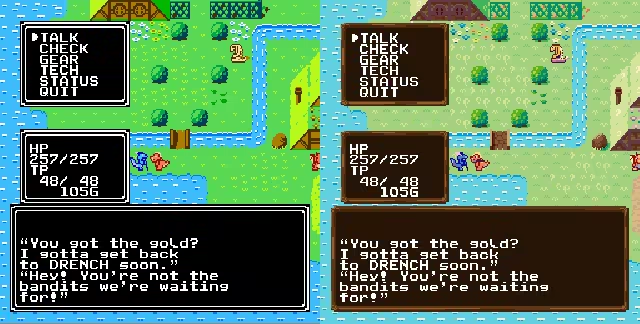
Is your computer not powerful enough for more than a few colors? Switch to Classic mode in the options for a cosmetic change back to the original visuals and music.
System Requirements
Will my PC run this? →Minimum
- Requires a 64-bit processor and operating system
- OS: Windows 10
- Memory: 1 GB RAM
- Graphics: OpenGL 3
- Storage: 512 MB available space
Recommended
- Requires a 64-bit processor and operating system
- OS: Windows 10
- Memory: 2 GB RAM
- Graphics: OpenGL 3/Vulkan 1.0
- Storage: 512 MB available space
Supported Languages
Latest news
AnnouncementsOfficial
Crop and Claw v1.3 + macOS version
Crop and Claw v1.3After some time, a few tricks were backported from Crop and Claw 2 to its prequel. There's a number of tweaks that makes overall game more forgiving, but a few big overhauls that should help with long term stability.Since there's a lot to go through, Crop and Claw will be discounted for a week, for fun.MacOS and ARM64 Linux SupportAlthough not notarized due to Apple being expensive and not worth that much effort, MacOS builds are now available and provided. The runtime itself supports both Intel and Apple Silicon, and is tested to have booted on both an Intel iMac and M4 Macbook Air.Linux was already the primary target, being what we develop on and what powers SteamOS and the Steam Deck. With the upcoming Steam Machine being a primary target for DInoleaf projects, first class Linux support will remain.Linux on ARM64, such as the Raspberry Pi or retro gaming handhelds such as Anbernic through Portmaster, also have first class support. The .pck file provided with the game files can be used without Steam on such devices, using a Godot ARM64 Linux runtime for v4.2.2. Knowing Valve's announcement of the Steam Frame running on ARM64 SteamOS, a separate release will be made to supply a runtime out of the box.Even in Windows 10, Crop and Claw is unstable despite prior attempts to debug it. With Windows becoming increasingly difficult to work with, updates are still provided, but it's unfortunately not really possible to fix due to not being able to diagnose the issues that only occur on Windows but not on any of the Unix-based platforms.Steam DecouplingPrior to this update, the toolkit for Steam had annoying issues that made it complicated to export to both Steam and itch + ARM64 Linux. Thanks to some devious trickery found during Crop and Claw 2's development, a workaround was made so that the .pck game data should now be identical with versions between Steam and non-Steam builds. Only the executable runtime will differ.This also means that no matter wher...Read full article on Community Announcements (Dinoleaf)AnnouncementsOfficial
Crop and Claw Anniversary Sale
Crop and Claw was released on Greenery Day 2024. To celebrate, it's now on sale for 50% for the week. It's gone through a few updates, but aside from the fact Windows still likes to crash it, it's stable on anything else we've run it on. Since release, Crop and Claw has gotten updates for: Repainted mode, with higher detailed graphics and MIDI music to compliment Classic mode with its Famicom graphics and music. A randomizer for items and dungeon enemies. A bootleg localization for April Fool's Day 2025. A fair number of bug fixes and small quality of life touches. A free release on Portmaster for playing on low-end Linux powered devices. A small presskit on Dinoleaf's website. Additionally, a retrospective was thrown together some time ago now. https://www.youtube.com/watch?v=QuJHSfEPflY Crop and Claw 2 Aside from fixing that some year, and maybe a possibly overlooked bug or two that gets caught over time, it's probably as final as it's going to get. Thus, we may as well spotlight that Crop and Claw does have a sequel in development, which is available to be wishlisted on Steam now. A demo will be coming sometime within the oncoming months. Crop and Claw 2 will be greatly increasing the scope, and development's been focused on getting the core working. It features many cut ideas of the prequel, more ways to play and replay, and is far more accessible to the average player without sacrificing the freedom of Crop and Claw 1. https://store.steampowered.com/app/3065270/Crop_and_Claw_2/ Feel free to share with other dragon adventure connoisseurs. While you wait, you can read the work-in-progress novella at https://dinoleaf.com/pages/writing/ which takes place between Crop and Claw 1 and 2. It is currently unfinished but in beta-reading. You can also follow development most closely on Dinoleaf's Discord at https://discord.gg/D3ttpCkmyk.Read full article on Community Announcements (Dinoleaf)Patch NotesOfficial
Crop and Claw v1.2 - Randomizer Update!
Crop and Claw has been around for well over half a year now. To add a little spicy flavor to revisiting players, a randomizer has now been added to the game. This, among a number of changes, bumps the game into v1.2. Crop and Claw Randomizer When starting a new save, you'll now be asked to start either a proper New Game or a Randomizer run. Randomizer runs will shuffle the contents of all chests, bags, hidden caches, and other map items in the world. This includes items from the Buried Castle and Canyon dungeons, potentially obtaining items you otherwise wouldn't get to play with very early on. Note that the randomizer is intended for players who are familiar with the game, locations, and hidden loot. There are some extra notes to the game when a randomized file is active: The L on file selection is replaced with an R if a file is randomized. While all dungeon and map encounters are randomized, overworld encounters are the same as the standard game to ease difficulty. Experience and gold dropped by enemies are doubled. The fellow who guards the Black Belt in Hidden Village until you are L30 allows you through immediately. Randomization may be inconsistent across platforms, and manually setting seeds is not supported. Save files carry their own randomization data, if any. If you are stumped and want to cheat, you can view the plaintext data in the game's save directory. Bear in mind the names alone are not inherently clear as they are internal names used by the game. Achievements are disabled. Patch notes Save file count has been raised from 5 to 9. Bank storage has been raised from 20 to 30 items. Add Camp item to many shops. Audio balancing in Repainted. Field music now resumes after combat, instead of resetting. Numerous tile cleanup on many maps. Adjust the flow of the Bandit village. The shop in Flutter finally refurbished a second door to encourage customer passage. Ocean waves added to two previously silent maps. Toned down flashing light intensity of various ...Read full article on Community Announcements (Dinoleaf)Patch NotesOfficial
Crop and Claw v1.12.1 patch
As of 2024-10-09, formally pushing the v1.12.1 patch. Player now checks their own tile if nothing interactable is in front of them. Fix issue oversight in which using Crystal Hammer and Magnet Rod as items attacks the player instead of the enemy. Adjust encounter tables in frosty caves, buried castle, and canyons. Fix oversight in which an unintended enemy can be encountered in the canyons. Fix player being able to open their menu in the credits screen. Credits screen showing the player now allows the game to reset to title screen instead of requiring the player to manually exit. Available after the character screen is up for 5 seconds. As usual, you can report any strange occurrences where ever you see fit or on the Discord at https://discord.gg/D3ttpCkmykRead full article on Community Announcements (Dinoleaf)Patch NotesOfficial
Crop and Claw v1.12 patch
As of 2024-09-29, formally pushing the v1.12 patch. Field menu's Quit option now exits to title screen instead of closing the game. This is a small quality of life feature to make save-scumming easier as Crop and Claw's balance is goofy. This is somewhat experimental and could lead to bugs, so report any strange occurrences where ever you see fit or on the Discord at https://discord.gg/D3ttpCkmyk For players who've done everything and for some reason want to keep playing, you can enable the debug menu by running the game with the parameter `--uuddlrlrba`. As part of this update, MN_NO_XP was added to the debug menu to disable XP gain for a L1 run. I have no idea if the game is actually possible to beat at L1, but you sure can try.Read full article on Community Announcements (Dinoleaf)


