

Screenshots

 Watch trailer on Steam ↗
False Dream
TenkaiGames · Published by TenkaiGames · Official site ↗
Very Positive — 97% positive (496 reviews) · 6 achievements
Last updated 28 Sept 2026
You find yourself trapped in a dream. If you capture anomalies in the dream with a camera, you might be able to escape.
£1.69
Lowest price we've ever recorded
View on SteamPrices can lag the live Steam store — always confirm before buying.
Price history
Indie · 2024 · More under £5 games
Explore a surreal dream world where capturing strange phenomena could be your key to awakening. False Dream challenges you to navigate and uncover the mysteries within.
About this game
How do I play?
Please take a look at the image below. Can you spot any unusual elements? It's a game where you find them and capture a photo with a camera.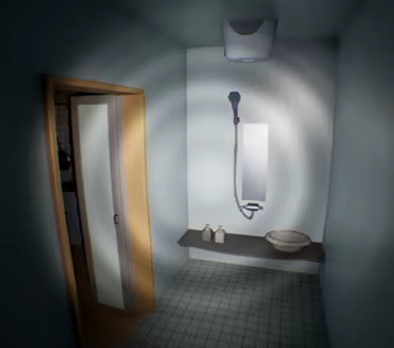
Two Modes
There are two modes: Normal Mode and Nightmare Mode.In Normal Mode, an anomaly will always occur at each time.
However, in Nightmare Mode, there are instances where no anomaly occurs. Is it that there are no anomaly, or is it simply that you haven't been discovered yet?
I recommend starting with the normal mode.
Playtime and content size
The expected playtime to clear the normal mode once is approximately 20 minutes to 1 hour and a half. It would take more than three hours to capture all anomalies. There will be a total of 81 anomalies occurring.Save Data
Even if you stop the game midway, the anomalies you've captured are saved. However, please be aware that anomalies discovered using the radio (helping item) are not saved, so please be cautious.If the Game Crashes
There are reports that updating the graphics card driver to the latest version resolves crashes.Additionally, it may not work without a driver that supports DirectX12.
insufficient graphics card memory could also be considered as one of the causes. Please try reducing the graphics quality from the settings menu.
If it still does not work, please proceed with a refund.
Gameplay Videos and Streaming
Feel free to publish gameplay videos or stream the game without contacting the developer.For Those Prone to Motion Sickness in 3D
Adjust the following settings in the configuration menu:- Set the "Head Bob" slider to 0.
- Set the "Motion Blur" slider to 0.
Recommended Graphics Settings
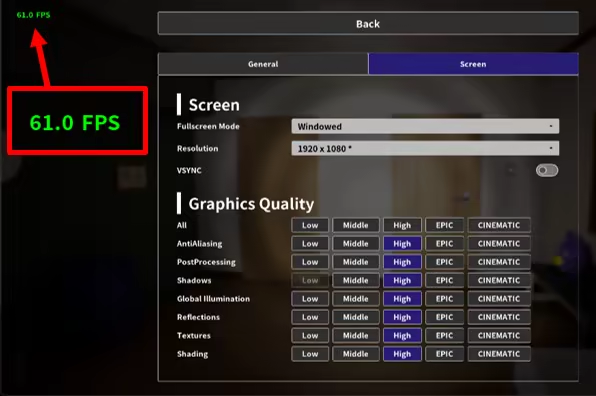
Setting the Global Illumination to "High" or higher enhances the game's atmosphere thanks to UE5's Lumen feature. However, be aware that this can significantly strain your GPU, potentially resulting in slower performance.If your FPS (Frames per Second) is low, consider lowering the graphics settings. After starting the game, pause it to see the FPS displayed in the top left corner. The FPS is adjusted in-game to range from 22 to 62.
System Requirements
Will my PC run this? →Minimum
- Requires a 64-bit processor and operating system
- OS: Windows 11
- Processor: 3 Ghz
- Memory: 1 GB RAM
- Graphics: 4GB VRAM
- DirectX: Version 12
- Storage: 500 MB available space
Recommended
- Requires a 64-bit processor and operating system
Supported Languages
Latest news
AnnouncementsOfficial
The spiritual successor to False Dream has been released.
I have released "False Mall," the spiritual successor to "False Dream," today! https://store.steampowered.com/app/3095550/ {STEAM_CLAN_IMAGE}/44815797/b6dcb5570759a467261c560b3c22eef38b8164cb.png The system from "False Dream," where you capture anomalies with a camera, has been carried over. This time, it's a game where you escape from a building resembling a shopping mall in a regional city. I put a lot of effort into creating the atmosphere of a shopping mall. If you enjoyed "False Dream," please be sure to check it out.Read full article on Community Announcements (masatoko)AnnouncementsOfficial
Nintendo Switch was released! (US and Japan)
Yesterday, the Nintendo Switch version was released! (Please note that it's available only in Japan and the United States. I apologize to those in other regions.) https://www.nintendo.com/us/store/products/false-dream-switch/ For those who had trouble running the PC version or simply want to enjoy the game more casually, try playing it on your Nintendo Switch. The content is the same as the final version on Steam. Enjoy!Read full article on Community Announcements (masatoko)Patch NotesOfficial
Final adjustments (v1.10.1)
I have made final adjustments: - Fine-tuned the collision size of interactive objects. - Adjusted the collision size of the target for capturing. - Improved the visibility of the clock face for better readability at lower screen resolutions. - Corrected the duplication of names of anomalies. - Improved the visibility of the square and checkmark icons on the camera UI. This update marks the final update for FalseDream. I hope to create more finding anomaly games like this in the future. Thank you for playing FalseDream!Read full article on Community Announcements (masatoko)Patch NotesOfficial
Update v1.10.0
- Added a feature to reset the save data. - Title menu -> Settings -> General tab -> Reset Save Data - Bug fixes: - Fixed a bug where, after completing all anomalies, enabling the "Disable captured (on title menu)" option could result in the anomalies being captured in the same session. - Review of anomaly names. - Updated images for each button and key in the button guide. - Display text for some interactable objects. - Modified the effects of anomalies with closets (since most players did not notice). - Button reassignment: Assigned "crouch" to the RT button. - Background art updates: - Added handles to sliding windows. - Added handrail to the balcony.Read full article on Community Announcements (masatoko)Patch NotesOfficial
Minor Changes (v1.9.1)
- Review of light settings (smooth shadows). - Settings UI: - Fixed a bug where toggle button settings were automatically reset to default values. - Changed the position of the "Back" button. - When the language setting is English, change the title logo to the English version. - Fixed models of some anomalies.Read full article on Community Announcements (masatoko)


