

Screenshots

 Watch trailer on Steam ↗
Pixel Fireplace
Hammertail · Published by Hammertail · Official site ↗
Positive — 90% positive (10 reviews)
Last updated 28 Sept 2026
Pixel Fireplace is a cozy, type-controlled simulation. Type commands to strike a match, throw logs onto the crackling fire and watch them burn down to hot coals in real-time. Discover commands with the hint system, or just sit back, turn the lights down and enjoy.
£4.29
Lowest price we've ever recorded
View on SteamPrices can lag the live Steam store — always confirm before buying.
Price history
Indie, Simulation · 2023 · More under £5 games
Tend to your digital hearth in Pixel Fireplace, where you control the flames by typing commands. Discover new actions through hints or simply bask in the warmth as logs reduce to glowing embers.
About this game
Pixel Fireplace is a cozy, type-controlled simulation. Type commands to strike a match, throw logs onto the crackling fire and watch them burn down to hot coals in real-time (about 25 min per log). Discover commands with the hint system, or just sit back, turn the lights down and enjoy.

Hint System
Letters appear gold if they're part of a command word.
Second Monitor Support
Run Pixel Fireplace on a second monitor while you work. Double-click to switch to windowed mode, then drag the window to another screen and double-click again for fullscreen.
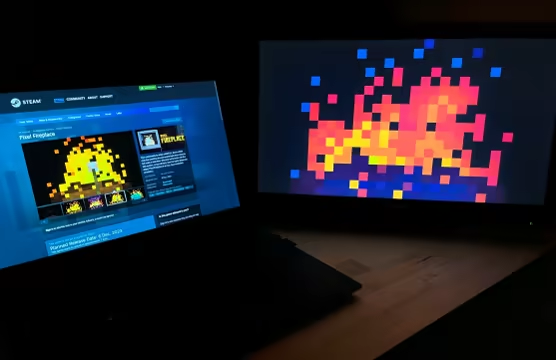
Enjoy a cozy work atmosphere :)
How to Play
1) Type the word FIREPLACE on the title screen to begin.
2) Follow the prompts by typing LOG and then MATCH.
3) Use the hint system described above to discover more commands. Here are a few to get started! MARSHMALLOW, SMORE, HOTDOG, FIRECRACKER, NEWSPAPER, BLUE, SUNSET, WATER
How to Quit
1) Press the Esc key or type WATER to exit from the fireplace screen to the title screen.
2) Press the Esc key at the title screen to quit.
System Requirements
Will my PC run this? →Minimum
- OS *: Windows 7
- Processor: 1.2Ghz+
- Memory: 1024 MB RAM
- Graphics: 256MB
- DirectX: Version 11
- Storage: 20 MB available space
Recommended
- OS *: Windows 7
- Processor: 2Ghz
- Memory: 2048 MB RAM
- Graphics: 1GB
- DirectX: Version 11
- Storage: 20 MB available space
Supported Languages
Latest news
Patch NotesOfficial
Update v1.2.5 - Options Menu
{STEAM_CLAN_IMAGE}/44744249/d9ddf6a944768db0913fa5040e8a97c86c7483c3.png Update v1.2.5 adds an Options Menu with a few options. Press "Esc" at the Fireplace screen to access it: Volume - run Pixel Fireplace in the background while doing other things such as listening to music, streaming, or watching videos without hearing the fireplace sounds. Fullscreen / Windowed - switch between Fullscreen and Windowed modes to drag Pixel Fireplace to a second monior. Switching can also be done by double-clicking. NOTE: DPI scaling needs to be the same on both monitors (eg. 125%) or Fullscreen won't work on the second monitor. These features were requests by the community. Thanks again for your feedback! 🔥 - TedRead full article on Community Announcements (Hammertail)Patch NotesOfficial
Patch v1.2.41 - Bug Fixes, Minor Changes
Hello :) Patch v1.2.41 brings a few bug fixes and minor changes. NOTE: 🔥 below indicates a change inspired by community suggestions and feedback! BUG FIXES & CHANGELOG - The Splash Screen takes less time now on start up. - You can now press any key to skip the Splash Screen instead of just Enter, Space, and left-mouse click. - Fixed the size of some GUI text on the Title Screen because they were too large at some resolutions. - Fixed a bug where more than three logs could be thrown when typed quickly before three had landed. 🔥 Fixed a bug where typing WATER before any logs where thrown would cause a crash. - Fixed a bug where QUIT didn't turn gold when typed. HINTS Thanks for checking out my boring patch notes! Here are a few command hints: FOREVER This will keep the logs from burning down. Type it again to turn it off. FIREWORKS / FIRECRACKER (/ω\) TWILIGHT I've been using this one a lot lately. It fits well with January's winter-y mood. Enjoy 🔥 - TedRead full article on Community Announcements (hellohammertail)Patch NotesOfficial
Update v1.2.4 - Demo, Two New Colors, Fixes
{STEAM_CLAN_IMAGE}/44744249/96590065edfe7578f4250fa1ea5c232a53c55baa.gif Hello! Update v1.2.4 is out and it brings a demo and two new color commands. NOTE: 🔥 below indicates a change inspired by community suggestions and feedback! DEMO There's now a demo available to try out on the Pixel Fireplace store page. Give it a shot and see if Pixel Fireplace vibes with you! TWO NEW COLOR COMMANDS: PINK AND CMYK {STEAM_CLAN_IMAGE}/44744249/518de14a22067013f8d806fdccf204689cbd4a4a.png - Type PINK after the fire is lit to activate the pink color command. 🔥 Type CMYK after the fire is lit to activate the cmyk color command. HOTFIXES & CHANGELOG - Adjusted the burn speed of HOTDOG command because it was burning too quickly. - Fixed a bug with second-screen fullscreen mode where the window could be moved. 🔥 'Esc to quit' added to the title screen. - Some font adjustments to address inconsistencies. - Added some characters to a font for the demo pop up message. They're not used for commands. KNOWN ISSUES - If a second screen has different DPI scaling compared to the main screen, second-screen fullscreen mode won't work. I don't know yet if this is fixable or if it's an engine bug. For now, set DPI scaling the same on both screens (eg. 125%) to allow second screen fullscreen mode. The resolutions can be different, by the way (eg. 1920x1080 and 3840x2160). Thank you to the community for suggestions, feedback, and support! 🔥 - TedRead full article on Community Announcements (hellohammertail)


