

Screenshots

 Watch trailer on Steam ↗
Aure
Taueon · Published by Taueon · Official site ↗
2 user reviews — 100% positive (2 reviews)
Last updated 27 Sept 2026
Aure is an open world exploration RPG where you take a role of an adventurer in a large and living fantasy world.
£4.29
Lowest price we've ever recorded
View on SteamPrices can lag the live Steam store — always confirm before buying.
Price history
Adventure, RPG · 2025 · More under £5 games
Embark on a journey of discovery in Aure, an open-world exploration RPG where your choices shape the fate of this dynamic fantasy realm.
About this game
Exploration in the open world
Aure is a vast fantasy world full of dangers as well as opportunities. You as an adventurer can freely roam in the wilderness, visit towns, trade with travellers or explore interesting locations.
There's a main quest that can give you a general direction where to go next but nothing stops you to play your own way and go where you please.
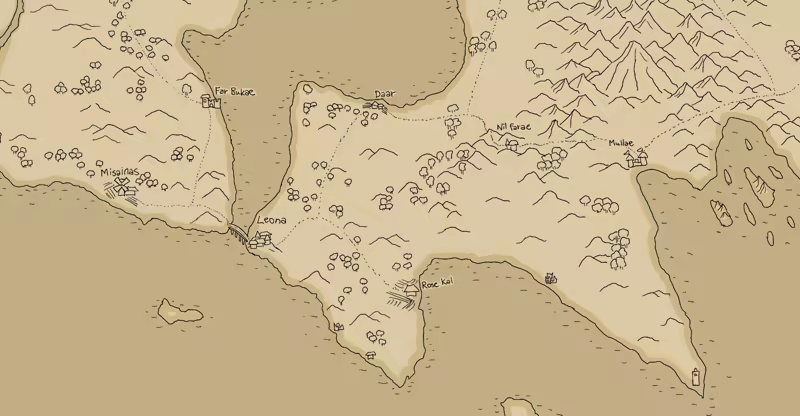
Map
You start your journey with a hand-drawn map that has clues of interesting locations. However, many of the world's secrets are not visible in the map and to find them you have to go and explore them yourself.
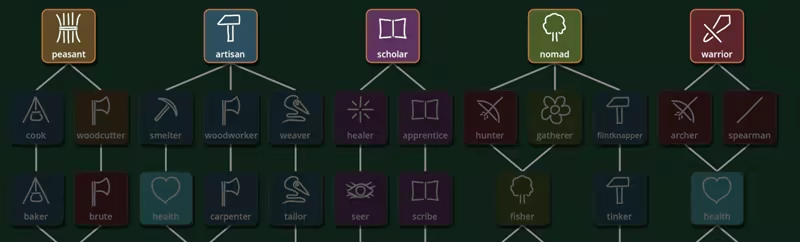
Skills
You can learn new skills during your journey. The skill tree is divided into five main branches:
Peasant for those who are not afraid of the hard, honest work.
Artisan which contains most of the crafting skills.
Scholar for those who want to know the magic.
Nomad with skills that help you survive in the wilderness.
Warrior if you prefer to solve problems with a brute force.
You are free to pick any branch or a combination of them, whichever fits best to your playing style.
Other features
Character customisation.
Melee and ranged combat.
Companions, buy animals or hire adventurers and manage their gear.
Quests, longer, hand-crafted ones as well as short, generated ones.
Crafting, convert resources you gather to more useful ones or craft your own gear.
Fishing, hunting, gathering and mining.
Magic.
System Requirements
Will my PC run this? →Minimum
- Requires a 64-bit processor and operating system
- OS: Windows 10
- Processor: x86_64 CPU
- Memory: 8 GB RAM
- Graphics: Dedicated modern GPU
- Storage: 1 GB available space
Recommended
- Requires a 64-bit processor and operating system
- OS: Windows 10 or newer
- Processor: x86_64 CPU with multiple physical cores
- Memory: 16 GB RAM
- Graphics: Dedicated modern GPU with Vulkan support
- Storage: 1 GB available space
Supported Languages
Latest news
AnnouncementsOfficial
Aure released
Long wait is over and the game is finally here ready to be played! I hope you find it entertaining! {STEAM_CLAN_IMAGE}/45260226/5e6cb46489648b24408d39f5e71df528fe937dd5.pngRead full article on Community Announcements (Taueon)AnnouncementsOfficial
Aure release date
Aure release date has been set: 16 January 2025 {STEAM_CLAN_IMAGE}/45260226/495a4155210fc42fc8843aeafb5e91809da4c9ed.pngRead full article on Community Announcements (Taueon)AnnouncementsOfficial
Steam deck compatibility info
The game is now tested to be playable on Steam deck. If you are a Steam deck user you may find the following notes useful: Recommended graphics settings To get a good frame rate it's recommended to drop the shadow quality to medium and set the scale to 0.75 or smaller. With these settings the game should run somewhat steady 60 FPS most of the time. To make it run better (and to save power) shadows can be disabled and the flora drawing range can be set to a smaller value. There may be some frame drops under the 60 FPS occasionally because of autosaves or if something big, for example a town, is loaded on the background. The autosave frequency can be adjusted from the settings if the default is too often. Input It is recommended to use Steam's own key mapping tool to set your own preferred layout and leave the in-game settings keys as they are by default. By default there's no Steam deck button assigned for the "discard"-key that is used to discard an inventory item. That functionality is hardly ever needed but can be enabled by assigning a Steam deck button to it manually in the settings.Read full article on Community Announcements (Taueon)


