

Screenshots

 Watch trailer on Steam ↗
Ardaria
Wise Dragon Studio · Published by Wise Dragon Studio · Official site ↗
Content notice: No sexual act but fights can be gore
Last updated 27 Sept 2026
Procedural building parts, schematics import/export on a open world voxel PLANET, mine, craft and upgrade your skills. Master parkour moves, face hordes of enemies, and tame powerful mounts! FREE PROTOTYPE
Action, Adventure, RPG · More free games
Embark on a journey of action, adventure, and RPG elements as you explore the procedural voxel planet of Ardaria. Build and upgrade your skills using imported schematics, master parkour moves, and face hordes of enemies while taming powerful mounts.
About this game
Ardaria will be a survival-creative game on a procedural voxel planet that you can fully terraform. Face brutal creatures in gore PvE fights with melee and magic. Build your character, choose skills and stats which match your play style. Explore monuments and villages populated with NPCs.
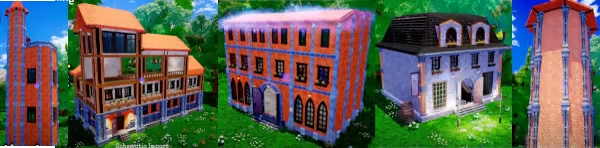
The creative mode gives you the most freedom you ever experienced in creative with an integrated schematic import / export feature to share your creations with the community.
Download it now and build something impressive !
Upcoming features:
Crafting and Job System
Resource Mining
Agriculture
Automation and Logic
RPG - Skills and Stats
NPCs
Tame and Ride Majestic Mounts

System Requirements
Will my PC run this? →Minimum
- OS: Windows 10
- Memory: 4 GB RAM
- Graphics: GTX 960
- DirectX: Version 11
- Storage: 3 GB available space
Recommended
- OS: Windows 11
- Processor: i5
- Memory: 8 GB RAM
- Graphics: GTX 1080
- DirectX: Version 12
- Storage: 3 GB available space
Supported Languages
Latest news
AnnouncementsOfficial
Creative Mode enters in Alpha
This is a massive update, the creative mode enters in alpha! First I apologize for the lack of news for almost a year, I’ve not been able to gradually release new features but had to ship them in 1 block. We now have a voxel world with a procedural forest, this is the first step towards making an interesting planet! The building features are MUCH better than before, with a powerful schematic import/export feature to share your builds. Here is the list of changes: World Integration of Voxel Plugin 2: paves the way for powerfull terraforming Procedural Voxel Planet First biome: Blue Magic Forest Day / Night Cycle Interactive foliage Build Mode Features Cursor mode - use the mouse to build Precision positioning - select an element and edit its position / rotation / scale Grouping: Select multiple elements and move them together Better import / export schematic: pre-visualisation before importing Scalability: Using SQLite to save builds allows better performances Full edits history navigation: Control+Z / Control+Y - persistent even if you quit game Simple Voxel Terraforming (1m cube) Remove foliage tool Gameplay Parkour moves: Climbing + Vault Ninja roll after a jump FPS Camera Settings Better Graphical settings, including TAA settings DLSS 3.7 + FSR 3.1.1 Other Better loading save screen Rework of artistic direction Better Cel-ShaderRead full article on Community Announcements (Ardaria Team)Patch NotesOfficial
Update 0.1.2 - Auto-build !
Ardarians! The v0.1.2 is here! The biggest feature of this version is the auto-build ! Aim, click, aim and click. It's already built! It's a self building house to let you discover what can be done with the procedural building system. The house size is adjustable before spawn, and of course, you can edit it as you wish once you spawned it. In the future, improvements could be achieved by randomizing the height, the shape of the roof, the materials used and even spawn lights and furniture inside the house. But for now, it's your builder's job! New features: - auto-building tool to create a house in 2 clicks - dynamic footstep sounds for grass/wood/stone - regen wall when removing a window/door from wall (gap will be filled) Changed: - can now use NON-procedural pillars to create walls - added a particles effects at the aimed location to get a better building feedback - added a particle effect to plot borders to better understand where are the borders - added UI sounds to the SFX volume controller - added a text on screen to remind the key to display keys (it's ) - disabled the motion blur to improve performances - reduced volume of birds - changed the forbidden sound when you can't place an element - hide FPS counter - add some missing icons - update the tutorial with simpler instructions - fixed the controls appearing in an unpredictable way For future versions: We noticed FSR 2.0 introduces a lighting bug with flashing lights. It only happens on certain camera angles and as it still improves performance, we think it's a good idea to keep it. Regarding the update to Unreal Engine 5.3, we are waiting either for FSR 2.0 to be compatible or for FSR 3.0 to be released as a native Unreal Engine plugin. Upgrading to 5.3 might be skipped as substrate materials will be stable as of 5.4 and 5.3 broke the procedural generation of the forest anyway. - improve floor and roof placement feedback with snap points - better drag&drop experience for placing many objects at once - fix...Read full article on Community Announcements (Ardaria Team)Patch NotesOfficial
Update 0.1.1 - Volume settings + FSR 2.0
Ardarians! It's time for an update.. YOUR FEEDBACK has been precious and we acted accordingly to what we have been asked by the community. The 2 main topics are: - settings for the volume, music and SFX. - improved performance by enabling FSR 2.0 In the future we will add more settings, especially the ability to adjust colors (not all of you like the saturated colors) and the motion blur, as it can helps with performances. The game now starts automatically on medium settings, which means lumen are disabled by default. While lumen gives a cool feeling to the game, it's also a pain because of the performance impact and the procedural meshes which can't benefit from global illumination. This makes the lighting unconsistent in the buildings. We hope the unreal team to improve the dynamic meshes render path so it can also benefit from lumen. We also are waiting for AMD to release the FSR 3.0 plugin for Unreal Engine 5 as it seems extremely promising in term of frame rate improvement. We are working hard to identify annoying bugs with the community in order to make Ardaria a better experience for you all. Cheers! JBRead full article on Community Announcements (Ardaria Team)Patch NotesOfficial
Material update!
Dear Ardarians, MATERIAL UPDATE We just released the 0.1.0 version of the base building prototype on Steam! You can see the update in action on youtube, right here -> https://youtube.com/shorts/ZIDB0w075NM Ardaria Prototype is a base building tool which let you create a house of any shape and any size + decorate it with 300+ props and 40 materials. What you must know about this update: added 40 materials for procedural walls, floors and roofs, you can all find them in the material tab of the inventory smart align system and drag&drop components on the map, build anything faster crash system report so we know when you have a problem a timelapse mode to render nice videos of the best community creations Due to the addition of the crash report tool, the update size is around 800MB. And some smaller features: a new type of wall cut: the arch toggle coordinates text helper with L Procedural pillars can be placed anywhere on the plot, no need for beams anymore echap will now let you close the inventory and menu save character orientation free build camera will keep character orientation when enabled you can delete a saved game Additionally, we fixed some issues: roof pattern now follow the underlying mesh slope some pivot fixes on some meshes the game now launches in "medium" quality by default AZERTY support lowered the birds fixed orientation of doors save corruption issues when new elements won't be saved in the build We believe the base building system is now ready to be used at it's full potential, we still can't find the limit of the engine regarding the amount of meshes you can spawn and the size of the build you can make. Here is a video of the biggest build we made, it's a fortress on 15,000 square meter. The future update will be focused on fighting hordes of ennemy, and to crush them in a cloud of blood. Stay tuned Ardarians ! JBRead full article on Community Announcements (Ardaria Team)AnnouncementsOfficial
Ardaria 0.0.2 !
Dear Ardarians, we just released an update containing few features and quick fixes. We hit 2000 downloads on the demo and 200 wishlists for the first 3 days on the store, it's encouraging! Due to a mistake on my side, YOU MIGHT HAVE TO VERIFY FILES INTEGRITY IN STEAM LAUNCHER Changelog - Outline shader in XIII style - Fast rotation by default - Add slowmode (C on keyboard) to reduce free build camera speed and rotation - Display current rotation axis - you can place procedural pillar anywhere - moved the coords text box, but it's not better... sry - snap to grid (20cm) - can toggle with G - reset rotation with R key - add snap point component to easily use procedural elements - update tuto control Enjoy the build! JBRead full article on Community Announcements (Ardaria Team)


