

Screenshots

 Watch trailer on Steam ↗
A-Train9 TRAIN CONSTRUCTION
ARTDINK · Published by ARTDINK · Official site ↗
Positive — 88% positive (32 reviews) · 11 achievements
Last updated 27 Sept 2026
"A-Train 9 TRAIN CONSTRUCTION" is a 3D railway vehicle customization software that allows you to craft your very own unique train. Let your imagination soar as you design every detail from the shape and paint to the smallest parts of your dream train and set it in motion!
£34.99
Lowest price we've ever recorded
View on SteamPrices can lag the live Steam store — always confirm before buying.
Price history
Simulation · 2024 · More £30+ games
Embark on a creative journey as you craft and construct your dream train in A-Train9 TRAIN CONSTRUCTION. From the smallest parts to the overall design, let your imagination run wild in this 3D railway vehicle customization software.
About this game
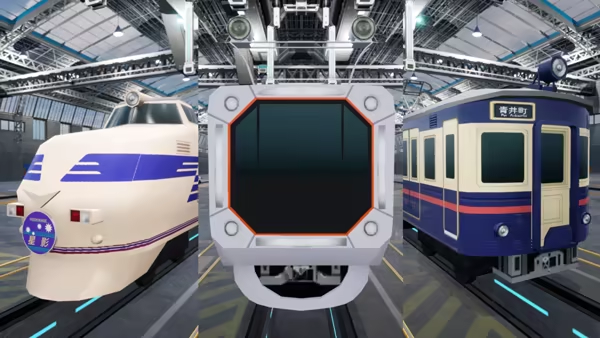
Everyone has dreamed at least once of their own unique railway vehicle. Now is the time to bring that vision to life.
"A-Train 9 TRAIN CONSTRUCTION" allows you to design everything from the shape and paint of your vehicle to the placement of intricate parts from scratch! Create a train that's uniquely yours.
Once crafted, you can set your creation in motion, snap photos, and share them with other users! Enjoy the charm of trains to the fullest with these enriching features.
Your dream train is ready to hit the tracks!
Make the trains of your dreams come true and customize them however you like!
- Vehicles: 65 different vehicle body styles are available for you. From freight trains to express trains, from streetcars to commuter trains to steam locomotives. Vehicles for all kinds of use from different eras.
- Vehicle Components: Customize your vehicles to pursue reality down to the finest detail. You can customize the train lights (change their size), the obstacle deflector, the train’s horn, its air conditioning, pantographs, head marks (can be painted), fall prevention fences, underfloor equipment, gangway connections, as well as smoke deflectors, sandboxes, bells and chimneys for steam locomotives.
- Wrapping: Combine stickers to decorate your vehicle and make your own creation freely! Use Japanese, alphabetic and numeric text and graphics (SVG files) of your own making.
- Windows: Customize the shapes and arrange the windows of your vehicle as you see fit. In "TRAIN CONSTRUCTION", you can even create unconventional designs that are difficult to find in reality!
- Trains: Connect the vehicles you have created and form your very own train. With each vehicle customizable individually, the combinations are truly limitless!
Try out and experience the potential of your trains in Test Drive mode!
- Maps: 4 types of maps are available: city, suburb, countryside, and space! Line up and operate up to 4 of your trains and find the map where they can shine the most.
- Manage your trains: Regulate their speed and direction and adjust railway junctions at your own will! Recreate departures and arrivals just like in real life to get yourself immersed even more in this world.
- Change time frame: Switch the time frame to either daytime, evening or night (except on the space map). Train windows and lights are lit during the night. Experience the different facets of your train depending on the time of day.
- Camera features: Change between 4 camera options: manual, train window, tracking and action; and enjoy your trains from dynamic perspectives as if you were actually there.
- Photo mode: Bring out the charm of your trains even further with the built-in photo mode! Set the lighting, adjust the angles and take the best photo that only you can take of your own train!
Share your creations and be a popular train designer!
- Upload: Show the world the vehicles and trains you created and upload the sticker sets (decal) you used for decorating them to the Steam Workshop. Share your thoughtful designs with others!
- Import: Try out trains created by others by importing them from the Steam Workshop. It’s a great way to enjoy many kinds of trains if you don’t like creating them yourself.
System Requirements
Will my PC run this? →Minimum
- Requires a 64-bit processor and operating system
- OS: Windows 11 / 10 (64 bit required)
- Processor: Intel Core i5 3.2GHz
- Memory: 8 GB RAM
- Graphics: GeForce GTX1050Ti
- DirectX: Version 11
- Storage: 4 GB available space
Recommended
- Requires a 64-bit processor and operating system
Supported Languages
Latest news
AnnouncementsOfficial
A-Train 9 V5.0 Worldwide Release is compatible with TRAIN CONSTRUCTION!
https://store.steampowered.com/app/3106160/ATrain_9_V50__Japan_Train_Simulator_Ultimate_Edition/ A-Train 9 V5.0 : Japan Rail Simulator Ultimate Edition is compatible with A-Train 9 TRAIN CONSTRUCTION (sold separately)! If you own TRAIN CONSTRUCTION and A-Train 9 V5.0, you’ll be able to import trains you make into your game! Not only that, you’ll be able to download and use any of the 4000+ trains that others have made available on Steam Workshop and upload your own designs for others to use! {STEAM_CLAN_IMAGE}/45118262/ec5801e63e2f4c7049a3b32cc3dc790dac4c1b23.jpg So get ready to lay some track with the Ultimate Edition of A-Train9, and see your custom trains from TRAIN CONSTRUCTION in action!Read full article on Community Announcements (nishimoto_mikoto)AnnouncementsOfficial
「A列車で行こう9 Version5.0 車両キット 3nd」発売決定!
※Japanese Only 鉄道会社の社長となり、線路を敷いて鉄道を走らせ、都市を発展させていく「A列車で行こう9」は、おかげさまで2025年に発売から15周年を迎えました。 発売後も「列車ごとの個別ダイヤ設定」「列車の連結」といった新機能による進化を続けています。 この度4月24日に、車両拡張ソフト第3弾「A列車で行こう9 Version5.0 車両キット 3nd」が発売されます! 最新の新幹線から、近年増えてきた路面電車(LRT)まで、新たに18車両を収録。 「A列車で行こう9」すべての総収録車両数は、これにて343車両へ拡充されます。 発展を続ける「A列車で行こう9 V5」で、まだ見たことのない、新たな鉄道風景を実現しましょう。 {STEAM_CLAN_IMAGE}/45118262/ca6ab35497d68c24427734643038d6c1138b2637.png {STEAM_CLAN_IMAGE}/45118262/7f02a32b9b3947a93d1c453042e970a029aeef54.png 「A列車で行こう9 Version5.0 車両キット 3nd」について 収録車両 多種多様な日本全国の車両、18車両が新たに登場! N700S「のぞみ」「かもめ」、E8系「つばさ」といった最新の新幹線や、521系(ハピラインふくい線)、F1000形「FUKURAM」、L形「キーボ」、のと鉄道NT200形&NT300形、キハ48形「花嫁のれん」など北陸新幹線開業で盛り上がりをみせる福井県や石川県を走る車両を収録いたします。 最新の鉄道風景を、あなたの街に! {STEAM_CLAN_IMAGE}/45118262/3f356e21224509536e30299d88a55a8aadac5980.png {STEAM_CLAN_IMAGE}/45118262/55e177d1beb7636e42560ccdd8ec79a067419d95.png {STEAM_CLAN_IMAGE}/45118262/0b863a7ad3a31e89a2827ba054e8d7964e2d491b.png 新車両を展示できる「鉄道博物館Ⅷ」も収録。 圧巻の車両群を、ご堪能ください。 {STEAM_CLAN_IMAGE}/45118262/b61d24d78378aa211f2ab6ace36babc2752f24f4.png 製品情報 A列車で行こう9 Version5.0 車両キット 3rd 発売予定日 :2025年4月24日(木)正午頃 価格 :1,800円(税込価格1,980円) 対応OS :Windows 11 / 10 ジャンル :A列車で行こう9 Ver5.0 車両追加キット 企画・開発 :株式会社アートディンク ※「A列車で行こう9 Version5.0」をお持ちの方が対象のソフトです。これだけではお遊びいただけません。 ※ダウンロード専売商品です。パッケージでの販売はございませんのでご了承ください。 公式サイト 必ず、お持ちの「A列車で行こう9 Version5.0」と同じバージョンをご購入ください。 お持ちの「A列車で行こう9 Version5.0」がSteam版の方 Steamでお買い求めください https://store.steampowered.com/app/3593980/ お持ちの「A列車で行こう9 Version5.0」がWindows版の方(Steam版でなければこちら) アートディンクeSHOPでお買い求めください ストアは発売日に公開されます(https://eshop.artdink.co.jp/)Read full article on Community Announcements (artdink_official)Community & EventsOfficial
[In Japan only] Collaboration Contest Held with JR Kyusyu
About Train Design Contest {STEAM_CLAN_IMAGE}/45118262/6020ca265b8b9633ead0582c0e4934fe7520bf10.png For details, please check the “Train Design Contest” special site. https://www.atrain.jp/special/a9tc-contest/ Prize-winning works The winning entries of the contest are introduced in Japanese. 【とても優れて“ええ”列車で賞】 円彩(ENSAi) 作者:あかき さん https://steamcommunity.com/sharedfiles/filedetails/?id=3434592089 【優れて“ええ”列車で賞】 D&S列車『腰かけて玄海』号 作者:e233_ura さん https://steamcommunity.com/sharedfiles/filedetails/?id=3436901616 琴の海-Grand Saloon (783系蓄電池設備搭載車) 作者:at9_coffee さん https://steamcommunity.com/sharedfiles/filedetails/?id=3436805961 すなぶろう 作者:ベルとらむ さん https://steamcommunity.com/sharedfiles/filedetails/?id=3436103077 【“ええ”列車で賞】 旅路(DESTINATION) 作者:chalisTCTW. さん https://steamcommunity.com/sharedfiles/filedetails/?id=3417373450 関門結 作者:デジーク さん https://steamcommunity.com/sharedfiles/filedetails/?id=3427834104 両豊紀行 作者:mmn さん https://steamcommunity.com/sharedfiles/filedetails/?id=3435982382 SAKAGURA 作者:ねづみ さん https://steamcommunity.com/sharedfiles/filedetails/?id=3430273890 D&S列車「おおいたけ」 てぃー さん https://steamcommunity.com/sharedfiles/filedetails/?id=3437126952Read full article on Community Announcements (artdink_official)Community & EventsOfficial
[In Japan only] Collaboration Contest Held with JR Kyusyu
Train Design Contest held! ARTDINK, developer and publisher of the urban development railroad simulation game “A-Train,” and JR Kyushu, the Japanese railroad company that operates the D&S train “A-Train” are holding a dream “Let's Go by A Train” collaboration contest! The Train Design Contest based on the theme “The train that is uniquely JR Kyushu” has started today. *This contest is open to entries from Japan only. {STEAM_CLAN_IMAGE}/45118262/6020ca265b8b9633ead0582c0e4934fe7520bf10.png For details, please check the “Train Design Contest” special site. https://www.atrain.jp/special/a9tc-contest/Read full article on Community Announcements (nishimoto_mikoto)Patch NotesOfficial
Update patch version 1.0.1 delivered!
Additional Elements -Lights, whistles, head marks, and through doors can now be attached to the front and rear of intermediate cars and to the rear of the lead car. (Some cars may not be eligible for this feature.) -The uneven patterns on the car body can now be painted with stickers. -The “Ctrl+R” shortcut has been added to copy front/rear parts to the opposite side of the car. -The shortcut “Shift+Left Click” has been added to select a range in the sticker list and BGM list. -In the countryside of a trial run, the created car now appears on the turntable. Bug fixes -The sticker gap at the border of the car body surface has been made less noticeable. If you wish to reflect this in a vehicle that has already been created, please go to Vehicle Development > Paint and then overwrite the saved data. -If you do not have a save data folder (document folder), a folder will be created for you. If you can no longer see your saved data in the game, please copy the saved data to the specified location by performing the operations described in the guide. Please copy the saved data to the specified location. https://steamcommunity.com/sharedfiles/filedetails/?id=3387670587 -The frontal misalignment of the “Express Type (Widened) 2” model has been corrected. If you are concerned about it, please readjust it. -Fixed a problem that the head mark sometimes disappears after saving when the head mark is placed under the car body. -Fixed a problem in which a headmark would disappear after saving when the headmark was placed under the car body. -Other minor bugs have been fixed.Read full article on Community Announcements (takai_kurara)


