

Screenshots

 Watch trailer on Steam ↗
Lethal Crisis Proto Sphere リーサルクライシスプロトスフィア
Daisessen · Published by Daisessen · Official site ↗
4 user reviews — 75% positive (4 reviews)
Last updated 27 Sept 2026
横2Dの世界でランダムダンジョンを採用!重力ありでも空中戦が得意だからこそ、どこにゴールがあろうが問題なく突き進める! 要らなくなったアイテムはTipに変換して、初期性能の強化を獲得! 周回しながら力を蓄え、全200ステージに潜む強敵達を撃破せよ!
DJCTQ lFull Controller Support
£7.49
Lowest price we've ever recorded
View on SteamPrices can lag the live Steam store — always confirm before buying.
£7.49
Price history
3 Sept 2026Lowest: £7.49 · Highest: £7.4913 Oct 2026
Action, Indie, RPG · 2023 · More £5 - £15 games
Embark on perilous adventures through randomly generated dungeons in Lethal Crisis Proto Sphere. Master gravity-defying aerial battles and outmaneuver enemies across 200 challenging stages.
About this game
最速の飛翔感を自負するアクション『リーサルクライシス』が
ローグ系ランダムダンジョンを引っ提げてリニューアル!!
■システム
攻撃・防御・エアダッシュが一体となった
「アサルト」を軸に、
ハイスピードで爽快なアクションバトルはそのままに
今回はローグダンジョンシステムを採用!
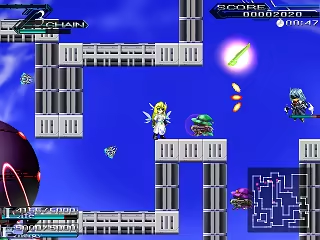
重力ありでも空中戦が得意だからこそ
どこにゴールがあろうが問題なく突き進める!
ランダムダンジョンを周回しながら力を蓄え
プロトスフィアに潜む強敵達を撃破せよ!
ステージ数は全部で200。
10面クリアごとにインターミッションがはいり
バックアップメモリ(消費アイテム)があればセーブも可能だし
気に入った装備を倉庫にしまって次の週に持ち越すことも可能!
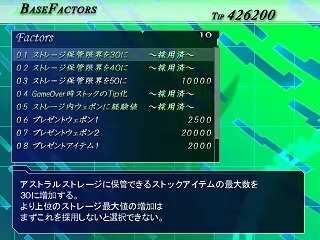
大量に拾いすぎて要らなくなったアイテムはTipに変換し
ポイントを消費して
ミッションフリーパスや初期性能の強化を獲得しよう!
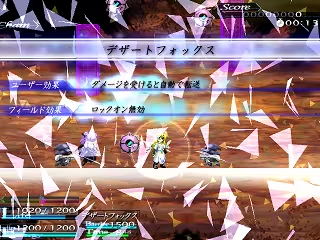
今回は新たな切り札、空間兵器スフィアタイラントも登場!
敵を自分の空間にまきこんで、有利なルール下で撃破せよ!
中には組み合わせると強い物や、
空間を出ても得をする結果が残るものもあるぞ!
■その他
さらに今回は外伝的な意味合いから
他所のサークルからのゲスト様もお迎えしています。
本気に強いので、出会ったら覚悟されたし!

ローグ系ランダムダンジョンを引っ提げてリニューアル!!
■システム
攻撃・防御・エアダッシュが一体となった
「アサルト」を軸に、
ハイスピードで爽快なアクションバトルはそのままに
今回はローグダンジョンシステムを採用!
重力ありでも空中戦が得意だからこそ
どこにゴールがあろうが問題なく突き進める!
ランダムダンジョンを周回しながら力を蓄え
プロトスフィアに潜む強敵達を撃破せよ!
ステージ数は全部で200。
10面クリアごとにインターミッションがはいり
バックアップメモリ(消費アイテム)があればセーブも可能だし
気に入った装備を倉庫にしまって次の週に持ち越すことも可能!
大量に拾いすぎて要らなくなったアイテムはTipに変換し
ポイントを消費して
ミッションフリーパスや初期性能の強化を獲得しよう!
今回は新たな切り札、空間兵器スフィアタイラントも登場!
敵を自分の空間にまきこんで、有利なルール下で撃破せよ!
中には組み合わせると強い物や、
空間を出ても得をする結果が残るものもあるぞ!
■その他
さらに今回は外伝的な意味合いから
他所のサークルからのゲスト様もお迎えしています。
本気に強いので、出会ったら覚悟されたし!
System Requirements
Will my PC run this? →Minimum
Minimum:
- OS *: Windows 7 or later
- Processor: 1.6 GHz processor
- Memory: 1 GB RAM
- Graphics: Any DirectX 9.0 supported card
- DirectX: Version 9.0
- Storage: 300 MB available space
Supported Languages
Japanese
Latest news
Patch NotesOfficial
Modifications to controller inputs
As a countermeasure when the controller input may not work Improved default key placement for games. If you could not enter it with the previous settings, you can install it again after uninstalling. It will be updated to the corrected input settings. * If the controller input still does not work Steam>setting>controller>『Controller Settings』 Turn off all controller Steam Input enablements. {STEAM_CLAN_IMAGE}/44284544/89a6a7a8ab4842b378eea6977ede5b7b920be1f1.png *Because Steam's functionality interferes with the input originally provided by the PC,Read full article on Community Announcements (daisessen)


