

Screenshots

 Watch trailer on Steam ↗
LethalCrisis リーサルクライシス
Daisessen · Published by Daisessen · Official site ↗
7 user reviews — 100% positive (7 reviews)
Last updated 27 Sept 2026
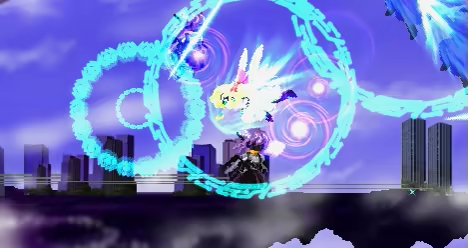
横2Dでありながら「方向自由のエアダッシュ+多少敵弾をはじく」アサルトにより 敵本体に突撃+連続斬撃を繰り広げます!! *This game currently only exists in Japanese version. However, there are people who have created unofficial English patches. https://youtu.be/k55OrMFQ7q0
DJCTQ l
£14.99
Lowest price we've ever recorded
View on SteamPrices can lag the live Steam store — always confirm before buying.
£14.99
Price history
3 Sept 2026Lowest: £14.99 · Highest: £14.999 Oct 2026
Action, Indie, RPG · 2023 · More £5 - £15 games
Navigate treacherous levels as you master air dashes and precise strikes in LethalCrisis, an indie RPG from Daisessen that blends 2D platforming with dynamic combat.
About this game
*This game currently only exists in Japanese version.
However, there are people who have created unofficial English patches.
■ストーリー
世界すべてを巻き込んだ『空地大戦』が終わるまでの数日間、
人の形をした兵器達が最悪な結末を回避するために何を成したか…。
前作LethalApplicationの10年前の物語です。
■アクションの中心「アサルト」
攻撃・防御・エアダッシュが一体となった
「アサルト」によりハイスピードで爽快なアクションを実現!
ジャンプ中に方向キー+ジャンプボタンだけでいつでも出せるから
重力なんて気にしないで跳び回れる!
■「エネルギー」は休憩か敵撃破で回復
アサルトを含めた攻撃はエネルギーを消費するので適度な休息は必要。
(回復中も移動やジャンプは好きにしてOK)
ただ、敵を撃破してもエネルギーを獲得できるので
連続撃破し続ければずっと攻め続けることも可能!
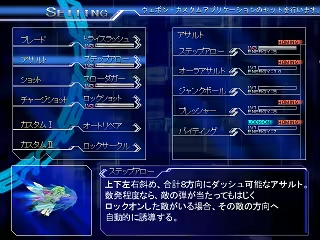
■逃げる敵もロックオン+ホーミングで追撃
初期装備のチャージショット等でロックオンをかけてしまえば、
ホーミング効果のある武器は目をつぶってても当たる!
特にアサルトは敵が逃げても追いかけ、接触でダメージを与えるので
そのままブレード・ショットへと連携していくことが可能!
■最後の切り札「バーストモード」
4ボタン溜めで発動する『バーストモード』は、攻撃力ある残像を作り出し、
エネルギーの回復速度を大幅に上げ、なにより一度LIFEを全回復と強力な奥の手!
「やばい!」と思ったら必ずバーストを使うべし!
ただし使ったら最後、解除はできず、常時LIFEが減り続ける諸刃の剣。
バースト後は攻めを強めて一刻も早くクリアせよ!
■ミッションクリアでアイテム獲得
ステージクリア時に表示された条件を達成することで、ライフ・エネルギーの最大値や
新たなウェポンを獲得できる!
できることが多彩になれば高難度のミッションも簡単にこなせるし、
特定の2つの装備が......には必須なのでどんどんミッションをクリアしよう!
■はじまりのメール
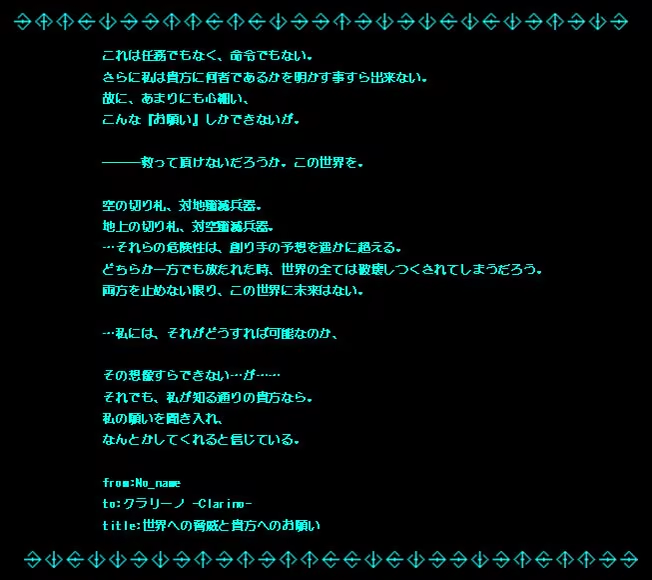
このメールを受け取った際のクラリーノは、
並の犯罪者以上に厳重な監視下に置かれていた。
それこそ、差出人不明で胡散臭い内容のメールが、
監視者に気づかれずに届くなど、絶対あり得ない程度には。
However, there are people who have created unofficial English patches.
■ストーリー
世界すべてを巻き込んだ『空地大戦』が終わるまでの数日間、
人の形をした兵器達が最悪な結末を回避するために何を成したか…。
前作LethalApplicationの10年前の物語です。
■アクションの中心「アサルト」
攻撃・防御・エアダッシュが一体となった
「アサルト」によりハイスピードで爽快なアクションを実現!
ジャンプ中に方向キー+ジャンプボタンだけでいつでも出せるから
重力なんて気にしないで跳び回れる!
■「エネルギー」は休憩か敵撃破で回復
アサルトを含めた攻撃はエネルギーを消費するので適度な休息は必要。
(回復中も移動やジャンプは好きにしてOK)
ただ、敵を撃破してもエネルギーを獲得できるので
連続撃破し続ければずっと攻め続けることも可能!
■逃げる敵もロックオン+ホーミングで追撃
初期装備のチャージショット等でロックオンをかけてしまえば、
ホーミング効果のある武器は目をつぶってても当たる!
特にアサルトは敵が逃げても追いかけ、接触でダメージを与えるので
そのままブレード・ショットへと連携していくことが可能!
■最後の切り札「バーストモード」
4ボタン溜めで発動する『バーストモード』は、攻撃力ある残像を作り出し、
エネルギーの回復速度を大幅に上げ、なにより一度LIFEを全回復と強力な奥の手!
「やばい!」と思ったら必ずバーストを使うべし!
ただし使ったら最後、解除はできず、常時LIFEが減り続ける諸刃の剣。
バースト後は攻めを強めて一刻も早くクリアせよ!
■ミッションクリアでアイテム獲得
ステージクリア時に表示された条件を達成することで、ライフ・エネルギーの最大値や
新たなウェポンを獲得できる!
できることが多彩になれば高難度のミッションも簡単にこなせるし、
特定の2つの装備が......には必須なのでどんどんミッションをクリアしよう!
■はじまりのメール
このメールを受け取った際のクラリーノは、
並の犯罪者以上に厳重な監視下に置かれていた。
それこそ、差出人不明で胡散臭い内容のメールが、
監視者に気づかれずに届くなど、絶対あり得ない程度には。
System Requirements
Will my PC run this? →Minimum
Minimum:
- OS *: Windows 7 or later
- Processor: 1.6 GHz processor
- Memory: 1 GB RAM
- Graphics: Any DirectX 9.0 supported card
- DirectX: Version 9.0
- Storage: 200 MB available space
Supported Languages
Japanese
Latest news
Patch NotesOfficial
Modifications to controller inputs
As a countermeasure when the controller input may not work Improved default key placement for games. If you could not enter it with the previous settings, you can install it again after uninstalling. It will be updated to the corrected input settings. * If the controller input still does not work Steam>setting>controller>『Controller Settings』 Turn off all controller Steam Input enablements. {STEAM_CLAN_IMAGE}/44284544/89a6a7a8ab4842b378eea6977ede5b7b920be1f1.png *Because Steam's functionality interferes with the input originally provided by the PC, It works fine with it.Read full article on Community Announcements (daisessen)


