

Screenshots

 Watch trailer on Steam ↗
Sulphur Memories: Alchemist
Spellweaver · Published by Spellweaver
Content notice: The game contains some non-realistic violence, light profanity and includes intoxicating substances intake. It deals with the topics of death and religious fanaticism.
Positive — 96% positive (25 reviews)
Last updated 27 Sept 2026
Sulphur Memories: Alchemist is a traditional roguelike of crafting, discovery, and immersion. Explore the uniquely generated world full of hidden knowledge and little stories, and use your creativity to overcome its challenges.
£9.99
Lowest price we've ever recorded
View on SteamPrices can lag the live Steam store — always confirm before buying.
Price history
Indie, RPG, Simulation, Early Access · 2024 · More £5 - £15 games
Embark on an immersive journey as you craft and discover in Spellweaver’s Sulphur Memories: Alchemist. This indie RPG challenges you with uniquely generated worlds filled with hidden knowledge and stories to uncover.
About this game
No giant sword to cleave through enemies. No magic powers to destroy them with a snap of your fingers.
Just your craftsmanship, and your ingenuity: the greatest weapon there is.
Sulphur Memories provides a classic turn-based experience of a traditional roguelike with less hack'n'slash and more immersive sim.
Mysteries of alchemy are at your service
Turn all kinds of raw items into useful tools and potions. The unique alchemical system allows you a wide variety of options when it comes to crafting. A potion asking for something verdant can be brewed from moss, leaves, or herbs. One asking for something sinister would work with a bat wing or an old metal chain. Whatever you find, can be used in some way. There is no such thing as "useless loot"!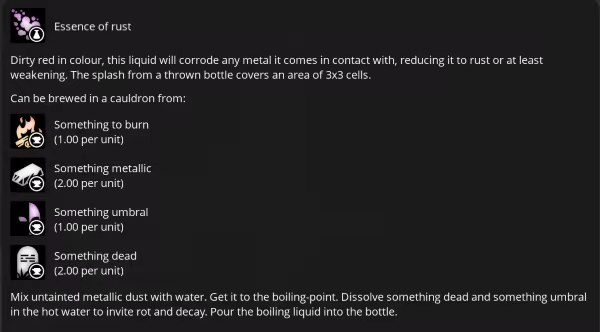
Knowledge is power
To progress, you find and read books, then assemble the knowledge gathered into new recipes. As your arsenal grows, so does your collection of lore. Not to forget about your own knowledge as a player.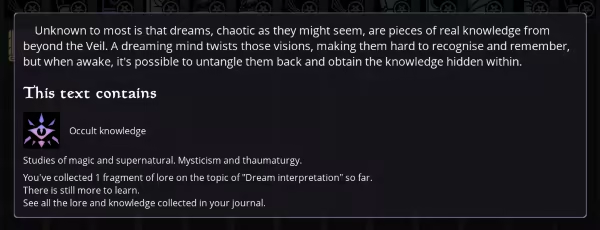
A world of stories
The world is generated anew for every game, and provides endless opportunity for exploration. The areas are distinct and varied, and each one has a small story of its own. From abandoned farms to bewitched woods - intriguing, even if unwelcoming.First ever ASMR roguelike
Rains and storms, sounds of wildlife, crackling of the fireplace, and flickering torches, with chill ambient music. All to immerse you into the vivid world, both visually and audially.Be creative
There is always more than one way to overcome an obstacle. A locked door? Pick the lock, blow up the door, or just kick it very hard, but be aware of traps. An iron grate? Melt the metal, or teleport to the other side.And when it comes to monsters, you could, of course, fight fair. But you don't have to, and you really shouldn't. You are smart, not strong. So learn their weaknesses, exploit the terrain, and overall use the world's interactivity to your advantage.
All the classic RPG trappings
Dungeon crawling and looting what's not nailed down is good, but we know RPGs are about more than that. Expansive dialogue trees, colourful character, meaningful choices and quests with multiple solutions are waiting for you.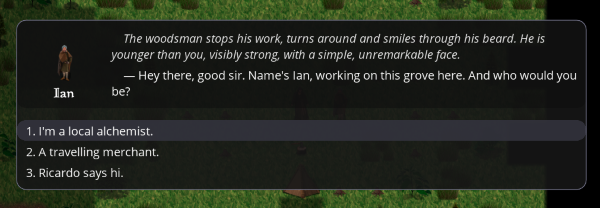
System Requirements
Will my PC run this? →Minimum
- Requires a 64-bit processor and operating system
- OS: WinXP+ (64 bit)
- Processor: Intel Core i3 / AMD (or equivalent)
- Memory: 2 GB RAM
- Graphics: OpenGL 2.1+
- DirectX: Version 9.0c
- Storage: 300 MB available space
Recommended
- Requires a 64-bit processor and operating system
- OS: Windows 10 (64 bit)
- Processor: Intel Core i7
- Memory: 4 GB RAM
- Graphics: OpenGL 3.3+
- DirectX: Version 10
- Storage: 500 MB available space
- Additional Notes: Numpad is recommended, but not required.
Supported Languages
*languages with full audio support
Latest news
Patch NotesOfficial
Sulphur Memories: Alchemist 0.4.2 UX update is out!
This update is fully compatible with saves from 0.4.1 version.If you bound anything to the "Tab" key, you will receive a warning about keybindings conflict, as this key is used for a new command.Changelog:UX:A new setting "UI scale" is available under Options > System > Video.This setting affects all UI elements and fonts' sizes, but not in-game graphics."Normal" scale is how the UI used to look, and is intended for screens up to 1920x1080."Larger" scale is intended for screens of 2560x1440 and larger.The setting is applied on restart.Research interface should look better on large screens now (research nodes should be spread out more evenly across the screen, instead of only taking a small portion of it).Second hotbar is now available.Switch between two hotbars by pressing "Tab" or clicking the button to the left of the hotbar.Saves from the old version will have the second hotbar empty.The game can now warn you about danger.The warnings are issued when you either take too much damage over one turn, or your health gets too low.When the warning is issued, the screen flashes red, a heartbeat sound plays, and your inputs are frozen for a short time to prevent accidental repeated presses.The values are set via "Danger warning: damage threshold" and "Danger warning: remaining vitality threshold" settings, under Options > Gameplay > UX. By default, both values are set so that warnings are never issued.The red flash can be toggled on/off with the setting Options > Gameplay > UX > Red flash on danger warning.The input freeze duration can be adjusted with Options > Gameplay > UX > Red flash on danger warning. The default is 0 (no freeze).The volume of the heartbeat sound can be adjusted with Options > System > Audio > Heartbeat volume.New items:Squids can be caught in sea waters.Snails can be caught in forest ponds.Honeyed peaches can occasionally be found as loot and in merchants' inventory.Balance:Buffed verdant sandals: the restorative effect can now restore vitality up t...Read full article on Community Announcements (spellsweaver)Patch NotesOfficial
Sulphur memories: Alchemist 0.4.1 content update is here + official Discord!
Join the official Discord server here!This update is incompatible with saves from previous versions due to changes to the world structure. You can watch the video to see the changes in the new version, or read the changelog below.Changelog:New contentTwo new visitors in Ricardo's tavern:A fisherman with a sleep problem.A wandering warrior looking for a strong potion.Two new side quests, given by the new visitors. Both quests involve you brewing the right potion.A straightforward quest for the fisherman.A multiple-ending quest for the warrior, with a somewhat hidden consequence.Fishing.Unlocked by completing the fisherman's quest.Fishing can be performed by wielding a fishing rod and interacting with any deep water tile.Fishing in different areas yields different fish and different loot.Fishing consumes bait (craftable).Fishing repeatedly in the same area reduces the chance of catching a fish. Fish replenishes over time.Scarlet flask works on the fish caught.Four new early-game areas (unlocked by talking to Ricardo, same as the rest of them):A shipwreck on the coast of the northern sea.A strange standing stone on a hill.A smuggler's hideout with some interesting items possibly still hidden.Ruins of a burnt village of suspected cultists.Four new creatures:A frigid sea anemone.A tiny lizard, encountered in rocky areas.A capricorn.An oozing darkness.Five new books, and related lore.New flora: clovers, growing in open, grassy areas.A plethora of new loot, found both in new and old areas, to provide some extra flavour.Various new jewellery: pearls, bracelets, earrings...All kinds of fish-related items: scales, whiskers, roe...Rare and powerful rewards: sealed whisper, Jubjub's feather, gilded helmet, liquid darkness...And others.Two new research nodes.Two new tools:Clockwork sorter. When enabled, it automatically converts (grinds or sorts) items that have only one possible output. It does nothing to items with multiple processing options, consumables, tools, books, or ite...Read full article on Community Announcements (spellsweaver)Patch NotesOfficial
Sulphur memories: Alchemist 0.3.2 QoL and balance update is here!
The update is partially compatible with saves from 0.3.1 (Some of the new features will only work on new saves). As new controls have been added, you might have to solve the keybindings conflicts if you set up custom keybindings before. You can watch the video to see the changes in the new version, or read the changelog below. Changelog: Presentation New sounds for ghouls. New sounds for efreets. New sound for the potion of unruly flame. New sounds for looting animal remains. New music for the sewers (will only take effect on new save files). Particle effects when looting stumps and sacks. Active gargoyle statues in dungeons now have eyes flashing red, to better distinguish them from inactive ones. Better water tiles (only has an effect when water shaders are disabled). Quality of life New quick harvest button. The default key is 'F'. Clicking the button (or pressing the key) causes you to gather loot from every neighbouring cell. Looting each individual object still takes a turn. Similar to other queued actions, this will stop when threatened or taking damage. Pressing the button when threatened will only make you loot one object at a time. Quick harvest will not automatically open locked containers. Aiming interface now displays the currently selected action on the "exit" button. Specific action keys. The setting "Specific action keys behaviour" under Options -> Gameplay -> Controls controls the way this feature behaves. "Press to aim" will open the aiming interface on button press. "Press to select" will switch to the key-specific action on button press. "Hold to override" (intended to be used with mouse controls) will change the selected action to the key-specific action while the button is held, and switch back when released. The default keybindings are: 'T' for throw, 'Y' for push, 'G' for interact, 'B' for hit. New controls settings to go with the above feature: Auto-switch to "throw" when equipping potions from the hotbar. When enabled (default), equipping a...Read full article on Community Announcements (spellsweaver)


