

Screenshots

 Watch trailer on Steam ↗
Master of Realms
TheMasterForge LLC · Published by TheMasterForge LLC · Official site ↗
Mostly Positive — 75% positive (56 reviews)
Last updated 27 Sept 2026
Master of Realms is mapmaking application for tabletop RPG’s that enables you to make amazing worlds, regions, and cities, then bring them into physical form with 3D Printable terrain!
£29.78
Lowest price we've ever recorded
View on SteamPrices can lag the live Steam store — always confirm before buying.
Price history
RPG, Strategy, Early Access · 2026 · More £15 - £30 games
Design and illustrate your own fantasy realms using Master of Realms, an innovative mapmaking tool for tabletop RPG enthusiasts. Experience the thrill of bringing your creations to life through printable terrain.
About this game
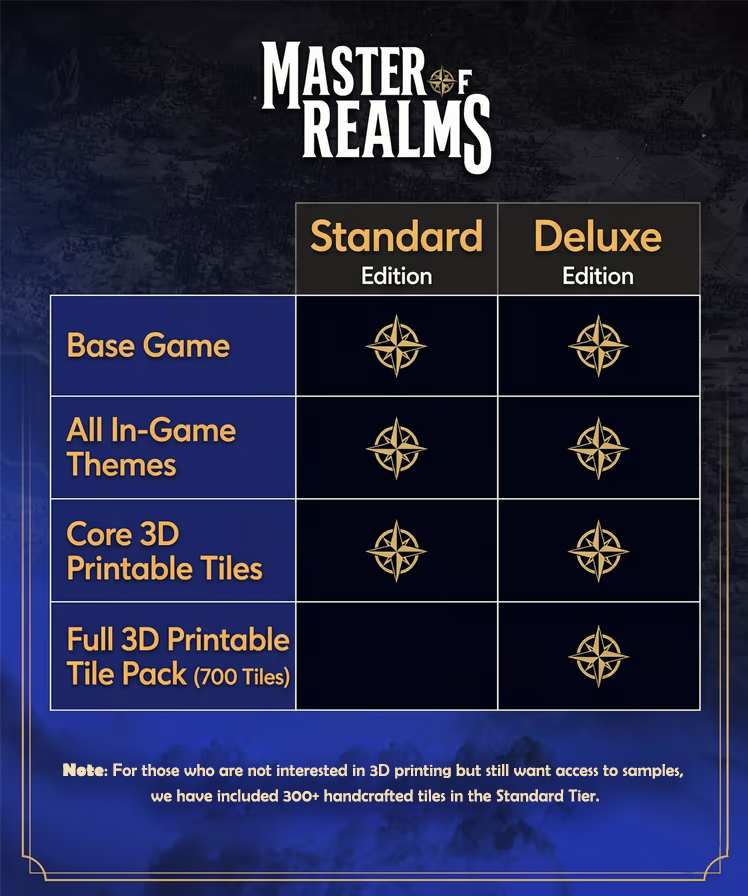
Digital Deluxe Edition
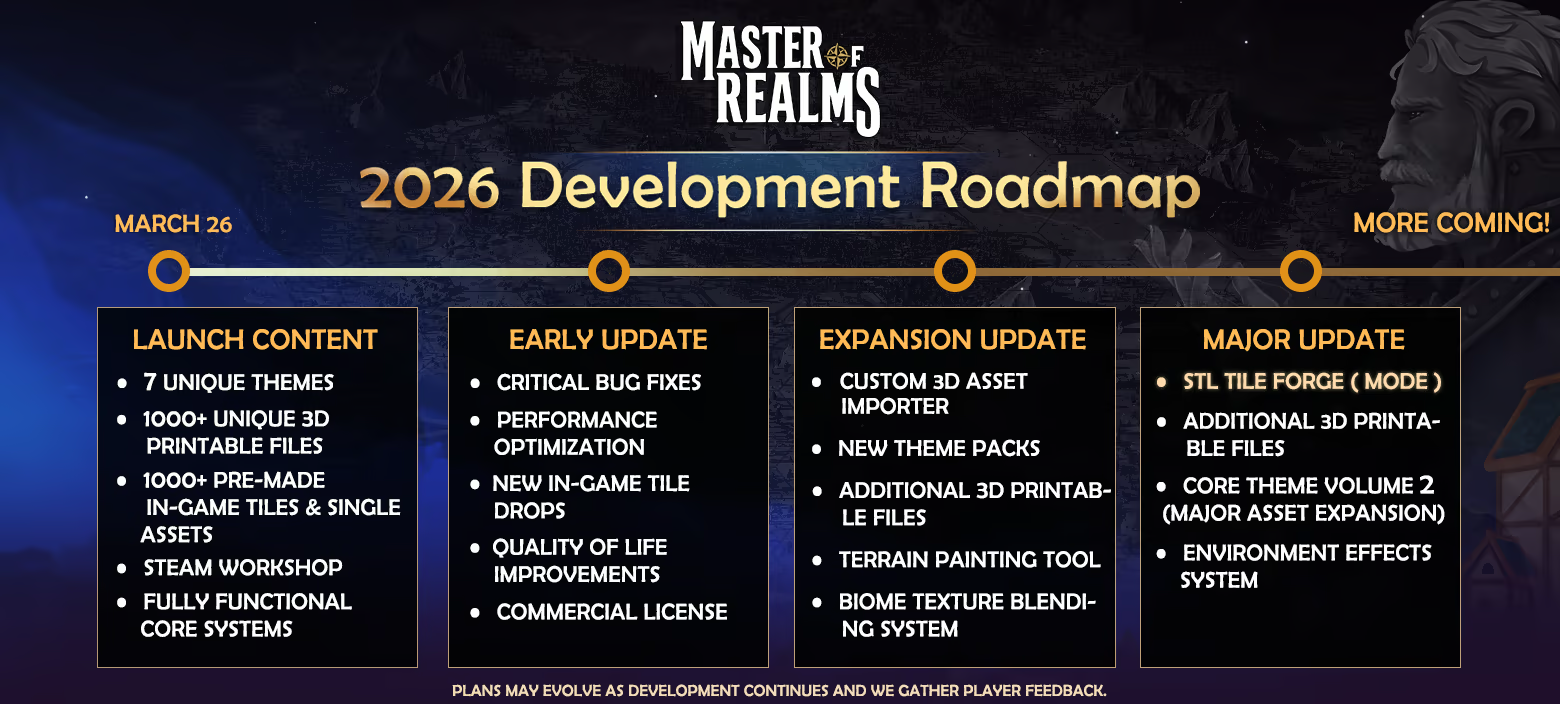
Roadmap
About the Game

Unleash your creativity with Master Of Realms, the revolutionary 3D Smart Hex Map Making Tool designed for tabletop RPG enthusiasts! Dive into immersive worldbuilding and craft world maps, regional maps, and city or town maps with ease. Master Of Realms lets you create stunning hex-based maps effortlessly, and you can bring them to life with 3D printing, 2D export for beautiful paper maps, or VTT export for your favorite online platforms.

Bring your creations to life on virtual tabletops! Export maps in 2D formats like JPG, PNG, or VTT, with full support for FoundryVTT and other platforms. Customize your grid overlay in Hex or Square style to match your campaign needs.

Go beyond the map—bring your realms to life in stunning 3D! Export fully detailed STL files for immersive gameplay, epic 3D prints, or jaw-dropping displays that showcase your world like never before.

Master of Realms gives you full flexibility to bring your imagination to life. Craft custom tiles from scratch, add objects of any shape, size, or style, and place them exactly where you want to create a world that’s truly your own.

Step into your world through your heroes’ eyes! Master of Realms introduces Character Tokens that let you explore your maps and scenes from a character’s point of view. Scale your tokens up or down to match any setting—perfect for tactical encounters or immersive storytelling. Plus, bring your characters to life in the real world with 3D-printable tokens, fully compatible with the 3D export system for STL files.
(Note: Master Of Realms is currently in active development. Features are continuously being implemented and optimized.)
System Requirements
Will my PC run this? →Minimum
- OS: windows 10
- Processor: Core i5 5th Generation
- Memory: 16 GB RAM
- Graphics: GTX 1060
- DirectX: Version 12
- Storage: 6 GB available space
- Additional Notes: You can run the application smoothly on medium graphic settings.
Recommended
- OS: windows 11
- Processor: Core i5 9th Generation
- Memory: 16 GB RAM
- Graphics: RTX 2060
- DirectX: Version 12
- Storage: 6 GB available space
- Additional Notes: You can run the application with high-quality settings for an optimal experience.
Supported Languages
Latest news
Patch NotesOfficial
Master of Realms — Update v1.12.0
Hello Realmsmiths,Update v1.12.0 is here!This update brings the brand new Cliff Tiles to Master of Realms, further expanding the existing library of assets at your disposal!Alongside the new content, we’ve also packaged a bunch of bug fixes and re-introduced AMD FSR by updating it to the latest version, which recently became available for Unreal Engine 5.8🌊New Cliff TilesThe Cliff Tiles are now available in Master of Realms! We're really excited to bring these long-awaited assets to your toolboxes, to let you build vast coastlines with lighthouses and cliffs to host your sea campaigns around🛠️ Bug Fixes• Fixed a crash during Path drawing• Fixed a crash during Custom Asset Import• Fixed a crash during Map loading• Fixed a crash linked to Regions List• Fixed Custom Asset Import vertex merge crash🖼️ AMD FSR v4.1.1We’ve re-introduced AMD FSR by updating it to the newest version and offer the best Upscaling and Frame Generation for a wide range of hardware!It can be enabled in the Settings on supported platforms.💬 Share Your FeedbackTry out the new Cliff Tiles and let us know what you think!If you're also testing our Experimental branch, please continue sharing your experience with its performance especially when working with larger maps and thousands of objects.Your feedback directly helps us decide what to polish, fix, and prioritize in future updates. The Experimental branch was introduced with the reworked rendering system in v1.10.0 specifically to gather player feedback before broader migration.💬 Join the community / share feedback: Discord Channel🎥 Watch update tutorials & videos: YouTube Channel🗨️ Steam Feedback & Discussion: Steam Discussion BoardThank you for continuing to support Master of Realms. We’re continuing to expand the tools, content, performance, and stability as we work toward making Master of Realms an even more powerful worldbuilding, mapmaking, and tabletop creation tool.— The Master of Realms TeamRead full article on Community Announcements (idSynth)Patch NotesOfficial
Master of Realms — Update v1.11.0
Hello Realmsmiths,Update v1.11.0 is here!This update brings the brand new Port Tiles to Master of Realms, expanding the environments you can create with new options for harbors, docks, coastal settlements, and waterfront regions.Alongside the new content, we’ve also resolved several crashes and improved the reliability of Map Loading and 2D Export.⚓ New Port TilesThe Port Tiles are now available in Master of Realms!Build coastal settlements, harbors, docks, trading ports, waterfront cities, and more while combining the new tiles with your existing environments.We’ve also added missing Port Tile assets to make sure the complete set is available.🛠️ Bug Fixes• Fixed a crash that could occur during Map Selection• Fixed a crash when loading maps containing Regions• Fixed an issue where the 2D Export preview was not displaying🖼️ 2D Export ImprovementsWe’ve made additional changes to the 2D Export system to improve stability and reliability while preparing and exporting your maps.We also removed unnecessary Ray Tracing usage from the 2D Export workflow.⚙️ Stability & Technical ImprovementsThis update also contains several behind-the-scenes improvements to our build and content pipeline.These changes are focused on making future updates more reliable while improving overall stability as Master of Realms continues to grow.💬 Share Your FeedbackTry out the new Port Tiles and let us know what you think!We’d love to see the harbors, coastal cities, ports, and larger worlds you create with them.If you're also testing our Experimental branch, please continue sharing your experience with its performance especially when working with larger maps and thousands of objects.Your feedback directly helps us decide what to polish, fix, and prioritize in future updates. The Experimental branch was introduced with the reworked rendering system in v1.10.0 specifically to gather player feedback before broader migration.💬 Join the community / share feedback: Discord Channel🎥 Watch update tutoria...Read full article on Community Announcements (themasterforgeofficial)Patch NotesOfficial
Master of Realms — Major Update v1.10.0
Hello Realmsmiths,v1.10.0 is an important technical update for Master Of Realms and a major step toward the long-awaited Battle Map mode. A lot of our current work is focused on building the foundations needed for larger maps, heavier scenes, better performance, and a smoother development pipeline for future updates. With this release, Master Of Realms has moved to Unreal Engine 5.8, bringing visual and performance improvements across all platforms, along with DLSS support. We’re also preparing improvements to our internal development processes so future updates can move more smoothly. The major focus of our current development is the technical foundation for the Battle Map mode, and that is also why this update took a little longer than our usual release pace. As part of that work, we’re giving players an early look at the future of Master Of Realms with a new experimental Steam branch featuring our fully reworked rendering system. This new approach dramatically improves how Tiles and Objects are handled, allowing thousands of Single Objects to be rendered much more efficiently and significantly reducing overhead compared to the previous system. It also helps future-proof Master Of Realms for much larger creations, increasing our long-term map size target from 100x100 all the way up to 1000x1000. Because this is a large rework of existing systems, we’re releasing it first as a separate experimental branch. This allows us to gather feedback, test the migration more broadly, and make the transition as smooth as possible without introducing new issues for players using the main version.How To Opt Into The Experimental BranchOpen Steam and go to your Library.Right-click Master Of Realms and select Properties.Open Game Versions & Betas.Select the experimental branch from the list.Steam will automatically download the branch update.Launch the game as usual once the download is complete.You can return to the main version at any time by going back to Game Versions & Betas ...Read full article on Community Announcements (idSynth)Patch NotesOfficial
Master of Realms — Major Update v1.9.0
Hello Realmsmiths,Update v1.9.0 is here, bringing one of our biggest visual and atmosphere focused updates. This update introduces Photo Mode, new Sound Effects, the brand new Dark Land theme, 4K UI clarity improvements, and performance work for custom TileForge tiles.📸 Added Cinematic ModePhoto Mode is now available in Master of Realms.You can now capture your maps from more cinematic angles, adjust your view, frame your scene, and create better screenshots directly inside the tool. Whether you are building a world map, a city layout, a dangerous lava region, or a dramatic fantasy landscape, Photo Mode gives you more control over how you present your creations.This is especially useful for sharing maps with players, showing off your worldbuilding, preparing campaign visuals, or creating promotional screenshots of your realms.🔊 Added Sound EffectsWe have added new sound effects to improve the overall feeling and atmosphere of the mapmaking experience.These new sounds are designed to make the tool feel more responsive and immersive while you build. The goal is to make each action feel cleaner, more satisfying, and more connected to the world you are creating.🌋 Added New Dark Land ThemeThe new Dark Land theme has been added.This theme focuses on dark fantasy, volcanic terrain, lava regions, ruined city structures, dangerous paths, and hostile landscapes. It is designed for demon lands, cursed realms, corrupted kingdoms, volcanic regions, underworld-inspired maps, and high-stakes campaign settings.The Dark Land theme includes a large set of new base tiles and standalone assets.🧱 Dark Land Base Tile ContentCity Wall: 16 variationsWall Intersection: 19 variationsCity Road: 18 variationsForest Path: 15 variationsLava Lakes: 52 variationsLava River: 18 variationsCity Ground: 1 variationGround: 1 variationTotal Dark Land base tile variations: 140Dark Land Standalone AssetsWe have also added 50 standalone assets for the Dark Land theme, giving you more options to decorate, c...Read full article on Community Announcements (themasterforgeofficial)Patch NotesOfficial
📜 Master of Realms — Patch Notes v1.8.1
🚀 Performance Improvements• Implemented custom asset LOD generation for improved performance (TileForge update will come later)🎛️ UI• Added a restricted Custom Asset Importer allowing up to 5 asset imports in the Demo version • Added a subscribed custom assets list to highlight Steam Workshop downloads and notify users of their associated categoriesRead full article on Community Announcements (idSynth)


