

Screenshots

 Watch trailer on Steam ↗
Shashingo: Learn Japanese with Photography
Autumn Pioneer · Published by Autumn Pioneer · Official site ↗
Very Positive — 91% positive (825 reviews) · 14 achievements
Last updated 27 Sept 2026
Shashingo is an edutainment game that teaches you Japanese through virtual photography. With your trusty camera, take photographs of the fictional streets of Japan to capture new words and images as fully translated flash cards!
£16.00
Lowest price we've ever recorded
View on SteamPrices can lag the live Steam store — always confirm before buying.
Price history
Indie, Simulation, Casual · 2024 · More £15 - £30 games
Capture new words and images as flash cards on the streets of Japan in Shashingo, a casual edutainment experience from Autumn Pioneer.
About this game
Explore bright, fictional Japanese streets filled with details and interesting objects to capture with your camera. Each photograph you take will translate the name of the content into Japanese and English so you can learn with your surroundings.
Features:
A stylised, approachable 3D environment
In-game photography system
Japanese audio
Photo album to store your flash-cards
Game modes that test your memory
Beginner phrases and grammar lessons
Day/Night and weather cycle
Display romaji, kana, furigana (recommended) or kanji
A lo-fi soundtrack perfect for studying
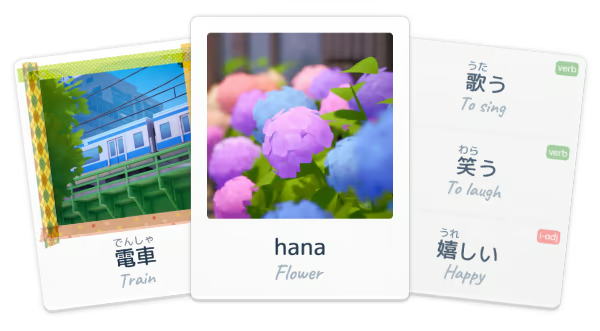
Create Stunning Photography Based Flash-Cards
Every photo flash-card you take will be unique to you. The idea behind this is to strengthen the relationship between a word and how you see its physical appearance. In the real world, you can then see such objects and make connections to the Japanese words you've already learned while playing Shashingo.
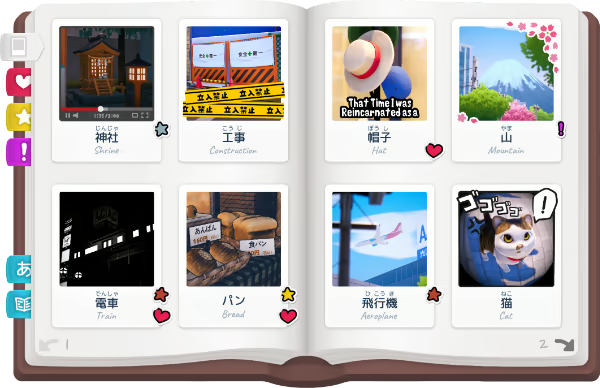
Track Your Progress in the Photo Album
Your photo album is where you keep your collection of photo flash-cards. If you remember them well in Find Mode, they'll be separated into the 'mastered' tab and shown with a gold star sticker. However, if you're struggling to remember a word in Find Mode, they'll be marked with a purple exclamation mark sticker, so you know which words you need to practice more.
Learn from Lessons In-Game
At the back of your photo album, there are also numerous pages of Japanese lessons designed for beginners that will teach you how to speak Japanese and use the vocabulary that you learn in Shashingo. Also included are some key words and important phrases that can help you in your future conversations.
System Requirements
Will my PC run this? →Minimum
- Requires a 64-bit processor and operating system
- OS *: Windows 7 / 8 / 10 / 11
- Processor: Intel i5-2500 3.3GHz
- Memory: 4 GB RAM
- Graphics: GeForce GTX 7x series / Radeon HD 6570
- DirectX: Version 11
- Storage: 2 GB available space
- Sound Card: DirectX compatible or onboard chipset
Recommended
- Requires a 64-bit processor and operating system
- Processor: Intel(R) Core(TM) i7-6700K CPU 4.00GHz
- Memory: 8 GB RAM
- Graphics: NVIDIA GeForce GTX 1080
- DirectX: Version 11
- Storage: 2 GB available space
Supported Languages
Latest news
AnnouncementsOfficial
New Influent + Shashingo Bundle!
Shashingo + InfluentI've been working with the developer of Influent to bring you an incredible discounted bundle of both Shashingo and Influent \, and now, it's finally live!If you haven't played Influent, it's a great way to learn more Japanese vocabulary around your home, which pairs wonderfully with Shashingo's outdoor environment. So if you've already played Shashingo and wanted to go back to your apartment and learn, this is your chance! Both Shashingo: Learn Japanese with Photography and Influent's Japanese version can now be purchased together at 15% off!Visual Japanese LearningExplore immersive 3D environments, interact with real-world objects, and build practical vocabulary naturally through gameplay. Whether you’re just getting started or looking to expand your skills, this bundle is designed to make learning Japanese engaging, intuitive, and genuinely enjoyable. If you’ve been interested in learning Japanese in a way that actually feels fun, well now you can, twice!Already Own Shashingo?If you already own Shashingo, this allows you to get Influent \ at a discounted rate, so take advantage of that if you want to continue your learning!I hope you all enjoy both of our games! We wish you well on your learning journey!Thanks for playing,RyanRead full article on Community Announcements (Autumn Pioneer)Patch NotesOfficial
Languages Update + Trading Cards & More
{STEAM_CLAN_IMAGE}/40512862/8f84db95ecfe3da5e0eeab527cb3eb07fe6965b4.jpg Localisation Wonderful members of the community have helped to localise the game into several new languages! Shashingo now supports learning Japanese from: French (Français) German (Deutsch) Spanish (EU) (Español (EU)) Spanish (Latin American) (Español (LAT.)) Brazilian Portuguese (português brasileiro) Simplified Chinese (简体中文) {STEAM_CLAN_IMAGE}/40512862/5b24cf1cd452931c3314abdd9402bf12d4460236.jpg {STEAM_CLAN_IMAGE}/40512862/db62b19e0859d4fd0a1e1b0cb6027b998be148f7.jpg We hope that this allows more of you to study Japanese with your native language rather than having to rely on what you know in English. As this has been a community effort, we would appreciate if you could share with us any issues you may find in the new languages over on our Discord server or on the Steam Forums. Romaji + Kana Added Romaji + Kana option for viewing the flash cards! This is good for beginners if you are not yet comfortable with hiragana and katakana! Steam Trading Cards You can now collect Steam trading cards for Shashingo! Collecting complete sets will allow you to earn and level up a Shashingo specific badge that has cool artwork, and earn new chat emoticons and user profile backgrounds! You can earn trading cards by playing the game, or purchase them via the marketplace from other users. Minor Updates - Minor optimization improvements - Some small text/clipping bugs fixed - A few Japanese words adjusted for clarity - Added control swapping for AZERTY/QWERTZ keyboards Thank you again for your support! - RyanRead full article on Community Announcements (Autumn Pioneer)Patch NotesOfficial
Movement Speed Increase & Motion-Sickness Reduction & Bug Fixes
Changes Movement speed has been increased Running speed has been increased Gameplay options menu now includes a WIP "Motion-Sickness Reduction" setting. Motion-Sickness Reduction This setting removes the offset of the camera and sets the pivot point to the centre point of the player. In theory this should help reduce feelings of nausea, but has not been thoroughly tested. Please let me know if this has helped! Bug Fixes: Fixed: Cars should no longer clip into each other. Fixed: Difficulties stepping into the butchers shop on low frame rates. Fixed: Rain would sometimes randomly occur when not supposed to. Fixed: Favourite button could be pressed on an photo empty slot. (Controller Input) Fixed: Small visual glitch for 1 frame when swapping borders on new photos. Fixed: Audio button input overlapping with take photo input in find mode. (Controller Input) Fixed: Quiz mode could be skipped with the page turn button after page 1. (Controller Input)Read full article on Community Announcements (Autumn Pioneer)Patch NotesOfficial
Small Hotfix
- Fixed an issue showing button prompts when the input did nothing - Fixed a lock out during the tutorials when played with controllerRead full article on Community Announcements (Autumn Pioneer)Patch NotesOfficial
Flash-Card Viewer Update
{STEAM_CLAN_IMAGE}/40512862/a600bf6613d834b1b06c934fba90f52d908ad096.jpg New Photo Flash-Card Viewer Many of you wanted to view your photo flash-cards from your album in full-screen just like when you make new ones. So I've included a new way to view them in the photo album! When playing with keyboard/mouse, simply middle mouse click one of your cards and you'll be able to see it much larger on the screen. If you're playing with a controller instead, use the right trigger when focused on the photo flash-card you want to view. On controller, you're also able to move left and right between the photos on the page you are viewing. {STEAM_CLAN_IMAGE}/40512862/f5d2e741ba3c656324ed7a07a4d63f588f6fd7af.jpg Day/Night Transition Slowed Down Many players said they love the sky's colours when the world transitions between day and night, but it was too fast to snap a nice photo. The transition time has now been increased so you can enjoy it a little longer. {STEAM_CLAN_IMAGE}/40512862/e0b718d68e575a0c1648ad1df8addba696b99c27.jpg Bug Fixes: Windowed full-screen was locking the mouse to the frame when it shouldn't have been. The bridge was visually not aligned properly to the road. Tree LODs have been adjusted to look better visually. Controller allowed some menu options to continue scrolling when past the final option, causing further bugs. Find-Mode could be replayed with the "weak" word set when the amount was higher than your actual amount of weak words after getting an answer correct in the previous session. Quiz mode duration was incorrect and never properly reset. One of the popup translations by the arcade was linked to the wrong sentence. Standardized "Reading & Listening" and "Reading + Listening". Coffee in the vending machine now counts as "Coffee". Ghost was missing it's highlight/focusing in find-mode. Thanks for playing, Ryan!Read full article on Community Announcements (Autumn Pioneer)


