

Screenshots

 Watch trailer on Steam ↗
StarRupture
Creepy Jar · Published by Creepy Jar · Official site ↗
Very Positive — 81% positive (13,592 reviews)
Last updated 27 Sept 2026
StarRupture is a first-person open world base-building game with advanced combat and tons of exploration. Play alone or in a group on this sublime and ever-changing planet, extract and manage resources, create your complex industrial system and fight off hordes of alien monsters.
£13.59
£16.99Lowest price we've ever recorded
View on SteamPrices can lag the live Steam store — always confirm before buying.
Price history
Action, Adventure, Indie, Simulation, Early Access · 2026 · More £5 - £15 games
Embark on an adventurous journey through StarRupture’s vast open world, where you can construct your own industrial empire while facing off against relentless alien threats. Explore, manage resources, and survive the ever-changing landscape of this early access game from Creepy Jar.
About this game
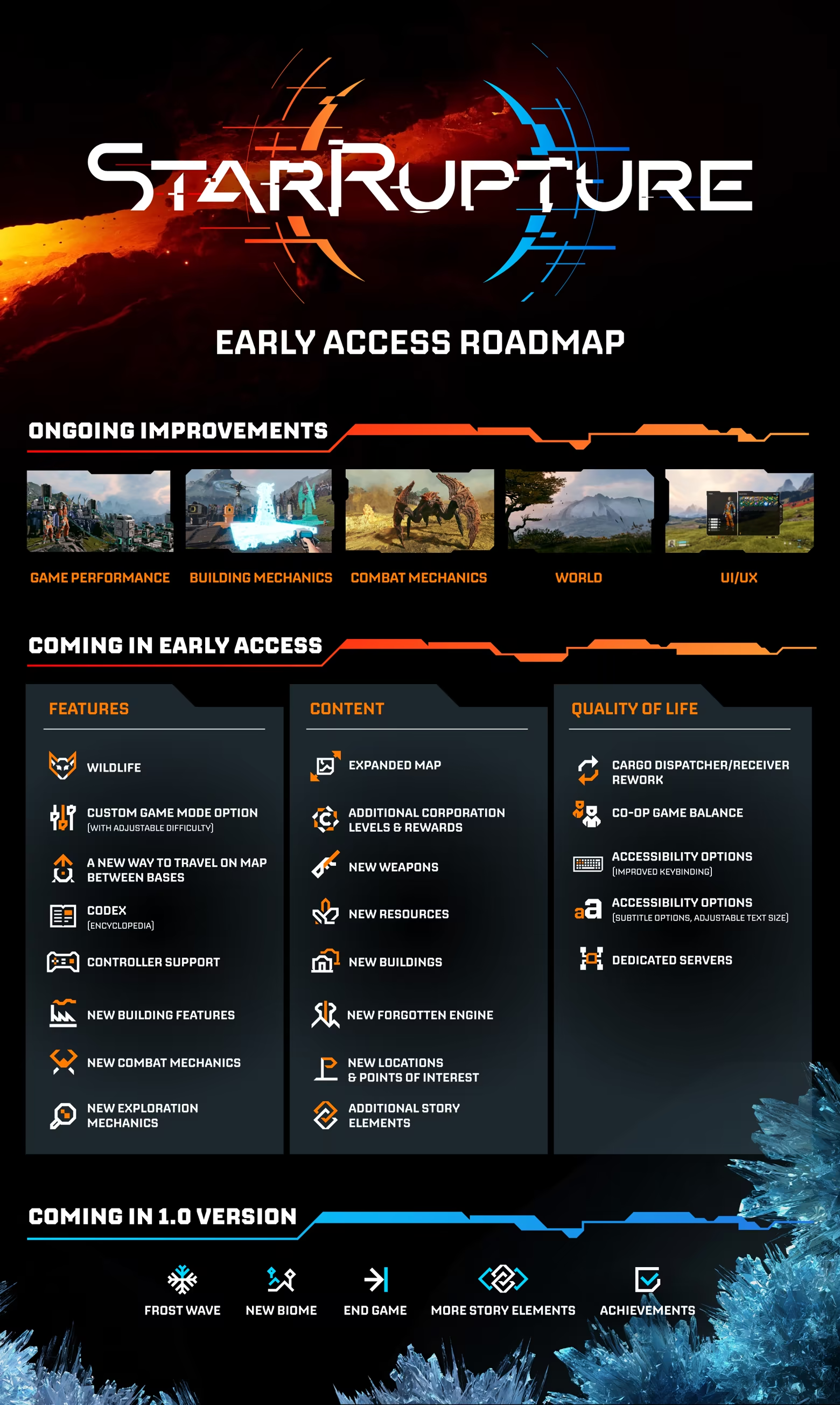
Roadmap
Special Edition

About the Game
Explore a mysterious planet in an ever-changing open world torn by recurring cataclysms. Build a complex industrial system to extract resources, produce goods and expand your base. Fight against hordes of alien monsters to defend your base and survive, alone or with friends.
Explore this vast open world, rich in resources, places and secrets to be found. Discover the beauty of this constantly reborn dangerous world torn apart by repeated cataclysms.

Search, mine and process resources to develop your complex industrial system. Unlock new technologies that will allow you and your base to survive the harsh conditions on the planet.

The planet will surprise you at every turn. Extreme temperatures are not the only things you’ll be challenged with. Get ready to defend yourself, your team and your base from a horde of aggressive alien creatures.

Experience and survive everything you encounter on this harsh planet. Do it alone or in a group of up to 4 friends. This world is waiting for you to be discovered.


System Requirements
Will my PC run this? →Minimum
- Requires a 64-bit processor and operating system
- OS: Windows 10 or later (64-Bit)
- Processor: Intel Core i5-8400 / AMD Ryzen 5 2600
- Memory: 16 GB RAM
- Graphics: NVIDIA GeForce GTX 1060 (6 GB VRAM) / AMD Radeon RX 580 (8 GB VRAM)
- DirectX: Version 12
- Storage: 45 GB available space
- Additional Notes: SSD required. Internet connection required for multiplayer.
Recommended
- Requires a 64-bit processor and operating system
- OS: Windows 10 or later (64-Bit)
- Processor: Intel Core i5-11400F / AMD Ryzen 5 3600
- Memory: 16 GB RAM
- Graphics: NVIDIA GeForce RTX 3060 (8 GB VRAM) / AMD Radeon RX 7600 (8 GB VRAM)
- DirectX: Version 12
- Storage: 45 GB available space
- Additional Notes: SSD required. Internet connection required for multiplayer.
Supported Languages
*languages with full audio support
Latest news
Patch NotesOfficial
Hotfix 0.3.2 - now available! [patch notes]
Hello everyone, This smaller hotfix addresses some stability issues with the game. {STEAM_CLAN_IMAGE}/44238153/0d85ea6f8148a23a2db5ed1ffec74adae6b7cf15.jpg {STEAM_CLAN_IMAGE}/44238153/31517dc8fcc9ad3430d8fc919df8a4d2e0139cce.png Crashes & Performance issues Secured the game's code that may have caused a crash when deconstructing items in the base Secured the game's code that might have caused a crash on Dedicated Servers when users were deconstructing machines without foundations Multiplayer issues Addressed an issue where loading a game via the "Continue" button after quitting to the main menu resulted in incorrect session visibility, preventing other players from joining {STEAM_CLAN_IMAGE}/44238153/04a2e9a8097ef61ae8ddf26612655282f3309231.png Thank you for your continuous feedback for the game’s Early Access - we are closely reviewing your comments and bug reports. We are actively working on fixing existing issues along with introducing new content to enrich your gaming experience. If you’d like to provide us with your feedback, check troubleshooting guides, or report a bug, please visit our Support Page. https://store.steampowered.com/app/4167250/StarRupture__Supporter_Pack/Read full article on Community Announcements (CreepyJarDev_Marcjanna)Patch NotesOfficial
Update 2: Quality of Life - now available! [what's new + patch notes]
Hello everyone! We’re excited to release to you our second Update to StarRupture’s Early Access, named “Quality of Life”. In this update, we have focused on crucial improvements to one of the core gameplay features - factory building. Besides fixing hundreds of bugs, this major update introduces numerous quality-of-life features based on your feedback. So we’d like to thank you all for your comments and messages, and for helping us make StarRupture the best it can be during its road to 1.0 release. Below, we’re presenting you with a summary of new features introduced in Update 2: Quality of Life, followed by an expanded explanation of each one of them, and we’ll top it off with the vast list of patch notes included in the Update. Full list of new features & improvements introduced in Update 2: Building Features Copying Buildings along with their settings Building settings copy-paste function Multi-deconstruct feature Deconstructing Buildings without Foundations Pillar Support height adjustment "Add Pillars" functionality in Building Mode Ability to snap Platforms to the sides of Pillars Drone Roundabout overhaul Game-balance improvements New and balanced production recipes Base Core upgrade cost rebalance UI Features Production per minute OCL’s package sendout rate Search bar in Buildings & Storages Teleporter & Base Core custom names on the Map Autosave heads-up Abandoned Bases Completion Tracker Infected Bases Completion Tracker Corporation level requirements display New interaction options with items "Continue" button in the main menu UI/UX Improvements Alphabetical Item order in Storages Custom building name & task icon visibility New game cursor Reworked Infolog New accessibility options (on/off): Headbob, Camera shake, Sprint FOV change Building Features Copying Buildings with their settings The building copy feature has been improved, as you can now copy a building alongside its settings by pressing the Z button. If you want to copy just the building without ...Read full article on Community Announcements (Adam_CJ)Patch NotesOfficial
UPDATE 2: Quality of Life - announcement
{STEAM_CLAN_IMAGE}/44238153/88c1086a42c2242c9ca9bd132192cb30e5624a94.jpg Great news, everyone! We’re excited to announce that Update 2 is coming to StarRupture - very soon! It will be titled “Quality of Life,” and it’s not without a reason! We have been listening to your feedback and suggestions, and we are working hard to deliver an update packed with dozens of gameplay improvements, primarily focused on factory building. Check out the highlights of the upcoming StarRupture Update 2: Quality of Life in our announcement teaser below. In this second update to StarRupture’s Early Access, we’re focusing on crucial improvements to one of the core gameplay features - factory building. Update 2 should significantly enhance your overall building and factory management experience with such improvements as detailed display of the information about production per minute, the ability to copy Buildings along with their settings, the Drone Roundabout overhaul, the ability to snap Platforms to the sides of Pillars (we wonder what cool things you will be able to build this way!), as well as other bigger and smaller changes in game balance and mechanics. Full list of planned new features & improvements coming to Update 2: Building Features Copying Buildings along with their settings Building settings copy-paste function Multi-deconstruct feature Deconstructing Buildings without Foundations Pillar Support height adjustment "Add Pillars" functionality in Building Mode Ability to snap Platforms to the sides of Pillars Drone Roundabout overhaul Game-balance improvements New and balanced production recipes Base Core upgrade cost rebalance UI Features Production per minute OCL’s package sendout rate Search bar in Buildings & Storages Teleporter & Base Core custom names on the Map Autosave heads-up Abandoned Bases Completion Tracker Infected Bases Completion Tracker Corporation level requirements display New interaction options with items "Continue" button in the main menu UI/UX Improveme...Read full article on Community Announcements (Adam_CJ)AnnouncementsOfficial
Developer Blog: August 2026
{STEAM_CLAN_IMAGE}/44238153/4ca8435ea932657b960040dcd0382b4e01ff34e9.jpg Hi Everyone! This month, we’re sharing some more sneak peeks at what we’re working on right now, and what you can expect for StarRupture in the future. If you haven’t seen our previous developer blog on Steam, we’re highly encouraging you to check it out as well: https://store.steampowered.com/news/app/1631270/view/719034111861197606 "Add Pillars" functionality in Building Mode {STEAM_CLAN_IMAGE}/44238153/9e8cef8558f9530ea7f39ae6366f947a12f00ea2.gif Placing new buildings on various height levels will be a breeze thanks to the “Add Pillars” ability. Enabling it will automatically add Pillars to buildings you want to place no matter the height. {STEAM_CLAN_IMAGE}/44238153/db0ab8f5c3f9405f1d46dc4ba2e2a58ddce97ea3.gif But if you’d like to make your base more airy, you can toggle the Pillars off, and build your building without any pillars - if the stability level allows it, of course! Automatic Pillar Support height adjustment {STEAM_CLAN_IMAGE}/44238153/3dbb91c772e0ce533fe77e259d1a266bb4646318.gif Pillars will adjust their height to the Platforms above automatically - so increasing your construction stability will be much easier. Search bar in Buildings & Storages {STEAM_CLAN_IMAGE}/44238153/d93cdc79655ef75a024385f9d4fd070342687508.png Sharp minds think fast, and so does the search bar we’ve added to Buildings & Storages, which speeds up the process of finding a particular item or recipe you want to locate. Teleporter & Base Core custom names on the Map {STEAM_CLAN_IMAGE}/44238153/40e2fe8924011c194c34da0a1518e15aef5a151b.png Custom names of your Teleporters & Base Cores will be visible on the map, so that remembering what you placed where will be much simpler - if you remember your custom names, that is. Abandoned Bases completion status guide on HUD & Map {STEAM_CLAN_IMAGE}/44238153/315462dc5f07ca357973e4d9583384f10ddb0ec7.png When you enter an Abandoned Base, you will be greeted not only with in...Read full article on Community Announcements (Adam_CJ)AnnouncementsOfficial
StarRupture - Base Building Basics: Part 2
{STEAM_CLAN_IMAGE}/44238153/231aae3f01700f2c153ac4c3d7b3417ad41b2a38.jpg Hi everyone! We’re inviting you to see the second part of our Base Buildings Video, which will shed more light on slightly more advanced mechanics. If you’ve missed the first part of our guide, go check it out on YouTube, and then come back here quickly for the next dose of factory-building knowledge. Knowing the following mechanics will advance you from a rookie builder to a pro factory architect: The principles of building stability Drone Smart Path system - aka how drones find their way Drones priority and how to make the best use of it Upgrading Drone Rails - did you know that you don’t need to deconstruct slower Drone Rails in order to upgrade them? Deconstructing the entire Base - one click solution gets you covered! A word on the Higher Tier Buildings and how to unlock them Tips on Quartz and how to get it What’s your favorite base-building tip from the video? Or maybe you have some extra tips to share with the community? Until the next one, Creepy Jar Team https://store.steampowered.com/app/4167250/StarRupture__Supporter_Pack/Read full article on Community Announcements (Adam_CJ)


