

Screenshots

 Watch trailer on Steam ↗
TRAIN CREW
Mizotsuki Rail / acty · Published by Mizotsuki Rail / acty · Official site ↗
Very Positive — 99% positive (488 reviews)
Last updated 27 Sept 2026
It is a game where you become a driver of the fictitious railway Tatehama Electric Railway and drive a train. Currently, you can drive up and down 28 km from Akayamacho Station to Tatehama Station.
£14.29
Lowest price we've ever recorded
View on SteamPrices can lag the live Steam store — always confirm before buying.
Price history
Simulation, Early Access · 2021 · More £5 - £15 games
Experience the thrill of operating a train on 28 km of tracks between Akayamacho and Tatehama stations as you take control in TRAIN CREW.
About this game
■ Train operation
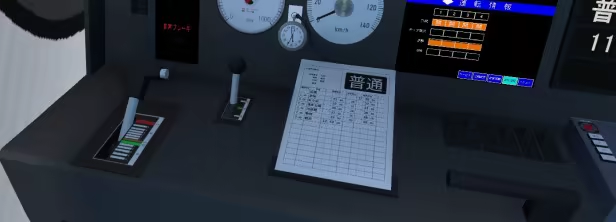
Train operation is performed by tilting the handle called a master controller back and forth.
Push it toward you to accelerate, and push it back to brake. Basically, you can proceed with the game only with this movement.
In addition, you can perform various operations such as horns, buzzer to contact the conductor, and switching viewpoints.
You can also check your driving rating after driving.
■ Conductor Work
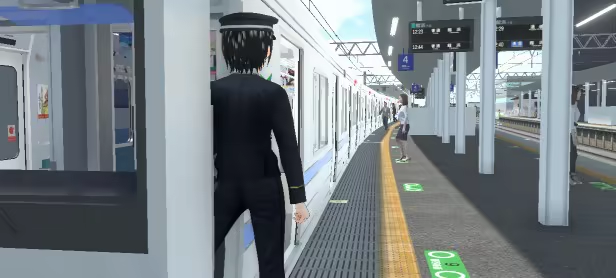
The conductor opens and closes doors, makes in-train announcements, and conducts safety checks.
■ About Tatehama Electric Railway
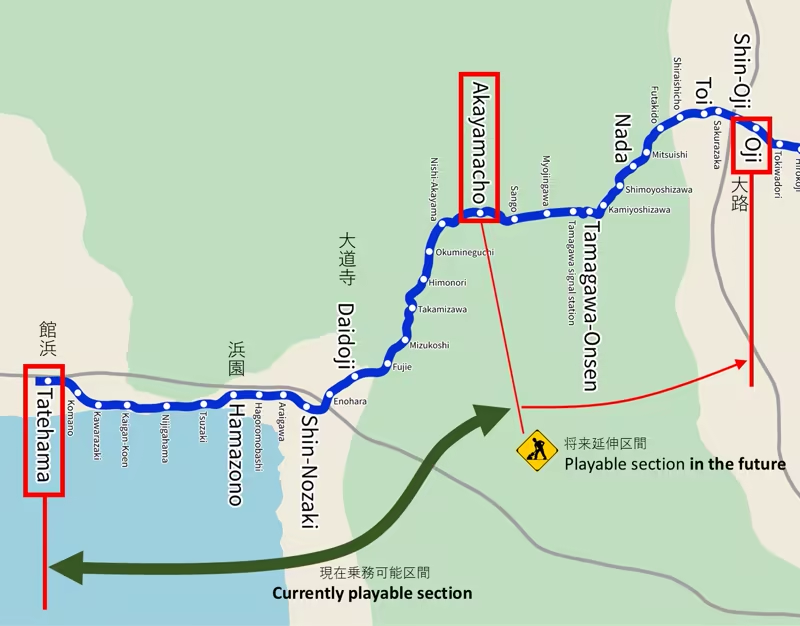
The Tatehama Electric Railway main line connects Otebashi Station to Tatehama Station. At present, the line can operate up and down 28 km of this line from Akayamacho Station to Tatehama Station.
■ About live distribution etc.
This game is OK for live video and distribution. It's okay to monetize your videos and distribution.
System Requirements
Will my PC run this? →Minimum
- OS: Windows 10 64-bit
- Processor: Intel Core i5-4210M CPU @ 2.60GHz
- Memory: 8 GB RAM
- Graphics: NVIDIA GeForce GTX 965M (VRAM 6GB or more)
- DirectX: Version 11
- Storage: 5 GB available space
Recommended
- OS: Windows 10 64-bit
- Processor: Intel Core i7-10700K CPU @ 3.80GHz
- Memory: 16 GB RAM
- Graphics: NVIDIA GeForce GTX1060 (VRAM 6GB or more)
- DirectX: Version 11
- Storage: 5 GB available space
Supported Languages
Latest news
Patch NotesOfficial
Brake Graph Display & Minor Fix Update
-Added Brake Graph Display Toggle Keybinding: Added "Toggle Brake Graph ON/OFF" to key settings (unassigned by default). When toggled on during operation, a graph showing Speed on the vertical axis and Distance on the horizontal axis will be displayed. Scoring Penalty Note: If you view the graph during operation, a penalty will be deducted from your "No-Guide Bonus" at a rate of (Seconds viewed - 1) × 30 points. (Viewing for less than 1 second incurs no penalty.) -Track & Physics Fixes: -Fixed a bug where track superelevation (cant) was reverse-tilted (negative cant) at certain locations. -Adjusted the Series 3000 hold brake performance to address over-deceleration. -Fixed an issue where the preview example failed to show when adjusting diagram size settings. -Implemented a fix to prevent overlapping/clashing AI traffic on active revenue service runs (Jiei R). (original Japanese) ブレーキグラフ表示追加などのアップデート ・キー割り当てに「ブレーキグラフ表示ON/OFF」を追加しました。(デフォルトは未設定状態) 運転時に表示すると縦軸は速度、横軸は距離のグラフが表示されます。 見ながら運転した場合ガイド不使用ボーナスから(見た秒数-1)×30ポイント減点されます。(1秒未満は減点なし) ・場所によって逆カントになってる場合がある不具合を修正しました。 ・ダイヤグラムサイズ設定時に表示例が出ないのを修正しました。 ・3000系列の抑速の減速が強いことへの対策を行いました。 ・自営Rの列車が重なることへの対策を行いました。Read full article on Community Announcements (Mizotsuki Rail (Acty))Patch NotesOfficial
Minor Fix Update
Fixed a bug in Conductor Mode that prevented trains from departing. (Original Japanese) ・車掌モードで出発できない不具合を修正しました。Read full article on Community Announcements (Mizotsuki Rail (Acty))AnnouncementsOfficial
初心者向けガイド追加などのアップデート
📢 Update Notes: Beginner Guide Features, Auto-Drive & Difficulty Options 🔰 Major Changes & Beginner Guides Added new beginner assistance guides: Target Speed Guide for Stopping: Displays recommended speeds as you approach a stopping mark (can be toggled with the Distance Guide). Braking Point Indicator: Displays estimated braking start points. 3D Speed Limit Markers: Displays upcoming speed limit start points directly in the 3D world. Added "Auto-Drive" (ATO/Autonomous driving) to Driver Mode. Restructured Difficulty Settings: The core "Difficulty Level" setting now only affects HP reduction rates. Other settings previously tied to difficulty have been split into individual customizable options: Door Opening Allowance Range, ATS Operation Settings, and Speed Limit Notice Distance (located in Display Settings). Added new keybinding options: Full Notch / Max Throttle Release Brakes 📊 Scoring & HP Balance Changes (Guide Implementation) Adjusted Stop Position Scoring: Previous Formula: 500 - (Stop Error in meters × 100) New Formula: 300 - (Stop Error in meters × 100) + No-Guide Bonus (Max 200) Stopping without using assistance guides grants a bonus score for each stop! Adjusted HP System by Difficulty: Easy / Normal: Unchanged from previous behavior. Hard: No score additions awarded; HP penalty deductions are increased by 1.5x. 🛠️ Other Changes & Improvements Added "Master Controller Interlock" option to Difficulty Settings. Adjusted sound effects when rapidly switching notch positions using key inputs. Added shortcuts to Difficulty and Display Settings directly on the pre-departure setup screen. Excluded the pause menu UI from screenshots generated when creating bug report files. Updated tutorial brake notch instructions to be based on the new braking guide system. Enabled wristwatch display during Two-Man operations (use the clock display ON/OFF key toggle). Added an option to mute game-side handle sound effects when using an external controller. *Original text (Japan...Read full article on Community Announcements (Mizotsuki Rail (Acty))Patch NotesOfficial
Minor Fix Update
-Fixed an issue in Conductor Mode where doors would unintentionally open upon arrival at Shin-Nozaki Station on Train 1541 (回1641 Train). -Implemented a fix for an issue where parts of the driving route map became obscured or cut off on lower-resolution displays. *Originai text (Japanese)* 一部修正のアップデート ・車掌モードで1541列車(回1641列車)新野崎到着時にドアが開いてしまう不具合を修正しました。 ・解像度が小さい画面で運転経路図が一部見えなくなる不具合の対策をしました。Read full article on Community Announcements (Mizotsuki Rail (Acty))Patch NotesOfficial
Minor Fix Update
-Fixed door-related issues, including a bug where doors opened upon arrival at Enohara Depot on Out-of-Service Train 1702A. -Renamed train 1103A to "1103AShort" in preparation for future line extensions. (The full/long version of 1103A is planned to be added when the extension is released.) *Originai text (Japanese)* 一部修正のアップデート ・回1702Aの江ノ原車庫到着時にドアが開くなど、ドア関係の不具合を修正しました。 ・将来の延伸に備えて1103Aを1103AShortにしました。(1103Aロング版は延伸時に追加予定です)Read full article on Community Announcements (Mizotsuki Rail (Acty))


